


AppBrain's verdict
- Last updated
- October 26, 2026
- Size
- 59.2 MB
User feedback
Ratings and reviews on the App StoreComments on Toccobird: PDF Drawing Markup for iOS
We don't have enough comments to show example comments. Please check back later.
Store listing
By 音建 何, from the App StoreDescription by 音建 何 Written by the developer, not by AppBrain. Click to read.
Present plans, dimensions and annotations on a compatible large screen, controlled from iPhone or iPad. Guide client proposals, team reviews and site briefings.
BIG-SCREEN PRESENTATIONS, CONTROLLED FROM YOUR DEVICE
Connect via AirPlay or a compatible external display. Prepare a saved drawing and tap Play. Zoom, pan and page changes follow on the big screen; controls stay on your device.
Circle, sketch and highlight as you speak. Show or hide annotations individually or with the existing Visible / Hidden groups. Temporary marks leave the saved drawing unchanged and clear when the session ends. Pause to show a waiting screen while preparing the next view.
FROM DRAWING REVIEW TO CLEAR DELIVERY
Combine PDF plans, images, markups, measurements, issues and photos for construction and renovation. No account required.
IMPORT PLANS
Open PDFs from other apps. The system share action receives up to 20 readable, unlocked PDFs; open Toccobird afterward to finish importing. Source files stay unchanged. Follow file and page preparation progress, or stop an import; completed files remain available.
Import PDF, JPEG, PNG and editable .tdm packages from Files. On the same Wi-Fi, transfer files from another device's browser while keeping the receiving screen open.
MARK UP AND ORGANIZE
Add ink, arrows, text, clouds, highlights, shapes and callouts. Adjust styles, copy, undo or redo. Prompts protect unfinished marks and note edits before you leave. Hide annotations or lock them against accidental edits; hidden marks remain in lists and exports.
Organize drawings in groups; manage tags, favorites, pages and trash.
MEASURE TO SCALE
Set or recognize a scale, or calibrate against a known length. Measure lengths, polylines and areas, or record site measurements. Use mm, cm, m, inches or feet, and m² or ft². Unit changes preserve physical dimensions and calibration.
Snap to usable vector intersections, endpoints and lines in PDFs, with orthogonal guides for alignment. Scans have no vector snap targets. Check scales on scans, images and ambiguous plans.
LINK PHOTOS TO ISSUES
Keep numbered issues, notes, authors, statuses, history and captioned photos at drawing locations. Filter the issue list and tap to locate a mark. Search existing PDF text, notes and photo captions. Library search respects your active filters.
WORK WITH APPLE PENCIL
On iPad, draw, select, adjust endpoints and erase whole annotations. Draw with Pencil and navigate with your fingers. Compatible double-tap and squeeze actions follow system preferences. Rotation and resizing preserve your view, selection and in-progress edits.
SHARE REPORTS AND EDITABLE FILES
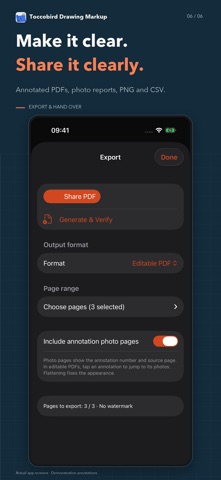
Export annotated, basic editable or flattened PDFs, PNG, CSV or originals. Stop export generation when needed. Issue reports link locations, notes and photos, with page links and pagination for long notes.
Editable PDFs retain Visible and Hidden annotation layers, both shown on opening. Compatible readers can toggle them; reader support varies.
Exchange .tdm packages with annotations, photos, scales and groups. Imported copies are independently editable and do not sync automatically. Back up groups or the library; older .toccobirdbackup files remain supported.
KEEP DRAWINGS LOCAL
Use drawings offline and explore the vector sample. Choose sharing and backup destinations; backups are not separately encrypted.
Interfaces support English, Simplified and Traditional Chinese, French, German, Japanese and Korean. Drawing and note content stays in its original language.
Importing, annotating, measuring and editing require an in-app purchase. Existing work remains viewable, searchable, exportable and available for backup and restore.
Verify important dimensions and scales before construction or installation. Measurements support documentation and communication. Optional LiDAR capture requires compatible hardware.
Safety and technology
Found in the app by AppBrain- Price
- Free
- App size
- 59.2 MB
- Content rating
- Everyone
Technologies used by Toccobird: PDF Drawing Markup
Releases
Updates seen on the App Store- Version
- 1.2
- Launched
- October 2026
No changelog data
Alternatives
Similar apps and more from 音建 何Alternatives to Toccobird: PDF Drawing Markup


More from 音建 何

Rankings
App Store top chartsApp Store Rankings for Toccobird: PDF Drawing Markup
About the app and developer
About Toccobird: PDF Drawing Markup
Toccobird: PDF Drawing Markup is a productivity app developed by 音建 何.
What is the rating of Toccobird: PDF Drawing Markup?
Toccobird: PDF Drawing Markup has no ratings yet.
Is Toccobird: PDF Drawing Markup free?
Toccobird: PDF Drawing Markup is free. The app size is 59.22 MB. The latest version available is 1.2. The last update was on October 26, 2026.
What are the requirements for Toccobird: PDF Drawing Markup?
The app has a content rating of Everyone. The app has been available on the App Store since October 2026.
Toccobird: PDF Drawing Markup is made and published by 音建 何. AppBrain is an independent app data site and isn't affiliated with 音建 何. The app name, icon, screenshots and description belong to 音建 何 and are shown as published on the App Store.
Developer information for 音建 何
Address: