

Tonalier: RAW Photo Editor
Tonalier: RAW Photo Editor is made and published by Eralp Yucel. AppBrain is an independent app data site and isn't affiliated with Eralp Yucel. The app name, icon, screenshots and description belong to Eralp Yucel and are shown as published on the App Store.
AppBrain's verdict
New- Rating on App Store
- 5.00
- 1 ratings
- Last updated
- October 26, 2026
Tonalier: RAW Photo Editor came out 25 days ago. It doesn't have enough ratings yet to judge what users think.
Rankings
App Store top chartsApp Store Rankings for Tonalier: RAW Photo Editor
Competitors
Similar apps and more from Eralp YucelAlternatives to Tonalier: RAW Photo Editor


Releases
Updates seen on the App Store- Version
- 1.1.4
- Launched
- October 2026
No changelog data
User feedback
Ratings and reviews on the App StoreComments on Tonalier: RAW Photo Editor for iOS
We don't have enough comments to show example comments. Please check back later.
Technology
Found in the app by AppBrain- Price
- Free
- App size
- 34.0 MB
- Content rating
- Everyone
Technologies used by Tonalier: RAW Photo Editor
About the app and developer
About Tonalier: RAW Photo Editor
Tonalier: RAW Photo Editor is a photo & video app developed by Eralp Yucel.
User Ratings
Tonalier: RAW Photo Editor is rated 5.00 out of 5 stars. The rating is based on one rating ratings.
App Information
Tonalier: RAW Photo Editor is freely available from the App Store. The app size is 34.00 MB. The latest version available is 1.1.4. The last update was on October 26, 2026.
Technical Requirements
The app has a content rating of Everyone. The app has been available on the App Store since October 2026.
Developer information for Eralp Yucel
Address:
Store listing
By Eralp Yucel, from the App Store


Description by Eralp Yucel Written by the developer, not by AppBrain. Click to read.
Tonalier’s built-in editors read each photo, its light, its colors and what’s in it, and edit it in their own style. You stay in charge: see every step, turn any of them off, and finish the edit yourself.
Every editing tool is included. No sign-up, and your photos stay on your device.
EDITORS WHO EACH SEE IT THEIR OWN WAY
• Lupe, pastel and airy: bright, soft light with a touch of pink.
• Roxie, film: warm, soft and a little faded, with real grain.
• Margo, golden: warm afternoon light, honey and earth tones, quiet blues.
• Dario, cinematic: deeper tones, cool shadows and warm highlights.
• Nilo, street at dusk: deep tones, quiet color and warm lights left glowing.
• Esme, people: bright, soft light and gently warm skin.
• Elio, clean: clean whites, true color and crisp detail. Fixes what is off and leaves the rest alone.
Each one leaves alone what is already right. “What Roxie Did” lists each step of the edit. The Effect slider sets how much of it you keep.
25 LOOKS, MADE BY HAND
A Look gives a photo a mood; a character fits the edit to the photo. Looks come in six series: Portrait, Film, Cinema, Bright, Moody and Mono, each with an Amount slider. Tap a Look to see it on your own photo. Save an edit you like as a Look of your own.
A REAL RAW EDITOR, EVERY EDITING TOOL INCLUDED
• Light, color, tone curve, HSL, color grading, skin tone, detail, lens corrections, grain and vignette
• Masks to edit just one part: subject, background, people, brush, linear and radial gradients, luminance and color ranges; add, subtract and intersect them
• Heal: tap a spot or paint over a small blemish and it is filled from the photo around it
• Crop with common ratios in one list, a straighten dial and perspective correction
• Histogram and clipping warning
• Opens RAW files (DNG, CR2, CR3, NEF, ARW, RAF, ORF, RW2 and more) as well as JPEG, HEIC, PNG and TIFF
• Non-destructive, with unlimited history
A LIBRARY YOU CAN SEARCH
Edits save themselves, and every photo opens the way you left it. Type what you remember: what’s in the photo, a color, a date, a camera setting. Smart collections gather edited, unedited and RAW photos for you. Rate, pick and reject. Make variants to try a second edit. Paste an edit onto another photo, all of it or only the parts you choose.
READY TO SHARE
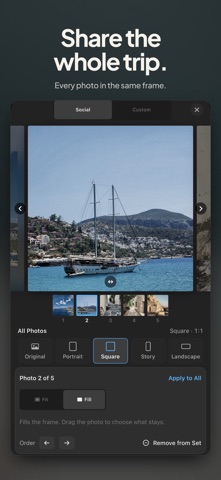
Export opens on Social and fits the photo to the format you pick: portrait, square, story or landscape. Fit keeps the whole photo on a white, black or blurred background; Fill fills the frame. Choose Custom for format, quality, color space, size, metadata and a copyright line. Select several photos to share them as a set: one format, with fit, fill and border for each. From Photos, tap Share to send a photo straight in.
YOUR PHOTOS STAY WITH YOU
Your photos are processed on your device and are not uploaded. No sign-up: open it and edit. Your originals stay as they are, and exporting always creates a new file.
TONALIER PRO, WHEN YOU WANT MORE
Without Pro you keep every editing tool, one Look in every series and one Look of your own, with no watermark, and you paste settings and export one photo at a time. Tonalier Pro, on iPhone and iPad, adds every Look and every character, as many Looks of your own as you like, export presets, and tools for several photos at once: start them with a Look, paste settings, match exposure and export as a set. You can preview Pro Looks and characters on your own photos before you subscribe, and new subscribers start with 7 days free.
Tonalier Pro is an auto-renewing subscription, available yearly or monthly. Payment is charged to your Apple Account at confirmation of purchase. The subscription renews automatically unless it is canceled at least 24 hours before the end of the current period. You can manage or cancel it in your Apple Account settings.
Terms of Use: https://tonalier.com/terms.html
Privacy Policy: https://tonalier.com/privacy.html