

Tool in the Cockpit
Tool in the Cockpit is made and published by Nicholas Bradley. AppBrain is an independent app data site and isn't affiliated with Nicholas Bradley. The app name, icon, screenshots and description belong to Nicholas Bradley and are shown as published on the App Store.
AppBrain's verdict
- Rating on App Store
- 4.65
- 17 ratings
- Last updated
- October 23, 2026
It doesn't have enough ratings yet to judge what users think.
Rankings
App Store top chartsApp Store Rankings for Tool in the Cockpit
Competitors
Similar apps and more from Nicholas Bradley




Releases
Updates seen on the App Store- Version
- 1.7.8
- Launched
- November 2023
No changelog data
User feedback
Ratings and reviews on the App StoreComments on Tool in the Cockpit for iOS
We don't have enough comments to show example comments. Please check back later.
Technology
Found in the app by AppBrain- Price
- Free
- App size
- 342.4 MB
- Content rating
- Everyone
Technologies used by Tool in the Cockpit
About the app and developer
About Tool in the Cockpit
Tool in the Cockpit is a reference app developed by Nicholas Bradley.
What is the rating of Tool in the Cockpit?
Tool in the Cockpit is rated 4.65 out of 5 stars, based on 17 ratings.
Is Tool in the Cockpit free?
Tool in the Cockpit is free. The app size is 342.39 MB. The latest version available is 1.7.8. The last update was on October 23, 2026.
What are the requirements for Tool in the Cockpit?
The app has a content rating of Everyone. The app has been available on the App Store since November 2023.
Developer information for Nicholas Bradley
Address:
Frequently asked questions about Tool in the Cockpit
Is Tool in the Cockpit free?
Yes. Tool in the Cockpit is free on the App Store.
Is Tool in the Cockpit still available?
Yes. Tool in the Cockpit is on the App Store, and the last update we saw was on October 23, 2026.
How large is Tool in the Cockpit?
Tool in the Cockpit is 342.39 MB.
Is Tool in the Cockpit suitable for children?
App Store rates the content of Tool in the Cockpit as suitable for everyone.
How do people rate Tool in the Cockpit?
Tool in the Cockpit scores 4.65 out of 5 stars, from 17 ratings on the App Store.
Who made Tool in the Cockpit?
Tool in the Cockpit was developed by Nicholas Bradley. It is listed in the reference category on the App Store.
What are the best alternatives to Tool in the Cockpit?
People looking at Tool in the Cockpit also look at these reference apps: Safely Track Me, PilotBox, FlightDeck EFB, E6B Pathfinder, JNC Bookings.
Store listing
By Nicholas Bradley, from the App Store


Description by Nicholas Bradley Written by the developer, not by AppBrain. Click to read.
A pilot’s app that feels like a cockpit upgrade.
Built by a commercial helicopter pilot for others who love flying and love great tools.
Tool in the Cockpit simplifies your preflight and in-flight routine — not just to save time, but to make flying more focused, more enjoyable, and more professional.
Key features include:
In-flight screen with relative wind, hover ceilings, density altitude, power limits, Vne, and more
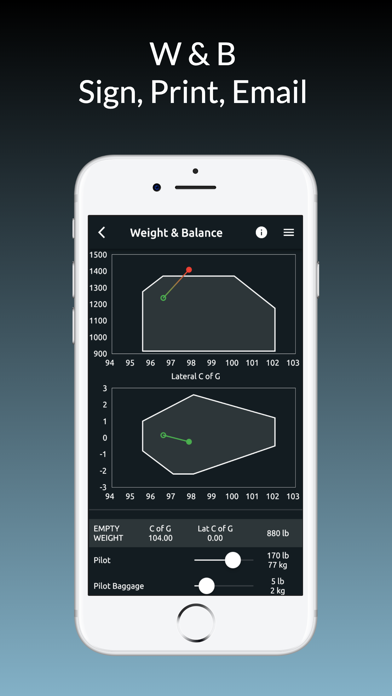
Weight & balance for R22, R44, R66, AS350 B2, H125 B3+, Bell 407, EC120, EC130 and AW119
Sign, save, and email W&B sheets in seconds
METARs and TAFs in two taps — enter ICAOs, hit send, and print
Warning light references pulled straight from the POH
HIGE / HOGE Hover ceiling charts
Fuel and weight shown in kg, lbs, litres, gallons, and percent
Offline unit converter with all the aviation-specific tools you need
Auto-generated PDFs for nav logs
As a working pilot, you know how fast things change — extra luggage, a fuel top-up, a last-minute detour. This app lets you recalculate performance or W&B right there in the cockpit, without switching apps or flipping through paper.
Whether you’re flying an R22 or a B3, training or flying charters, Tool in the Cockpit keeps your flying sharp, confident, and stress-free.
R22 and AS350 are always free. For R44, R66, and other machines start a free trial and unlock full capability.