
Tools for Roku is made and published by Glass Onion LLC. AppBrain is an independent app data site and isn't affiliated with Glass Onion LLC. The app name, icon, screenshots and description belong to Glass Onion LLC and are shown as published on the App Store.
AppBrain's verdict
- Rating on App Store
- 4.20
- 5 ratings
- Last updated
- May 26, 2023
- Size
- 7.33 MB
It doesn't have enough ratings yet to judge what users think.
User feedback
Ratings and reviews on the App StoreComments on Tools for Roku for iOS
We don't have enough comments to show example comments. Please check back later.
Store listing
By Glass Onion LLC, from the App Store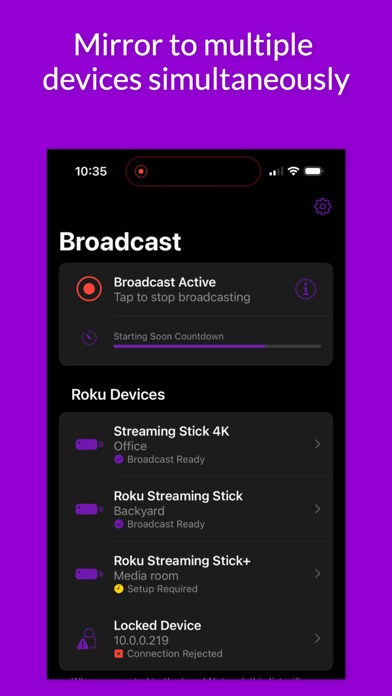
Description by Glass Onion LLC Written by the developer, not by AppBrain. Click to read.
Use the completely free Tools for Roku mobile app to:
* Discover and configure all your Roku devices.
* Glass to Glass mirroring of your iOS device. No ads, no reduced quality, no restrictions.
* Mirror to multiple devices simultaneously - part of the Pro Features optional upgrade.
* Themes that cascade from the app to the Receiver Channel - part of the Pro Features optional upgrade.
* Launch a Starting Soon screen to get your audience ready - part of the Pro Features optional upgrade.
* Precise control of your broadcast - part of the Pro Features optional upgrade.
You must connect your phone or tablet to the same wireless network as your Roku device(s) to use the features of the Tools for Roku app.
App notes:
* Some screen content is protected by Digital Rights Management by Apple and app developers. DRM protected content will appear as a black box when it is mirrored.
* Your Local Network performance can impact the Glass to Glass lag you experience.
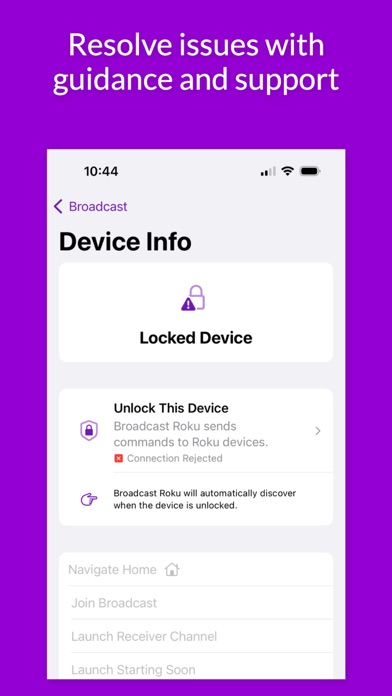
* A wide variety of Roku models have been tested, but some older models may not work as expected. You can discover upgrade options in the app.
* Wi-Fi connectivity and Local Network access are required. You’ll find helpful information in the app if either of these issues exist.
* Sound is not mirrored. Tools for Roku mirrors screen content only.
* A Receiver Channel must be installed on your Roku devices. You’ll find simple steps and options in the app to help you complete this.
* Tools for Roku does not track any usage or data from the app. Your privacy is assured.
Pro Features:
* Automatically start the broadcast on all your connected and configured Roku devices.
* Automatically launch a Starting Soon Screen that auto hides after a configurable period of time.
* Automatically restart the broadcast on your Roku devices if the Receiver Channel is exited before the broadcast ends.
* Automatically close the Receiver Channel when the broadcast ends.
* Optionally show a heads-up title on the Roku screen.
* Control the appearance (theme) of the Receiver Channel.
* Support requests from Pro Feature owners are prioritized in the queue.
Disclaimers:
* If you purchase a Roku product through the app we may earn a commission of up to 5% on your purchase.
* Open Source libraries are acknowledged in the Settings app.
* This app is not affiliated with Roku or any other trademark mentioned here. ROKU, the ROKU Logo, STREAMING STICK, ROKU TV, ROKU POWERED, the ROKU POWERED Logo, ROKU READY, the ROKU READY Logo, "STOP DREAMING. START STREAMING.", "HAPPY STREAMING", "THERE'S A TON OF ENTERTAINMENT IN THIS LITTLE BOX," and "NOW THIS IS TV" are trademarks and/or registered trademarks of Roku, Inc. in the United States and other countries.
We are thrilled to provide the best Glass to Glass mirroring experience for free. If you enjoy using Tools for Roku, please consider leaving a positive rating and review. And finally, we think the options and capabilities in Pro Features are compelling and more than worth the cost, please consider making a purchase.
Safety and technology
Found in the app by AppBrain- Price
- Free
- App size
- 7.33 MB
- Content rating
- Everyone
Technologies used by Tools for Roku
Releases
Updates seen on the App Store- Version
- 1.02
- Launched
- May 2023
No changelog data
Alternatives
Similar apps and more from Glass Onion LLCAlternatives to Tools for Roku






Rankings
App Store top chartsApp Store Rankings for Tools for Roku
About the app and developer
About Tools for Roku
Tools for Roku is an utilities app developed by Glass Onion LLC.
What is the rating of Tools for Roku?
Tools for Roku is rated 4.20 out of 5 stars, based on 5 ratings.
Is Tools for Roku free?
Tools for Roku is free. The app size is 7.33 MB. The latest version available is 1.02. The last update was on May 26, 2023.
What are the requirements for Tools for Roku?
The app has a content rating of Everyone. The app has been available on the App Store since May 2023.
Developer information for Glass Onion LLC
Address:
Frequently asked questions about Tools for Roku
Is Tools for Roku free?
Yes. Tools for Roku is free on the App Store.
Is Tools for Roku still available?
Yes. Tools for Roku is on the App Store, and the last update we saw was on May 26, 2023.
How large is Tools for Roku?
Tools for Roku is 7.33 MB.
Is Tools for Roku suitable for children?
App Store rates the content of Tools for Roku as suitable for everyone.
How do people rate Tools for Roku?
Tools for Roku scores 4.20 out of 5 stars, from 5 ratings on the App Store.
Who made Tools for Roku?
Tools for Roku was developed by Glass Onion LLC. It is listed in the utilities category on the App Store.
What are the best alternatives to Tools for Roku?
People looking at Tools for Roku also look at these utilities apps: Spare IPCam - Phone IP Camera, Remote For Smart TV Universal, 4K Vertex2 Total Control, DNS Security Pro, What time is it? - Voice clock.