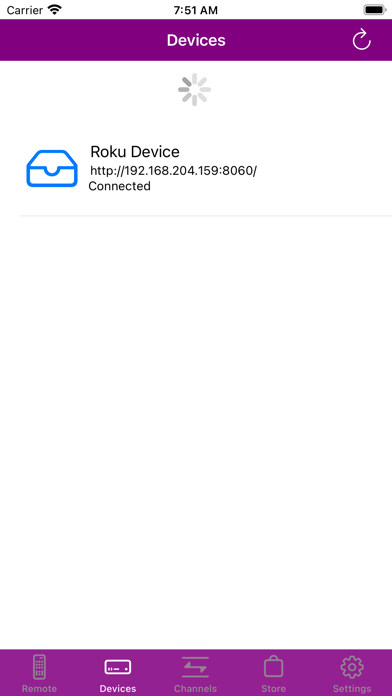
Remote For Smart TV Universal is made and published by
Do Tan Loc.
AppBrain is an independent app data site and isn't affiliated with Do Tan Loc.
The app name, icon, screenshots and description belong to Do Tan Loc and are shown as
published on the App Store.
About Remote For Smart TV Universal
Remote For Smart TV Universal is an utilities app developed by Do Tan Loc.
What is the rating of Remote For Smart TV Universal?
Remote For Smart TV Universal has no ratings yet.
Is Remote For Smart TV Universal free?
Remote For Smart TV Universal is free. The app size is 6.41 MB. The latest version available is 1.0.1. The last update was on April 24, 2023.
What are the requirements for Remote For Smart TV Universal?
The app has a content rating of Everyone. The app has been available on the App Store since March 2023.
Description by Do Tan Loc(from the App Store)
Do you often find yourself struggling to locate your television remote, or do you simply prefer to use a more convenient and modern device? If so, our Smart TV Remote app is perfect for you! It emulates the features of a traditional remote control and allows you to effortlessly manage your Smart TV with your mobile device.
Our app not only provides an easy-to-use interface with responsive touchpad and fast keyboard search, but also offers automatic customization for a user-friendly setup. You can even use it for screen mirroring, casting photos, videos, and music to the bigger screen, and more.
Connecting your phone and Smart TV to the same Wi-Fi network is all you need to do in order to take advantage of this app's smart features. And, if you're a Roku fan who's tired of misplacing your remote, you'll love using our Remote for RokuTV, Smart TV.
Here are some of the main features of our app:
• Intuitive and user-friendly interface • Full functionality of a remote controller • Fast keyboard searching • Automatic customization • Screen mirroring for photos, videos, and music • Works through Wi-Fi for smart and easy control
Using our app is easy! Simply follow these steps:
Ensure that your phone and Smart TV are connected to the same Wi-Fi network. Click the "Connect" icon on the top right of your phone screen. Choose and connect to your Smart TV from the list of available devices. Start using our app! Our Smart TV Remote app supports Roku and other smart TVs. Please note that it is not affiliated with or endorsed by any relevant companies.
Each subscription will automatically renew 3 days before the expiration date for
the same time period. Subscriptions can be cancelled at any time before the renewal.