It doesn't have enough ratings yet to judge what users think.
Remote Control For LCRM is made and published by
Pin Creation Technology Co., Ltd.
AppBrain is an independent app data site and isn't affiliated with Pin Creation Technology Co., Ltd.
The app name, icon, screenshots and description belong to Pin Creation Technology Co., Ltd. and are shown as
published on the App Store.
About Remote Control For LCRM
Remote Control For LCRM is an utilities app developed by Pin Creation Technology Co., Ltd.
User Ratings
Remote Control For LCRM is rated 5.00 out of 5 stars. The rating is based on one rating ratings.
App Information
Remote Control For LCRM is freely available from the App Store. The app size is 64.69 MB. The latest version available is 1.3.1. The last update was on August 26, 2026.
Technical Requirements
The app has a content rating of High Maturity. The app has been available on the App Store since March 2023.
Description by Pin Creation Technology Co., Ltd.(from the App Store)
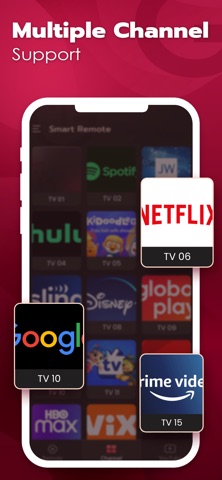
TV Remote For LCRM APP is Suitable For Any LCRM TVs. Simply Put, With The Universal Remote Control For LCRM APP, You Can Control The Entire LCRM World. Forget it! Throw Your Physical LCRM Remote into The Sea Now. Let The Smart TV Remote APP Became Your Smart Home Helper. Download The Universal TV Remote APP, Realize Intelligent Life At Your Home.
Features: -Video Cast Supported, Video TV Cast For LCRM Smart TV -YouTube Cast Supported, LCRM Smart Share -Wi-Fi LCRM Remote, LCRM Smart TV Remote Supported, WebOS LCRM TV Supported -TV Remote Control For LCRM APP, Suitable For iPhone
Advantages: - LCRM Connect APP, Easy to Connect LCRM Smart TV -Equipped With Unique Search And Setting Functions - LCRM Remote Control Free APP, Download For Free, Easy to Achieve LCRM TV Remote Control
Subscription Details: 1. Users must purchase a subscription to become a member in order to enjoy exclusive benefits, such as unlimited access to all features and an ad-free experience. 2. Subscription Periods: Annual, Monthly, and Weekly (includes a 3-day free trial). 3. Subscription Pricing: Annual Plan: $29.99; Monthly Plan: $19.99; Weekly Plan: $14.99 (includes a 3-day free trial). 4. Payment: Upon confirming your purchase and completing the payment, the fee will be charged to your iTunes account. 5. Your iTunes account will be charged within 24 hours prior to the end of the current subscription period. Once the charge is successfully processed, your subscription will automatically renew for the next subscription cycle. 6. To cancel automatic renewal, you must turn off the auto-renewal feature at least 24 hours before the end of the current subscription period. 7. Cancellation Instructions: Open [Settings] on your iPhone -> Tap [iTunes Store & App Store] -> Tap [Apple ID] -> Select [View Apple ID] -> Tap [Subscriptions], then select the subscription you wish to cancel. If you do not cancel the subscription at least 24 hours before the end of the current period, it will automatically renew.
Privacy Policy: https://www.pintrontech.com/PrivacyPolicy.html Terms of Use: https://www.pintrontech.com/termsofuse.html
Disclaimer: The LCRM Universal Remote APP is NOT an Official Appliance For LG. And Also is NOT Affiliated With Any Other Developers Like LG Smart Thinq Or LG Thinq.
Each subscription will automatically renew 3 days before the expiration date for
the same time period. Subscriptions can be cancelled at any time before the renewal.