Touch Trigonometry is an overall app developed by Aisatsu LLC.
How many times has Touch Trigonometry been downloaded?
What is the rating of Touch Trigonometry?
Touch Trigonometry has no ratings yet.
Is Touch Trigonometry free?
Touch Trigonometry is free to download. The APK download size is 48.42 MB. The latest version available is 1.0. The last update was on February 11, 2026.
What are the requirements for Touch Trigonometry?
The app has a content rating of Everyone. The app has been available on Google Play February 2026.
Description
Finally understand trigonometry.
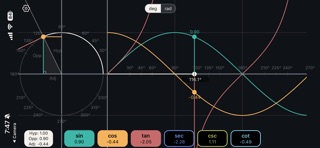
Touch Trigonometry is the most intuitive way to learn the trigonometric functions. Instead of memorizing formulas, you'll see how sin, cos, tan, and the rest actually work—by touching and exploring a live unit circle and graph. Drag your finger around the circle and watch trig functions respond in real time. You'll be amazed at how quickly the "true meaning" of trigonometry becomes clear. Watch the graph on the right trace their values. In seconds, concepts that confused you for years will suddenly click. This app is great for students struggling with trigonometry or anyone looking for a refresher.
HOW IT WORKS
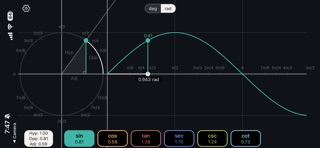
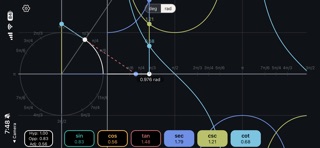
On the left: an interactive unit circle. Touch anywhere and drag to change the angle θ (theta). A triangle forms showing the relationships between the angle and the trig values. On the right: live graphs of all six trig functions. As you move the angle, dots trace along each curve showing the current value. Touch the graph side to control the angle from there too. It's bidirectional, immediate, and intuitive. No tutorial needed—just touch and explore. Users have told us that they never understood *why* the trig functions existed—until they used this app. From students to the math curious, Touch Trigonometry offers a truly intuitive way to understand one of the trickiest parts of geometry—at your fingertips!
FEATURES
• Interactive unit circle with touch control • All 6 trig functions: sin, cos, tan, sec, csc, cot • Live function graphs with real-time value tracking • Bidirectional control (circle or graph) • Right triangle overlay showing opposite/adjacent/hypotenuse • Reference angle markers (30°, 45°, 60°, 90°, etc.) • Switch between degrees and radians • Snap-to-reference-angles mode • Pinch to zoom the graph • Colorblind-friendly color palette • Clean dark theme, no distractions • No ads, no account required
WHO IT'S FOR
• High school & college students learning trig • Teachers demonstrating concepts in class • Engineers & scientists refreshing fundamentals • Anyone who was told to "just memorize SOHCAHTOA" • Visual learners who need to see it to get it
FREE FEATURES
• Full unit circle interaction • Sine visualization • Triangle overlay • Degree/radian switching • All UI customization options
UNLOCK EVERYTHING (One-Time Purchase)
• One-time purchase for lifetime access to all paid features • Cosine, tangent, secant, cosecant, cotangent • All future paid features
Each subscription will automatically renew 3 days before the expiration date for
the same time period. Subscriptions can be cancelled at any time before the renewal.