

TracingMat is made and published by Yoko Nishimura. AppBrain is an independent app data site and isn't affiliated with Yoko Nishimura. The app name, icon, screenshots and description belong to Yoko Nishimura and are shown as published on the App Store.
AppBrain's verdict
Established- Rating on App Store
- 3.63
- 27 ratings
- Last updated
- August 9, 2026
- Size
- 4.96 MB
It doesn't have enough ratings yet to judge what users think.
User feedback
Ratings and reviews on the App StoreComments on TracingMat for iOS
We don't have enough comments to show example comments. Please check back later.
Store listing
By Yoko Nishimura, from the App Store


Description by Yoko Nishimura Written by the developer, not by AppBrain. Click to read.
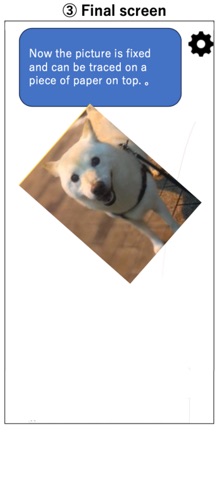
It is also possible to prepare the manuscript on paper, stack the copy destination paper on it, place it on the screen, and illuminate it from below with this application.
[How to use]
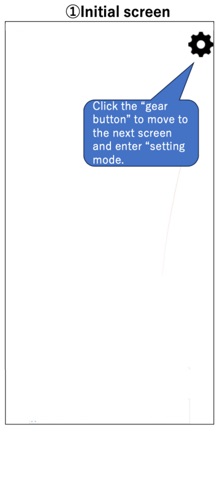
Tap the “gear” button on the upper right to enter the setting mode.
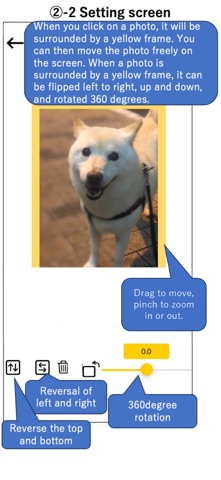
In the setting mode, add the image to be displayed with the “+” button or "Camera" button at the bottom left. You can also add text using the "T" button. Tapping a displayed image or text highlights it with a yellow frame; in this state, you can move it by dragging, or zoom in and out using a pinch gesture. Images and text can also be flipped or rotated, while text can be edited or have its styling modified.
You can save the current image and text layout with the “Save” button, and restore the saved layout later with the “Load” button, even after restarting the app.
The screen brightness can be adjusted with the slider bar at the bottom right.
When you tap the “left arrow” button on the upper left to exit the setting mode, the displayed image and text will be fixed, so place a piece of paper on the screen and trace it.
[Caution]
- I think it is easier to see the image under the paper if the room is darkened a little.
- Attach a protective film, etc., to prevent the display from being scratched during copying.
- Please use this application at your own risk. We do not take any responsibility for the disadvantage caused by using this application.
Safety and technology
Found in the app by AppBrain- Price
- Free
- App size
- 4.96 MB
- Content rating
- Everyone
Technologies used by TracingMat
Releases
Updates seen on the App Store- Version
- 1.17
- Launched
- February 2020
No changelog data
Alternatives
Similar apps and more from Yoko NishimuraAlternatives to TracingMat







Rankings
App Store top chartsApp Store Rankings for TracingMat
About the app and developer
About TracingMat
TracingMat is an utilities app developed by Yoko Nishimura.
What is the rating of TracingMat?
TracingMat is rated 3.63 out of 5 stars, based on 27 ratings.
Is TracingMat free?
TracingMat is free. The app size is 4.96 MB. The latest version available is 1.17. The last update was on August 9, 2026.
What are the requirements for TracingMat?
The app has a content rating of Everyone. The app has been available on the App Store since February 2020.
Developer information for Yoko Nishimura
Address:
Frequently asked questions about TracingMat
Is TracingMat free?
Yes. TracingMat is free on the App Store.
Is TracingMat still available?
Yes. TracingMat is on the App Store, and the last update we saw was on August 9, 2026.
How large is TracingMat?
TracingMat is 4.96 MB.
Is TracingMat suitable for children?
App Store rates the content of TracingMat as suitable for everyone.
How do people rate TracingMat?
TracingMat scores 3.63 out of 5 stars, from 27 ratings on the App Store.
Who made TracingMat?
TracingMat was developed by Yoko Nishimura. It is listed in the utilities category on the App Store.
What are the best alternatives to TracingMat?
People looking at TracingMat also look at these utilities apps: AR Mini Sketch, Screen Light Color, Tattoo - How to Draw, Ideas, Color Savvy, COPIC Collection.