




AppBrain's verdict
- Rating on App Store
- 4.78
- 18 ratings
- Last updated
- November 11, 2026
- Size
- 75.4 MB
It doesn't have enough ratings yet to judge what users think.
User feedback
Ratings and reviews on the App StoreComments on Trinote for iOS
We don't have enough comments to show example comments. Please check back later.
Store listing
By Vero Fide LLC, from the App StoreDescription by Vero Fide LLC Written by the developer, not by AppBrain. Click to read.
Browse & organize
Explore your full note tree with lazy loading, clones, and branches — the way Trilium models your workspace. Create, move, duplicate, and delete notes; keep favorites and recents at hand; optionally work with open-note tabs.
Find anything
Run full-text search on the server to jump to the right note fast. Offline, search titles in your cached notes. Use find-on-page once a note is open.
Read & edit
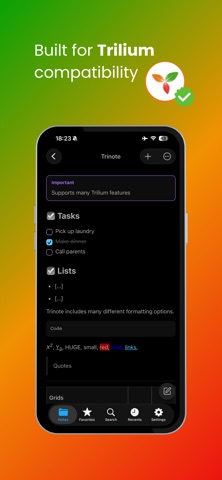
Open and edit text notes with a rich editor — formatting, lists, task lists, tables, callouts, code blocks, images, links, and math. Work with code, images, and files too.
Also supported: canvas, Mermaid diagrams, mind maps, spreadsheets, geo maps, calendars, kanban boards, and presentations (availability can depend on your Trilium version).
Attachments
Add from Camera, Photos, or Files. Preview, download, rename, and share.
Share & capture
Save text, links, images, and files into Trinote via the iOS Share extension (Markdown becomes HTML). Manage public Trilium share links, or send notes to a nearby device over your local network.
Stays useful offline
Caches tree structure and note content so you can keep browsing and editing when the network drops. Changes sync when you’re back online. Full-text search and some live actions still need the server.
Connect your way
Sign in with your Trilium password (TOTP supported). Use multiple server profiles, and optional Cloudflare Access for protected setups.
Appearance & security
Choose light, dark, or system appearance, plus color themes and custom accents. Lock the app with a PIN and Face ID / Touch ID.
Privacy
Trinote does not host your notes. Your data lives on your Trilium server and your local device.
Safety and technology
Found in the app by AppBrain- Price
- Free
- App size
- 75.4 MB
- Content rating
- Everyone
Technologies used by Trinote
Releases
Updates seen on the App Store- Version
- 1.24.0
- Launched
- March 2026
No changelog data
Alternatives
Similar apps and more from Vero Fide LLCAlternatives to Trinote


More from Vero Fide LLC


Rankings
App Store top chartsApp Store Rankings for Trinote
About the app and developer
About Trinote
Trinote is a productivity app developed by Vero Fide LLC.
User Ratings
Trinote is rated 4.78 out of 5 stars. The rating is based on 18 ratings.
App Information
Trinote is freely available from the App Store. The app size is 75.39 MB. The latest version available is 1.24.0. The last update was on November 11, 2026.
Technical Requirements
The app has a content rating of Everyone. The app has been available on the App Store since March 2026.
Trinote is made and published by Vero Fide LLC. AppBrain is an independent app data site and isn't affiliated with Vero Fide LLC. The app name, icon, screenshots and description belong to Vero Fide LLC and are shown as published on the App Store.
Developer information for Vero Fide LLC
Address:
Frequently asked questions about Trinote
Is Trinote free?
Yes. Trinote is free on the App Store.
Is Trinote still available?
Yes. Trinote is on the App Store, and the last update we saw was on November 11, 2026.
How large is Trinote?
Trinote is 75.39 MB.
Is Trinote suitable for children?
App Store rates the content of Trinote as suitable for everyone.
How do people rate Trinote?
Trinote scores 4.78 out of 5 stars, from 18 ratings on the App Store.
Who made Trinote?
Trinote was developed by Vero Fide LLC. It is listed in the productivity category on the App Store.
What are the best alternatives to Trinote?
People looking at Trinote also look at these productivity apps: Tiny Tools - All-in-One, Clastly — Personal Database, NotePal AI - Note Taker, Caliu - Markdown Notes, Snippety - Snippets Manager.