

TS File Explorer is made and published by 国奉 刘. AppBrain is an independent app data site and isn't affiliated with 国奉 刘. The app name, icon, screenshots and description belong to 国奉 刘 and are shown as published on the App Store.
AppBrain's verdict
- Last updated
- October 5, 2026
- Size
- 89.5 MB
User feedback
Ratings and reviews on the App StoreComments on TS File Explorer for iOS
We don't have enough comments to show example comments. Please check back later.
Store listing
By 国奉 刘, from the App Store

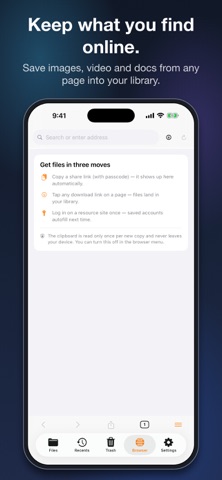

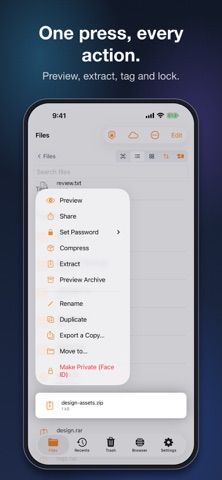


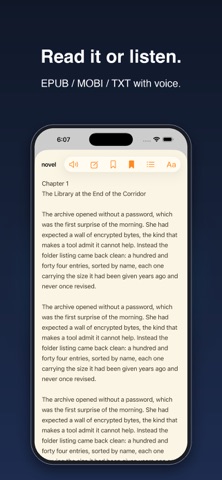
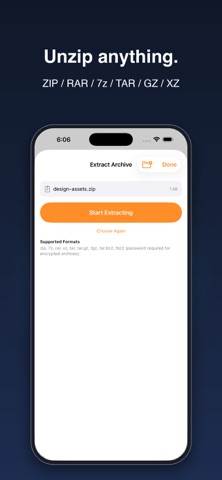

Description by 国奉 刘 Written by the developer, not by AppBrain. Click to read.
ARCHIVES
• Create ZIP, 7z, TAR, TAR.GZ and TAR.XZ, and password-protect ZIP or 7z with AES-256
• Extract ZIP, 7z, RAR, TAR, GZ, TGZ, BZ2, TBZ2 and XZ, including encrypted archives
• Look inside an archive and preview any file before you extract it
FILE MANAGER
• Copy, move, rename, multi-select batch actions, Recents, and a Trash that keeps items for 30 days
• App Lock with Face ID or Touch ID; archive passwords are stored in the Keychain
• Wi-Fi transfer: open the printed address on your computer to upload and download without a cable
MEDIA
• Compress or convert images between JPEG, PNG, HEIC and WebP, with crop
• Video: convert the container, or shrink it with H.264 re-encoding plus resolution, bitrate and frame-rate controls
• Audio: convert and compress MP3, AAC, WAV, FLAC, OGG and Opus
• Player for MP4, MOV, MKV, AVI and WebM, plus HLS streams
DOCUMENTS AND READING
• PDF: highlight, underline, strikethrough, pen, marker, lasso and handwritten signature, plus camera scanning
• Reader for TXT, EPUB and MOBI with a chapter list, day/sepia/night themes and text to speech
• Connect to WebDAV, Quark, Baidu Netdisk, Google Drive, Dropbox, SMB and FTP
PRICING
TS File Explorer is free and displays ads; some tools have a daily allowance you can extend by watching a video ad. Pro removes ads and allowance limits with a monthly, yearly or lifetime plan. Subscriptions renew automatically unless cancelled at least 24 hours before the end of the current period, and you can manage or cancel them any time in Settings → Apple ID → Subscriptions on your device.
Need something that's missing? Write to support@tonescoop.app — we read every message.
Terms of Use: https://tonescoop.app/file-explorer/terms
Privacy Policy: https://tonescoop.app/file-explorer/privacy
Safety and technology
Found in the app by AppBrain- Price
- Free
- App size
- 89.5 MB
- Content rating
- Everyone
Technologies used by TS File Explorer
Releases
Updates seen on the App Store- Version
- 1.0.5
- Launched
- September 2026
No changelog data
Alternatives
Similar apps and more from 国奉 刘Alternatives to TS File Explorer


More from 国奉 刘

Rankings
App Store top chartsApp Store Rankings for TS File Explorer
About the app and developer
About TS File Explorer
TS File Explorer is an utilities app developed by 国奉 刘.
User Ratings
The app has no ratings yet.
App Information
TS File Explorer is freely available from the App Store. The app size is 89.50 MB. The latest version available is 1.0.5. The last update was on October 5, 2026.
Technical Requirements
The app has a content rating of Everyone. The app has been available on the App Store since September 2026.
Developer information for 国奉 刘
Address:
Frequently asked questions about TS File Explorer
Is TS File Explorer free?
Yes. TS File Explorer is free on the App Store.
Is TS File Explorer still available?
Yes. TS File Explorer is on the App Store, and the last update we saw was on October 5, 2026.
How large is TS File Explorer?
TS File Explorer is 89.50 MB.
Is TS File Explorer suitable for children?
App Store rates the content of TS File Explorer as suitable for everyone.
Who made TS File Explorer?
TS File Explorer was developed by 国奉 刘. It is listed in the utilities category on the App Store.
What are the best alternatives to TS File Explorer?
People looking at TS File Explorer also look at these utilities apps: HexaConverter, 极简下载器, Zipper: Archive Manager, IIIume, MediaDrop -Smart Media Manager.