

TV Home Pro
TV Home Pro is made and published by Owen McLoughlin. AppBrain is an independent app data site and isn't affiliated with Owen McLoughlin. The app name, icon, screenshots and description belong to Owen McLoughlin and are shown as published on the App Store.
AppBrain's verdict
- Last updated
- November 6, 2026
- Size
- 34.9 MB
User feedback
Ratings and reviews on the App StoreComments on TV Home Pro for iOS
We don't have enough comments to show example comments. Please check back later.
Store listing
By Owen McLoughlin, from the App Store


Description by Owen McLoughlin Written by the developer, not by AppBrain. Click to read.
LIVE TV
• Pick a channel to preview it, with what's on now and next. Pick it again for full screen.
• On Apple TV, Up and Down change channel, Left goes back to the last one, and Right shows the ones you watched recently. On iPhone, the player's arrows change channel.
• On Apple TV, browse a strip of channels along the bottom without leaving what's playing.
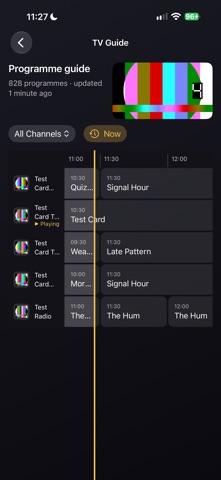
THE GUIDE
• A full programme guide from your account or playlist, from 12 hours back to a week ahead, as far as its guide goes.
• It opens on now, with the programme on air filled to the minute. A remote's Guide button opens it, and Page Up and Page Down move a screen at a time.
• Remind Me on a programme still to come: your iPhone tells you when it starts, and so does the Apple TV while TV Home Pro is open.
• Catch-up: where your account keeps an archive, a programme that's over plays again from the start, for Xtream Codes accounts and playlists that offer it. On Xtream Codes, Start Over plays the one on now from its beginning.
FILMS AND SERIES
• Your account's films and series by category, with posters, details, seasons and episodes.
• Continue Watching picks up where you stopped, and the next episode is offered when one ends.
• Play films and episodes slower or faster, from 0.5× to 2×, and set a sleep timer, including for the end of the programme.
SEARCH
• One search across live TV, what's on now, the guide's programmes, films and series, with a count for each. On a Stalker portal it searches live TV.
MAKE IT YOURS
• Favourites, and your recent channels on the home screen.
• Hide channels and whole categories you never watch, rename the rest, and put favourites and categories in your own order.
• TV Home Pro reopens where you left off, on the channel you watched last. A setting starts that channel playing too.
• Add a source on your iPhone and send it to your Apple TV instead of typing with the remote.
ON IPHONE
• Picture in Picture, sound that plays on in the background, AirPlay, and controls on the Lock Screen.
PICTURE AND SOUND
• Plays the streams IPTV accounts actually send: MPEG-TS and HLS; interlaced SD and HD; MPEG-2, H.264 and HEVC video; MP2, AAC, AC-3 and E-AC-3 sound.
• 4K and HDR10. On Apple TV, full screen switches your TV to the stream's frame rate and dynamic range, when Match Content is on in the Apple TV's settings.
• Choose your audio and subtitle languages once. Subtitles follow your Accessibility caption style.
• Reconnects by itself when a stream drops, and keeps to your account's connection limit.
PRIVATE BY DESIGN
• No account with us, no ads, no tracking, no analytics.
• Your logins stay in the Keychain of the device they're on and are never synced. They go only to the server they belong to, or, when you send a source, straight from your iPhone to your Apple TV, encrypted, after you compare a code.
• With Sync with iCloud on, your favourites, what you've watched and where you stopped follow you between your devices through your own iCloud. Never a login.
• TV Home Pro talks only to the servers you add, the addresses they give for artwork, and your iCloud.
BEFORE YOU START
• You need an IPTV account: a server address with a username and password, a portal address with the MAC address and device details from the box or player you already use, or a playlist address.
• What you can watch, and whether there's a guide or catch-up, depends on your account.
• Only add accounts you have the right to use. TV Home Pro doesn't host, store or link to any content.
Safety and technology
Found in the app by AppBrain- Price
- Free
- App size
- 34.9 MB
- Content rating
- Everyone
Technologies used by TV Home Pro
Releases
Updates seen on the App Store- Version
- 1.0
- Launched
- November 2026
No changelog data
Alternatives
Similar apps and more from Owen McLoughlinMore from Owen McLoughlin


Rankings
App Store top chartsApp Store Rankings for TV Home Pro
About the app and developer
About TV Home Pro
TV Home Pro is an entertainment app developed by Owen McLoughlin.
User Ratings
The app has no ratings yet.
App Information
TV Home Pro is freely available from the App Store. The app size is 34.93 MB. The latest version available is 1.0. The last update was on November 6, 2026.
Technical Requirements
The app has a content rating of Everyone. The app has been available on the App Store since November 2026.
Developer information for Owen McLoughlin
Address:
Frequently asked questions about TV Home Pro
Is TV Home Pro free?
Yes. TV Home Pro is free on the App Store.
Is TV Home Pro still available?
Yes. TV Home Pro is on the App Store, and the last update we saw was on November 6, 2026.
How large is TV Home Pro?
TV Home Pro is 34.93 MB.
Is TV Home Pro suitable for children?
App Store rates the content of TV Home Pro as suitable for everyone.
Who made TV Home Pro?
TV Home Pro was developed by Owen McLoughlin. It is listed in the entertainment category on the App Store.