

TV Remote Control & Casting
TV Remote Control & Casting is made and published by 洁 蒋. AppBrain is an independent app data site and isn't affiliated with 洁 蒋. The app name, icon, screenshots and description belong to 洁 蒋 and are shown as published on the App Store.
AppBrain's verdict
- Last updated
- October 7, 2026
Rankings
App Store top chartsApp Store Rankings for TV Remote Control & Casting
Competitors
Similar apps and more from 洁 蒋Alternatives to TV Remote Control & Casting


More from 洁 蒋


Releases
Updates seen on the App Store- Version
- 1.0.0
- Launched
- October 2026
No changelog data
User feedback
Ratings and reviews on the App StoreComments on TV Remote Control & Casting for iOS
We don't have enough comments to show example comments. Please check back later.
Technology
Found in the app by AppBrain- Price
- Free
- App size
- 24.6 MB
- Content rating
- Everyone
Technologies used by TV Remote Control & Casting
About the app and developer
About TV Remote Control & Casting
TV Remote Control & Casting is an utilities app developed by 洁 蒋.
User Ratings
The app has no ratings yet.
App Information
TV Remote Control & Casting is freely available from the App Store. The app size is 24.60 MB. The latest version available is 1.0.0. The last update was on October 7, 2026.
Technical Requirements
The app has a content rating of Everyone. The app has been available on the App Store since October 2026.
Developer information for 洁 蒋
Address:
Frequently asked questions about TV Remote Control & Casting
Is TV Remote Control & Casting free?
Yes. TV Remote Control & Casting is free on the App Store.
Is TV Remote Control & Casting still available?
Yes. TV Remote Control & Casting is on the App Store, and the last update we saw was on October 7, 2026.
How large is TV Remote Control & Casting?
TV Remote Control & Casting is 24.60 MB.
Is TV Remote Control & Casting suitable for children?
App Store rates the content of TV Remote Control & Casting as suitable for everyone.
Who made TV Remote Control & Casting?
TV Remote Control & Casting was developed by 洁 蒋. It is listed in the utilities category on the App Store.
What are the best alternatives to TV Remote Control & Casting?
People looking at TV Remote Control & Casting also look at these utilities apps: TV Remote: Smart TV, NoStrings: TV Remote Control, Universal TV Remote: All TVs, AnyTV | Smart TV Remote, Universal Remote for TV - Remo.
Store listing
By 洁 蒋, from the App Store

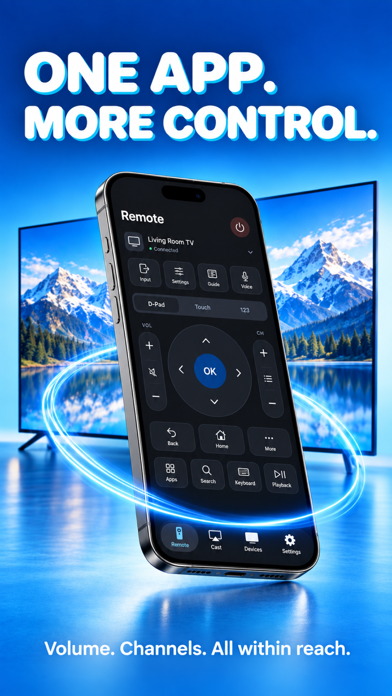


Description by 洁 蒋 Written by the developer, not by AppBrain. Click to read.
► EVERYDAY TV CONTROLS
Navigate with a directional pad, touchpad or number pad. Adjust volume, mute sound, change channels and control playback where your TV supports them.
► KEYBOARD & VOICE INPUT
Type with your device's keyboard or dictate text, review it and send it to a compatible TV text field. Text entry and voice typing depend on your TV and permissions.
► PHOTOS & VIDEOS ON TV
Choose media from your library and send it to a compatible receiver. Control playback and enjoy your selected moments on a larger display.
► APP SHORTCUTS & INPUTS
Access supported TV apps and switch inputs where available. The controls shown depend on your television's capabilities.
► CONNECT & PERSONALIZE
Discover TVs on your local network or add an address manually. Save devices, adjust touch and haptic preferences, and use connection diagnostics when you need help.
► SCREEN MIRRORING GUIDE
Follow the guide to start screen mirroring using the built-in AirPlay controls on your iPhone or iPad. An AirPlay-compatible receiver is required.
Compatibility depends on TV model, firmware, network settings and enabled services. Your device and receiver must be on the same local network.
PRO SUBSCRIPTION
A Pro subscription is required for remote control and photo/video casting. Weekly, monthly and annual plans are offered. A free trial may be available to eligible accounts on selected plans; the purchase screen shows the current offer and price. Payment is charged to your Apple Account. Subscriptions renew automatically unless canceled at least 24 hours before the current period ends. Manage or cancel in your Apple Account subscription settings.
Privacy Policy: https://clearwarejj.netlify.app/privacy_policy
Terms of Use (EULA): https://clearwarejj.netlify.app/terms_of_service