

TypeMaster – Type Run & Letter
TypeMaster – Type Run & Letter is made and published by Rahul Jalavadiya. AppBrain is an independent app data site and isn't affiliated with Rahul Jalavadiya. The app name, icon, screenshots and description belong to Rahul Jalavadiya and are shown as published on the App Store.
AppBrain's verdict
- Last updated
- December 24, 2025
Rankings
App Store top chartsApp Store Rankings for TypeMaster – Type Run & Letter
Competitors
Similar apps and more from Rahul JalavadiyaAlternatives to TypeMaster – Type Run & Letter




More from Rahul Jalavadiya


Also available on Google Play

Releases
Updates seen on the App Store- Version
- 4.0
- Launched
- October 2024
No changelog data
User feedback
Ratings and reviews on the App StoreComments on TypeMaster – Type Run & Letter for iOS
We don't have enough comments to show example comments. Please check back later.
Technology
Found in the app by AppBrain- Price
- Free
- App size
- 43.6 MB
- Content rating
- Everyone
Technologies used by TypeMaster – Type Run & Letter
About the app and developer
About TypeMaster – Type Run & Letter
TypeMaster – Type Run & Letter is a games app developed by Rahul Jalavadiya.
User Ratings
The app has no ratings yet.
App Information
TypeMaster – Type Run & Letter is freely available from the App Store. The app size is 43.65 MB. The latest version available is 4.0. The last update was on December 24, 2025.
Technical Requirements
The app has a content rating of Everyone. The app has been available on the App Store since October 2024.
Developer information for Rahul Jalavadiya
Address:
Frequently asked questions about TypeMaster – Type Run & Letter
Is TypeMaster – Type Run & Letter free?
Yes. TypeMaster – Type Run & Letter is free on the App Store.
Is TypeMaster – Type Run & Letter still available?
Yes. TypeMaster – Type Run & Letter is on the App Store, and the last update we saw was on December 24, 2025.
How large is TypeMaster – Type Run & Letter?
TypeMaster – Type Run & Letter is 43.65 MB.
Is TypeMaster – Type Run & Letter suitable for children?
App Store rates the content of TypeMaster – Type Run & Letter as suitable for everyone.
Who made TypeMaster – Type Run & Letter?
TypeMaster – Type Run & Letter was developed by Rahul Jalavadiya. It is listed in the games category on the App Store.
What are the best alternatives to TypeMaster – Type Run & Letter?
People looking at TypeMaster – Type Run & Letter also look at these games apps: AI-Powered Typing Practice, Typing Planet, Typing Practice game, AI Word Typing Practice Games, Fast Typing Game : Type speed.
Store listing
By Rahul Jalavadiya, from the App Store


Description by Rahul Jalavadiya Written by the developer, not by AppBrain. Click to read.
With a clean UI, smooth controls, and interactive challenges, Typr Go makes typing practice enjoyable. Play solo or add players and compete in a fun turn-based typing challenge where everyone gets a chance to test their typing skills. Practice typing A–Z alphabets, 1–100 numbers, speed rounds, and accuracy challenges designed to improve your performance.
-> Fun & Smart Typing Practice Game
Typr Go offers alphabetical (ABC) and numeric (123) typing modes. This helps you practice both letter typing and number typing with better accuracy. Simply choose your challenge, select your player, and start the typing test. Each round stays fresh and exciting with new tasks and random timers.
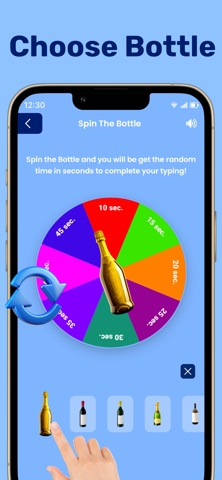
-> Spin the Bottle – Random Timer Challenge
One of the most entertaining features is the Spin the Bottle mode. The wheel generates a random time limit such as 10 sec, 25 sec, 30 sec, 40 sec, etc. You must complete the typing challenge within that time to win the round. This makes Typr Go a unique typing game that adds excitement with random time-limit challenges.
-> Turn-Based Multiplayer Typing Game
Add multiple players using the Players screen. Select whose turn it is, and the app assigns tasks such as Type A–Z in 25 seconds or Type numbers in 20 seconds. This interactive turn feature makes it an amazing typing challenge game for friends, family, classrooms, and groups.
-> Track Performance & Share Score
After each round, view your typing score, completion time, and task summary. You can even share your score with friends using the share button. This motivates you to type faster while helping you track and improve your WPM over time.
-> Easy to Understand – How to Play Guide
A dedicated How to Play section explains everything — creating players, choosing challenges, game rules, spinning the wheel, and completing the typing tasks. Beginners can start instantly without confusion.
-> Why You’ll Love Typr Go
* Fun typing test game
* Practice alphabets and numbers
* Helps improve typing speed & accuracy
* Designed to help improve WPM typing score
* Multiplayer & turn-based challenges
* Spin-the-bottle timer twist
* Easy UI for fast typing practice
* Perfect for beginners & advanced users
* Great for students, professionals, and fast-typing learners.
Typr Go is more than a typing test — it’s a fun typing improvement game and a speed typing app blended into one. Download now and challenge yourself or your friends to type faster and sharpen your skills!