

PDF Editor & Scanner Pro
PDF Editor & Scanner Pro is made and published by Rahul Jalavadiya. AppBrain is an independent app data site and isn't affiliated with Rahul Jalavadiya. The app name, icon, screenshots and description belong to Rahul Jalavadiya and are shown as published on the App Store.
AppBrain's verdict
- Last updated
- July 23, 2026
- Size
- 44.4 MB
User feedback
Ratings and reviews on the App StoreComments on PDF Editor & Scanner Pro for iOS
We don't have enough comments to show example comments. Please check back later.
Store listing
By Rahul Jalavadiya, from the App Store





Description by Rahul Jalavadiya Written by the developer, not by AppBrain. Click to read.
Whether you are a student highlighting lecture notes, a professional signing a business contract, or someone needing a quick mobile scanner, PDF Editor & Scanner Pro gives you the ultimate desktop-grade tools right in your pocket.
Download for free and start viewing, editing, and scanning your documents instantly!
Key Features Included:
POWERFUL PDF EDITOR & ANNOTATION TOOLS
Make changes to any PDF file with our intuitive markup and drawing suite.
• Draw and write smoothly using a precise Pen, Highlighter, and Eraser.
• Highlight text, underline critical data, or apply strike-through marks.
• Type text boxes, drop custom sticky notes, or insert images into any file.
• Secure your privacy by using the Redact tool to permanently hide sensitive information.
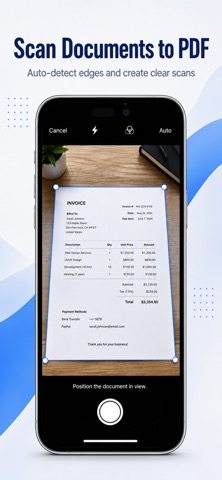
SMART MOBILE SCANNER
Turn your physical paperwork into crisp, professional digital files.
• Capture documents flawlessly with Autocapture edge detection or manual mode.
• Crop, straighten, and clean up scans automatically.
• Turn receipts, multi-page contracts, or book pages into high-quality PDFs.
FILL FORMS & SIGN SECURELY
Complete paperwork digitally and eliminate printing entirely.
• Type directly into interactive or static PDF form fields.
• Create your unique electronic signature using your fingertip or stylus.
• Place your saved signature onto contracts and legal forms in one tap.
ADVANCED DOCUMENT TOOLS
Handle complex document tasks on the move.
• Merge & Split: Combine multiple files or extract individual pages effortlessly.
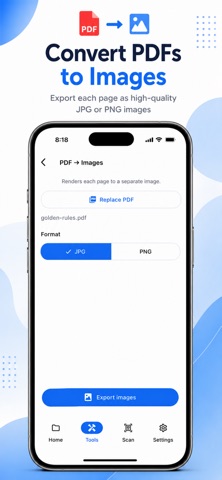
• File Conversions: Turn images to PDF instantly, or export pages as clean images.
• Compress PDF: Reduce document file sizes for quick, trouble-free email attachments.
• PDF Security: Add strong password protection, or safely remove existing passwords.
PAGE MANAGEMENT & NAVIGATION
Stay organized with total control over your files.
• Rearrange, delete, rotate, or add fresh, blank pages to any existing document.
• Search text inside a PDF to find exact keywords in seconds.
• Bookmarks & Go To Page shortcuts let you navigate massive files with ease.
SYNC, STORAGE & ACCOUNT SECURITY
• Secure your entire app using App Lock with FaceID or TouchID authentication.
• Custom configurations: Pick Dark Mode, adjust default page views, and set default tool colors.
• Seamlessly import files from or save your work directly to your favorite Cloud storage.
• Easily share your completed work via email, messages, or cloud links.
Go Pro for Unlimited Power
Enjoy a robust suite of viewing and editing tools completely free. Upgrade to our Premium subscription to unlock unlimited advanced tools including bulk merging, file compression, OCR text recognition, and premium cloud integrations.
Your subscription will be charged to your iTunes account at confirmation of purchase. Subscriptions automatically renew unless auto-renew is turned off at least 24 hours before the end of the current period. Manage your subscription and auto-renewal settings easily in your App Store Account Settings.
Privacy Policy: https://doc-hosting.flycricket.io/srkwebstudio-privacy-policy/64f68df3-4304-4de0-84b6-8b293a40f23b/privacy
Safety and technology
Found in the app by AppBrain- Price
- Free
- App size
- 44.4 MB
- Content rating
- Everyone
Technologies used by PDF Editor & Scanner Pro
Releases
Updates seen on the App Store- Version
- 7.0
- Launched
- June 2026
No changelog data
Alternatives
Similar apps and more from Rahul JalavadiyaAlternatives to PDF Editor & Scanner Pro


More from Rahul Jalavadiya


Rankings
App Store top chartsApp Store Rankings for PDF Editor & Scanner Pro
About the app and developer
About PDF Editor & Scanner Pro
PDF Editor & Scanner Pro is a productivity app developed by Rahul Jalavadiya.
What is the rating of PDF Editor & Scanner Pro?
PDF Editor & Scanner Pro has no ratings yet.
Is PDF Editor & Scanner Pro free?
PDF Editor & Scanner Pro is free. The app size is 44.38 MB. The latest version available is 7.0. The last update was on July 23, 2026.
What are the requirements for PDF Editor & Scanner Pro?
The app has a content rating of Everyone. The app has been available on the App Store since June 2026.
Developer information for Rahul Jalavadiya
Address:
Frequently asked questions about PDF Editor & Scanner Pro
Is PDF Editor & Scanner Pro free?
Yes. PDF Editor & Scanner Pro is free on the App Store.
Is PDF Editor & Scanner Pro still available?
Yes. PDF Editor & Scanner Pro is on the App Store, and the last update we saw was on July 23, 2026.
How large is PDF Editor & Scanner Pro?
PDF Editor & Scanner Pro is 44.38 MB.
Is PDF Editor & Scanner Pro suitable for children?
App Store rates the content of PDF Editor & Scanner Pro as suitable for everyone.
Who made PDF Editor & Scanner Pro?
PDF Editor & Scanner Pro was developed by Rahul Jalavadiya. It is listed in the productivity category on the App Store.
What are the best alternatives to PDF Editor & Scanner Pro?
People looking at PDF Editor & Scanner Pro also look at these productivity apps: PDF to Word Converter: Editor, OnePDF: Scanner & Editor, Scanly: Scanner & PDF, Editify: PDF Editor & Scanner, PDF Studio Forge.