

Typing Mill: Type Tutor
Typing Mill: Type Tutor is made and published by Koreniuk Oleksandr. AppBrain is an independent app data site and isn't affiliated with Koreniuk Oleksandr. The app name, icon, screenshots and description belong to Koreniuk Oleksandr and are shown as published on the App Store.
AppBrain's verdict
- Last updated
- September 7, 2026
Rankings
App Store top chartsApp Store Rankings for Typing Mill: Type Tutor
Competitors
Similar apps and more from Koreniuk OleksandrMore from Koreniuk Oleksandr


Releases
Updates seen on the App Store- Version
- 1.1.1
- Launched
- June 2022
No changelog data
User feedback
Ratings and reviews on the App StoreComments on Typing Mill: Type Tutor for iOS
We don't have enough comments to show example comments. Please check back later.
Technology
Found in the app by AppBrain- Price
- $9.99
- App size
- 2.96 MB
- Content rating
- Everyone
Technologies used by Typing Mill: Type Tutor
About the app and developer
About Typing Mill: Type Tutor
Typing Mill: Type Tutor is a productivity app developed by Koreniuk Oleksandr.
What is the rating of Typing Mill: Type Tutor?
Typing Mill: Type Tutor has no ratings yet.
Is Typing Mill: Type Tutor free?
Typing Mill: Type Tutor costs $9.99. The app size is 2.96 MB. The latest version available is 1.1.1. The last update was on September 7, 2026.
What are the requirements for Typing Mill: Type Tutor?
The app has a content rating of Everyone. The app has been available on the App Store since June 2022.
Developer information for Koreniuk Oleksandr
Address:
Store listing
By Koreniuk Oleksandr, from the App Store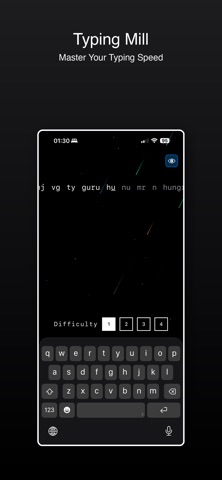


Description by Koreniuk Oleksandr Written by the developer, not by AppBrain. Click to read.
An endless mill of real English words scrolls toward you, one character at a time. Hit the right key and the word advances. Miss and nothing moves. That is the whole loop, and it is enough.
FOUR LEVELS, FINGER BY FINGER
Each level adds the keys another pair of fingers reaches, and every word is built only from the keys unlocked so far:
1 — index fingers: r f v t g b y h n u j m
2 — middle fingers: e d c i k
3 — ring fingers: w s x o l
4 — little fingers: q a z p
Level 1 draws on 137 words. Level 4 draws on 9,894. Real words, not random letters, so your hands learn English rather than noise. Change level whenever you like — one tap, no menu, no progress to lose.
A BACKGROUND THAT ANSWERS YOU
The animation behind the words reacts to the key you are on, how fast you are going and which level you are running. If you would rather have plain black, switch it off with the button in the corner.
MAC, IPHONE AND IPAD
On Mac it is full screen and your own keyboard, with nothing between you and the mill. On iPhone and iPad the keyboard stays up and the words scroll above it. One purchase covers all three.
NO ACCOUNT, NO CLOUD, NO SUBSCRIPTION
Nothing is collected, nothing is uploaded, nothing expires. Buy it once and it is yours.