

Uchinoko Kiroku
Uchinoko Kiroku is made and published by Tomotaka Sakuma. AppBrain is an independent app data site and isn't affiliated with Tomotaka Sakuma. The app name, icon, screenshots and description belong to Tomotaka Sakuma and are shown as published on the App Store.
AppBrain's verdict
- Last updated
- October 26, 2026
Rankings
App Store top chartsApp Store Rankings for Uchinoko Kiroku
Competitors
Similar apps and more from Tomotaka SakumaAlternatives to Uchinoko Kiroku





More from Tomotaka Sakuma


Releases
Updates seen on the App Store- Version
- 1.5.5
- Launched
- October 2025
No changelog data
User feedback
Ratings and reviews on the App StoreComments on Uchinoko Kiroku for iOS
We don't have enough comments to show example comments. Please check back later.
Technology
Found in the app by AppBrain- Price
- Free
- App size
- 11.9 MB
- Content rating
- Everyone
Technologies used by Uchinoko Kiroku
About the app and developer
About Uchinoko Kiroku
Uchinoko Kiroku is a lifestyle app developed by Tomotaka Sakuma.
User Ratings
The app has no ratings yet.
App Information
Uchinoko Kiroku is freely available from the App Store. The app size is 11.93 MB. The latest version available is 1.5.5. The last update was on October 26, 2026.
Technical Requirements
The app has a content rating of Everyone. The app has been available on the App Store since October 2025.
Developer information for Tomotaka Sakuma
Address:
Frequently asked questions about Uchinoko Kiroku
Is Uchinoko Kiroku free?
Yes. Uchinoko Kiroku is free on the App Store.
Is Uchinoko Kiroku still available?
Yes. Uchinoko Kiroku is on the App Store, and the last update we saw was on October 26, 2026.
How large is Uchinoko Kiroku?
Uchinoko Kiroku is 11.93 MB.
Is Uchinoko Kiroku suitable for children?
App Store rates the content of Uchinoko Kiroku as suitable for everyone.
Who made Uchinoko Kiroku?
Uchinoko Kiroku was developed by Tomotaka Sakuma. It is listed in the lifestyle category on the App Store.
What are the best alternatives to Uchinoko Kiroku?
People looking at Uchinoko Kiroku also look at these lifestyle apps: シンプル日記+, Rabbit Care -Pet Log & Tracker, 底値管理 - バーコードで最安値メモ, JotItDownYo, One Page: Simple Diary.
Store listing
By Tomotaka Sakuma, from the App Store



Description by Tomotaka Sakuma Written by the developer, not by AppBrain. Click to read.
Why Choose Uchinoko Kiroku?
# Quick & Easy Recording
Record important information with just a few taps. You can add basic details immediately and fill in additional information later at your convenience. You can also record with a single tap from your wrist on Apple Watch.
# Privacy First
Photos of poop, pee, and other health records are stored only within the app - they won't appear in your device's photo gallery. No account or login required. Your data is stored only on your device and in your own iCloud.
# Your Data, Your Control
Export all your data as JSON format anytime. Your records belong to you and can be backed up or transferred as needed.
Key Features
# Meal Tracking
Register calorie information and portion sizes for each type of food to easily log daily meals.
You can categorize wet food, dry food, and treats for clear management.
Frequent meals can be saved as presets for quick entry, and meal presets are automatically selected based on the time of day (morning, noon, or evening).
# Health Logs
Easily record poop, pee, symptoms, and water intake.
Just select the type and amount to review daily changes at a glance in a simple list view. For poop and pee, you can also see how long it has been since the last one.
# Temperature & Weight
Quickly record temperature and weight taken at home while checking the previous values.
The latest values appear on the pet's details, and a tap opens the trend chart.
# Medications
Record the medications you give and their dosages.
Set a reminder for each medication, and link reminders to Apple's Reminders app.
# Lab Results
Record blood test and other lab values and follow the trends in a chart or table.
Take a photo of a lab result sheet to read the test items and values into the entry fields.
# Vet Visits
Record each visit and the next appointment.
Keep notes of what you want to ask the vet, and sync upcoming appointments to the iOS Calendar app.
# Free Notes & Today's Note
Add free-form notes about your pet's daily activities, moods, or anything you notice.
Entries can be organized by category (behavior, health, mood, etc.) and marked with importance levels ("Normal," "Watch," or "Caution") to help you keep track of important details.
# Pet Profiles
Register photos and basic information for each pet to manage their data individually.
You can view health and activity changes over time for each dog or cat.
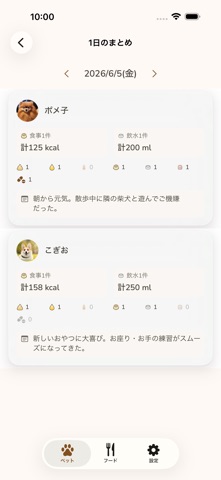
# Stats & Daily Summary
Review meal quantities and bathroom logs in charts and a daily summary for better health tracking and easier vet consultations.
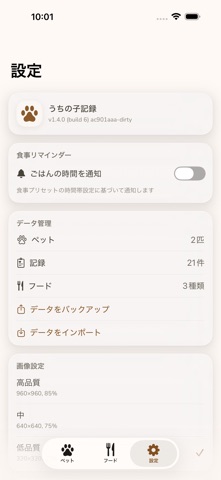
# iCloud Sync & Backup
Sync your data automatically across multiple iPhones and iPads with iCloud.
Backup and restore features help you safely store your valuable records.
Don't miss the small daily changes. Keep your beloved companion healthy and happy.