AppBrain
AppBrain
  • Apps
  • Apps being viewed right now Trending apps today Most popular apps All-time most installed apps Top rated apps iPhone and iPad apps
  • Intelligence ▾
    Intelligence overview → Track any Android app or your whole market
    Track & analyze
    Keyword Tracker & OptimizerTrack & improve Play rankings App Performance ReportOne-off PDF for any app StatisticsFree Android & Play market stats
    Promote your app
    Featured Apps App Links
  • Intelligence
  • Pricing
  • Dashboard
  • Sign up
  • Log in
App Store Apps > Photo & Video > SimpleCollage: Photo Collage
SimpleCollage: Photo Collage icon

SimpleCollage: Photo Collage

0.2.2
Tomotaka Sakuma
0.00
0 reviews
Free

SimpleCollage: Photo Collage Screenshot 1 of 4
SimpleCollage: Photo Collage Screenshot 2 of 4
SimpleCollage: Photo Collage Screenshot 3 of 4
SimpleCollage: Photo Collage Screenshot 4 of 4
Screenshots by Tomotaka Sakuma, from the the App Store listing
View on the App Store

AppBrain's verdict

Last updated
October 31, 2026
Size
786.0 KB
Official page on the App Store

User feedback

Ratings and reviews on the App Store

Comments on SimpleCollage: Photo Collage for iOS

We don't have enough comments to show example comments. Please check back later.

Store listing

By Tomotaka Sakuma, from the App Store
Description by Tomotaka Sakuma Written by the developer, not by AppBrain. Click to read.
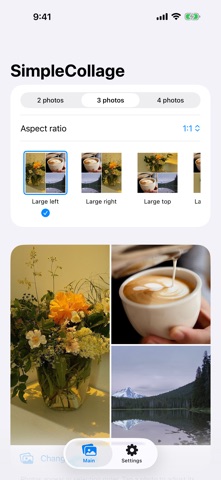
SimpleCollage combines 2–4 photos into one image with white gaps between them. Adjust the layout, cover faces with mosaics or emoji stickers, then save or share your collage.

ARRANGE YOUR PHOTOS
Photos appear in the order you select them. Touch and hold a photo, then drag it onto another slot to swap them.

CHOOSE A LAYOUT
Place photos side by side or stack them vertically. With 3 or 4 photos, you can make one photo larger on the left, right, top, or bottom. With 4 photos, you can also choose a 2 × 2 grid. Choose from 1:1, 4:5, 3:4, 9:16, 4:3, and 16:9 aspect ratios.

ADJUST AND RETOUCH
Tap a photo to adjust its position and zoom with drag and pinch gestures. Add round or square mosaics and emoji stickers. Drag a mosaic’s corners to change its shape and size.

ADD A FILTER
Apply Vivid, Mono, Noir, Sepia, Chrome, Fade, or Instant to all photos. The white gaps stay white.

SAVE AND SHARE
Save the finished image to Photos, copy it, or share it with another app.

PRIVACY
No account, ads, or tracking. Photos are processed on your iPhone and are not uploaded to our servers. Support and donation links open in your browser.

Available in nine languages. The app follows your iOS app language setting.

Safety and technology

Found in the app by AppBrain
Price
Free
App size
786.0 KB
Content rating
Everyone

Technologies used by SimpleCollage: Photo Collage

Releases

Updates seen on the App Store
Version
0.2.2
Launched
October 2026

No changelog data

Alternatives

Similar apps and more from Tomotaka Sakuma

Alternatives to SimpleCollage: Photo Collage

Simple Collage - No Ads icon Simple Collage - No Ads
Jeongbae Oh
0.0
Free
CapLog – Cap it, Stick it! icon CapLog – Cap it, Stick it!
VVELD AI
0.0
Free
Mugen Player icon Mugen Player
Koichiro Kamada
4.0
Free
6 ratings
ImageResize - Photo Resizer icon ImageResize - Photo Resizer
Yoshinobu Sonoda
4.5
Free
228 ratings
PiCRO[ピクロ] icon PiCRO[ピクロ]
株式会社EDIONクロスベンチャーズ
0.0
Free
Simple Negative Image icon Simple Negative Image
Ryouhei Azuma
4.5
Free
123 ratings
PhotoFrame Simple icon PhotoFrame Simple
Yosuke Seki
4.8
Free
446 ratings
Photo Cut Out Editor icon Photo Cut Out Editor
丽譞 牛
4.6
Free
7.2K ratings

More from Tomotaka Sakuma

Noteline - Timeline Memo icon Noteline - Timeline Memo
Tomotaka Sakuma
0.0
Free
Uchinoko Kiroku icon Uchinoko Kiroku
Tomotaka Sakuma
0.0
Free

Rankings

App Store top charts

App Store Rankings for SimpleCollage: Photo Collage

This app is not ranked

About the app and developer

About SimpleCollage: Photo Collage

SimpleCollage: Photo Collage is a photo & video app developed by Tomotaka Sakuma.

What is the rating of SimpleCollage: Photo Collage?

SimpleCollage: Photo Collage has no ratings yet.

Is SimpleCollage: Photo Collage free?

SimpleCollage: Photo Collage is free. The app size is 786.00 kB. The latest version available is 0.2.2. The last update was on October 31, 2026.

What are the requirements for SimpleCollage: Photo Collage?

The app has a content rating of Everyone. The app has been available on the App Store since October 2026.

SimpleCollage: Photo Collage is made and published by Tomotaka Sakuma. AppBrain is an independent app data site and isn't affiliated with Tomotaka Sakuma. The app name, icon, screenshots and description belong to Tomotaka Sakuma and are shown as published on the App Store.

Developer information for Tomotaka Sakuma

Tomotaka Sakuma

Address:

Frequently asked questions about SimpleCollage: Photo Collage

Is SimpleCollage: Photo Collage free?

Yes. SimpleCollage: Photo Collage is free on the App Store.

Is SimpleCollage: Photo Collage still available?

Yes. SimpleCollage: Photo Collage is on the App Store, and the last update we saw was on October 31, 2026.

How large is SimpleCollage: Photo Collage?

SimpleCollage: Photo Collage is 786.00 kB.

Is SimpleCollage: Photo Collage suitable for children?

App Store rates the content of SimpleCollage: Photo Collage as suitable for everyone.

Who made SimpleCollage: Photo Collage?

SimpleCollage: Photo Collage was developed by Tomotaka Sakuma. It is listed in the photo & video category on the App Store.

What are the best alternatives to SimpleCollage: Photo Collage?

People looking at SimpleCollage: Photo Collage also look at these photo & video apps: Simple Collage - No Ads, CapLog – Cap it, Stick it!, Mugen Player, ImageResize - Photo Resizer, PiCRO[ピクロ].

Share SimpleCollage: Photo Collage

Apps other people are watching Top new apps Today's trending apps Popular Photo & Video Apps Price drops on Google Play
Simple Collage - No Ads icon Simple Collage - No Ads
CapLog – Cap it, Stick it! icon CapLog – Cap it, Stick it!
Mugen Player icon Mugen Player
ImageResize - Photo Resizer icon ImageResize - Photo Resizer
PiCRO[ピクロ] icon PiCRO[ピクロ]
Simple Negative Image icon Simple Negative Image
PhotoFrame Simple icon PhotoFrame Simple
Photo Cut Out Editor icon Photo Cut Out Editor
Overview Alternatives Reviews Rankings Technology
AppBrain Intelligence premium content

Subscribe now to get full and unlimited access to AppBrain Intelligence. You'll have access to:

  • App Intelligence dashboard (performance timeline, competitor comparison, country rankings, insight cards)
  • Detailed ranking data per app
  • Full timeline per developer
  • Device market shares data per country
  • Unlimited keyword tracking
  • AI assistant access via MCP (Claude, Cursor or any MCP client)
1 Month

$75/mo
(billed every month)

SAVE 0%
Subscribe
3 Months

$65/mo
($195 billed every 3 months)

SAVE 13%
Subscribe
1 Year

$57.50/mo
($690 billed every year)

SAVE 23%
Subscribe
Each subscription will automatically renew 3 days before the expiration date for the same time period. Subscriptions can be cancelled at any time before the renewal.

AppBrain is an app data site, we track rankings, ratings, installs for all apps and games on Google Play and the App Store. AppBrain doesn't host app files or APKs, all install links go directly to the official store. All trademarks are owned by their respective owners.

More apps

  • Top Android apps being viewed
  • View Jungle Rush Slots: Win Cash
  • View king7slots : real money
  • King7Slots

App statistics

  • Android statistics
  • Google Play Developer stats
  • Trending Android Apps
  • Trending iOS apps
  • Top popular Apps
  • Buy the best Android phone
  • Buy & sell app businesses

About AppBrain

  • Contact
  • Privacy
  • Documentation
  • DMCA takedowns
  • Blog
  • Free online games · play instantly
© 2010-2026 - AppBrain