

UCHIYO: Home Inventory
UCHIYO: Home Inventory is made and published by Lijun Xie. AppBrain is an independent app data site and isn't affiliated with Lijun Xie. The app name, icon, screenshots and description belong to Lijun Xie and are shown as published on the App Store.
AppBrain's verdict
- Last updated
- September 30, 2026
Rankings
App Store top chartsApp Store Rankings for UCHIYO: Home Inventory
Competitors
Similar apps and more from Lijun XieAlternatives to UCHIYO: Home Inventory


Releases
Updates seen on the App Store- Version
- 2.0
- Launched
- September 2026
No changelog data
User feedback
Ratings and reviews on the App StoreComments on UCHIYO: Home Inventory for iOS
We don't have enough comments to show example comments. Please check back later.
Technology
Found in the app by AppBrain- Price
- Free
- App size
- 3.66 MB
- Content rating
- Everyone
Technologies used by UCHIYO: Home Inventory
About the app and developer
About UCHIYO: Home Inventory
UCHIYO: Home Inventory is a lifestyle app developed by Lijun Xie.
User Ratings
The app has no ratings yet.
App Information
UCHIYO: Home Inventory is freely available from the App Store. The app size is 3.66 MB. The latest version available is 2.0. The last update was on September 30, 2026.
Technical Requirements
The app has a content rating of Everyone. The app has been available on the App Store since September 2026.
Developer information for Lijun Xie
Address:
Store listing
By Lijun Xie, from the App Store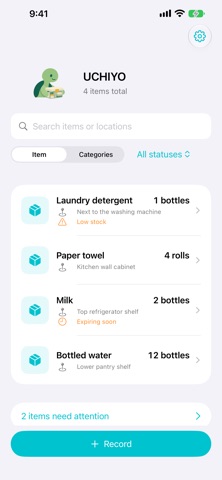


Description by Lijun Xie Written by the developer, not by AppBrain. Click to read.
UCHIYO is a lightweight home inventory app that keeps your items, quantities and storage locations easy to find.
• Browse items first, or switch to a category view
• Filter expired, expiring soon and low-stock items
• Record quantities, units, locations, photos, notes, expiry dates and low-stock thresholds
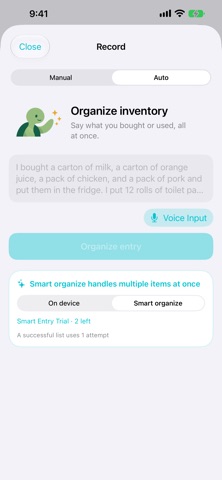
• Choose Manual or Auto entry; switch between On device and Smart organize on the Auto screen
• Use on-device speech transcription and photo-based name suggestions
• Review changes before applying them, and undo quick quantity adjustments
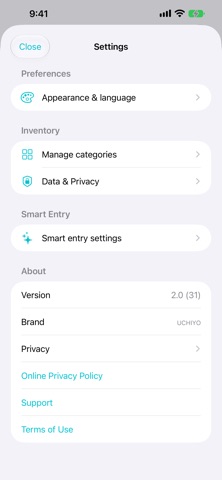
• Choose from six theme colors and Simplified Chinese, English or Japanese
• Optionally sync through your private iCloud database and export inventory with photos as JSON
Core inventory management, manual entry, on-device entry and local image recognition are free and unlimited. On-device entry handles one item at a time using supported phrases. Voice input is available only when the device supports offline recognition.
Optional cloud Smart organize includes 5 free attempts. It turns more complex text into an editable confirmation list of up to 10 items. One attempt is used when a usable list is generated; errors and clarification requests do not use an attempt. After the free attempts are used, manual and on-device entry remain free and unlimited. This version contains no in-app purchases, subscriptions or ads.
Inventory is stored locally by default. iCloud sync is opt-in. Cloud Smart Entry requires explicit consent and sends submitted text, selected language and necessary request information only when you choose to organize an entry. Original audio, photos and existing inventory are not uploaded through AI. You can withdraw AI consent, export your data or delete your inventory at any time.