

Universal TV Remote live
Universal TV Remote live is made and published by Gowalk - Fzco. AppBrain is an independent app data site and isn't affiliated with Gowalk - Fzco. The app name, icon, screenshots and description belong to Gowalk - Fzco and are shown as published on the App Store.
AppBrain's verdict
Loved by users- Rating on App Store
- 4.69
- 108 ratings
- Last updated
- September 14, 2026
Users love it: 4.7 stars from 108 ratings.
Rankings
App Store top chartsApp Store Rankings for Universal TV Remote live
Competitors
Similar apps and more from Gowalk - FzcoMore from Gowalk - Fzco


Also available on Google Play

Releases
Updates seen on the App Store- Version
- 2.0.0
- Launched
- July 2024
No changelog data
User feedback
Ratings and reviews on the App StoreComments on Universal TV Remote live for iOS
We don't have enough comments to show example comments. Please check back later.
Technology
Found in the app by AppBrain- Price
- Free
- App size
- 58.5 MB
- Content rating
- Everyone
Technologies used by Universal TV Remote live
About the app and developer
About Universal TV Remote live
Universal TV Remote live is an utilities app developed by Gowalk - Fzco.
User Ratings
Universal TV Remote live is rated 4.69 out of 5 stars. The rating is based on 110 ratings.
App Information
Universal TV Remote live is freely available from the App Store. The app size is 58.51 MB. The latest version available is 2.0.0. The last update was on September 14, 2026.
Technical Requirements
The app has a content rating of Everyone. The app has been available on the App Store since July 2024.
Developer information for Gowalk - Fzco
Address:
Frequently asked questions about Universal TV Remote live
Is Universal TV Remote live free?
Yes. Universal TV Remote live is free on the App Store.
Is Universal TV Remote live still available?
Yes. Universal TV Remote live is on the App Store, and the last update we saw was on September 14, 2026.
How large is Universal TV Remote live?
Universal TV Remote live is 58.51 MB.
Is Universal TV Remote live suitable for children?
App Store rates the content of Universal TV Remote live as suitable for everyone.
How do people rate Universal TV Remote live?
Universal TV Remote live scores 4.69 out of 5 stars, from 108 ratings on the App Store.
Who made Universal TV Remote live?
Universal TV Remote live was developed by Gowalk - Fzco. It is listed in the utilities category on the App Store.
Store listing
By Gowalk - Fzco, from the App Store

Description by Gowalk - Fzco Written by the developer, not by AppBrain. Click to read.
A subscription is required to connect a TV and use every remote, shortcut, AI and screen-sharing feature. You can complete onboarding, close the offer and browse the app before subscribing. Purchase and Restore remain available in the app.
CONTROLS THAT FIT YOUR TV
Use the controls supported by your connected TV: navigation, playback, volume, mute, power, channel numbers and inputs. Scan your local network or enter a TV address manually. Pair when your TV requires it and save devices with room names.
LESS TYPING ON YOUR TV
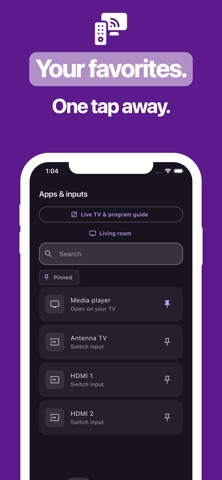
Swipe through menus or enter text with your phone's keyboard on supported TVs. Browse reported apps and inputs and pin the ones you use most.
YOUR EVERYDAY SHORTCUTS
Create and edit ordered remote actions. Preview a sequence before running it, keep it bound to the selected TV and stop it at any time. AI can help draft a supported sequence from your request; you review the steps before anything is sent.
LIVE TV AND SCREEN SHARING
Browse antenna channels where your TV reports them. Program listings depend on guide availability. Share your phone screen with a compatible WebRTC browser receiver after opening the displayed receiver address and entering its code. System capture permission is always required, and Stop stays available.
COMPATIBILITY AND SETUP
Your phone and network TV generally need the same local network. The exact model, operating system, TV settings and negotiated capabilities determine which controls are available. A brand name does not mean every model supports every feature. Screen sharing needs its own compatible receiver; remote-control support alone does not provide mirroring, and a TV brand does not imply a built-in browser receiver. Protected video may be blank or unavailable. See Connection help in Settings for platform-specific setup.
PRIVACY AND PURCHASES
Screen sharing starts only after your explicit permission. AI requests are sent to the app's service; review suggested actions before execution. Subscription prices and any eligible introductory offer are displayed by your store before purchase. Manage renewal in your store account and use Restore to recover an eligible existing subscription.
This is an independent app and is not affiliated with Roku, Inc. or any TV manufacturer.
Terms of Use: https://www.apple.com/legal/internet-services/itunes/dev/stdeula/
Privacy Policy: https://rokutv-wn2k.pages.dev/p/rokutv/privacy