

UniWin
UniWin is made and published by InfoTech Logistics B.V. AppBrain is an independent app data site and isn't affiliated with InfoTech Logistics B.V. The app name, icon, screenshots and description belong to InfoTech Logistics B.V. and are shown as published on the App Store.
AppBrain's verdict
- Last updated
- August 2, 2022
- Size
- 14.7 MB
User feedback
Ratings and reviews on the App StoreComments on UniWin for iOS
We don't have enough comments to show example comments. Please check back later.
Store listing
By InfoTech Logistics B.V., from the App Store

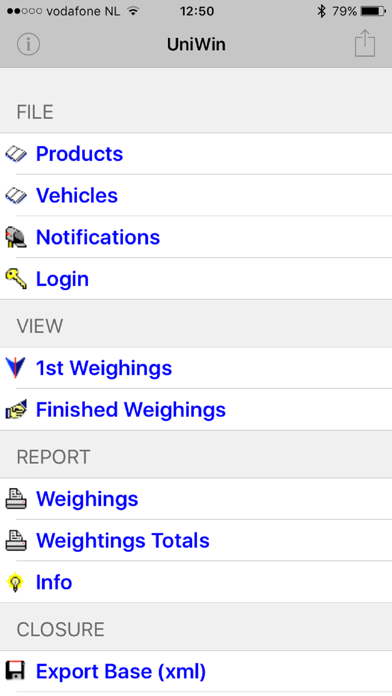


Description by InfoTech Logistics B.V. Written by the developer, not by AppBrain. Click to read.
UniWin is free of charge and functional for users owning a UniWin solution.
If you do not own a UniWin solution, the UniWin app will automatically connect to a demo UniWin Solution.
UniWin® for IOS is a remote application with UniWin functionality on your iPhone, iPad or iPod Touch. The App allows you to view, verify, report and monitor your UniWin solution via WiFi or Mobile Data Connection.
Usage:
• View and verify all base data, such as customers, products, orders, transporters, etc.
• View and verify all transactional data, such as weighings, vehicles on-site, (un-) loaded vehicles, etc.
• View status of all used devices, such as scales / weighbridges, readers (barcode / cards / RFID / OCR), barriers, traffic-lights, printers, camera's, etc.
• View status of all connected clients.
• View logging. The logging of UniWin shows all activities, errors, issues.
• Generate and view reports.
• Further functionality depends on the configuration of your UniWin solution.
Features:
• Search / filter functionality of base and transactional data.
• Multi-lingual.
• Quick login using a pincode / touch-id / face-id.
• Ability to change status of devices, such as zeroing scales / weighbridges, open / close barriers, green / red traffic-lights.
Easy-Setup:
• A manual is available at our website.
• Scan QR-code in your UniWin solution to gather all connection settings.
• Or in the Connection Settings, you can enter the IP-address or Hostname of the UniWin Server in the parameter UniWin Host.
• Enter the port / socket number of the UniWin solution (normally defaulted to 5000).
• Enter the optional password needed for the connection.
• All other settings (linke language, font-sizes, etc) can be adjusted to your preference.
Requirements:
• WiFi or mobile data connection.
• UniWin Server or Network license version 3.0/1.0.1.4 or higher, but we advise to use 3.0/1.0.1.9 or higher for best performance and security.
Contact us when you have any queries / remarks, or when you require more information regarding solutions to weigh / scale vehicles, manage access control on plant-sites or any other logistical needs.
Safety and technology
Found in the app by AppBrain- Price
- Free
- App size
- 14.7 MB
- Content rating
- Everyone
Technologies used by UniWin
Releases
Updates seen on the App Store- Version
- 3.1026.4
- Launched
- September 2012
No changelog data
Alternatives
Similar apps and more from InfoTech Logistics B.V.Alternatives to UniWin





More from InfoTech Logistics B.V.

Rankings
App Store top chartsApp Store Rankings for UniWin
About the app and developer
About UniWin
UniWin is a productivity app developed by InfoTech Logistics B.V.
User Ratings
The app has no ratings yet.
App Information
UniWin is freely available from the App Store. The app size is 14.75 MB. The latest version available is 3.1026.4. The last update was on August 2, 2022.
Technical Requirements
The app has a content rating of Everyone. The app has been available on the App Store since September 2012.
Developer information for InfoTech Logistics B.V.
Address: