Useful Video Mosaic PRO is made and published by
katapu.net.
AppBrain is an independent app data site and isn't affiliated with katapu.net.
The app name, icon, screenshots and description belong to katapu.net and are shown as
published on the App Store.
About Useful Video Mosaic PRO
Useful Video Mosaic PRO is a photo & video app developed by katapu.net.
What is the rating of Useful Video Mosaic PRO?
Useful Video Mosaic PRO has no ratings yet.
Is Useful Video Mosaic PRO free?
Useful Video Mosaic PRO costs $2.99. The app size is 108.32 MB. The latest version available is 1.2.0. The last update was on October 5, 2026.
What are the requirements for Useful Video Mosaic PRO?
The app has a content rating of Everyone. The app has been available on the App Store since October 2024.
Description by katapu.net(from the App Store)
A great app for detecting faces in videos and applying mosaic blur with a single tap is here!
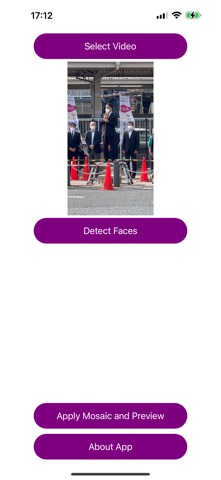
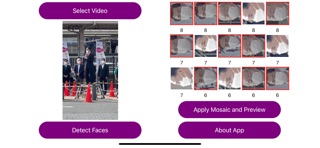
When you upload videos to social media, do the faces of people in the footage ever get in the way? This app detects people's faces in a video, applies mosaic blur with one tap, lets you preview the result, and then saves it to help protect privacy. After loading a video, tap “Mosaic and Preview” to detect every person's face in the video, apply mosaic blur, and create a preview video. If the preview looks good, save it. After loading a video, tap “Detect Faces” to detect and identify face images in the video. By default, mosaic is turned on for every face. The identified faces appear as tiles at the bottom of the screen. Tap each face tile to choose individually whether that face should be mosaicked. (Faces with mosaic on appear with a red border and a darkened face image. Faces with mosaic off appear with a white border and the face image displayed normally.) After choosing mosaic on or off for all faces, tap “Mosaic and Preview” to create a preview video using those on/off settings. If the preview looks good, save it. If you want to upload a video to social media but people you do not want to show are visible, this app is worth trying.
The basic flow is simple: process with one tap, create a preview, and save it. If there are specific people you do not want to mosaic, tap “Detect Faces”, choose mosaic on or off for each identified face, then create the preview and save it. Please be careful not to upload the original video by mistake instead of the saved mosaic video.
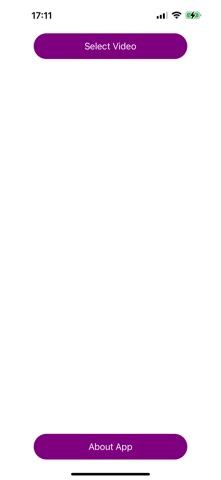
How to use 1-1. Tap “Select Video” and choose a video. 2-1. Tap “Mosaic and Preview” to apply mosaic blur and create a preview. 3-1. If the preview looks good, tap “Save Video” to save it.
1-2. Tap “Select Video” and choose a video. 2-2. Tap “Detect Faces” to detect face images in the video. 3-2. Tap the identified face tiles to set mosaic on or off. 4-2. Tap “Mosaic and Preview” to apply mosaic blur using your selected on/off settings and create a preview. 5-2. If the preview looks good, tap “Save Video” to save it. If not, cancel, adjust the mosaic on/off settings again, and repeat step 4-2.
Each subscription will automatically renew 3 days before the expiration date for
the same time period. Subscriptions can be cancelled at any time before the renewal.