

Valence 3D
Valence 3D is made and published by Hi-Rez, LLC. AppBrain is an independent app data site and isn't affiliated with Hi-Rez, LLC. The app name, icon, screenshots and description belong to Hi-Rez, LLC and are shown as published on the App Store.
AppBrain's verdict
Well rated- Rating on App Store
- 4.20
- 121 ratings
- Last updated
- October 4, 2026
- Size
- 196.1 MB
Users rate it well: 4.2 stars from 121 ratings.
User feedback
Ratings and reviews on the App StoreComments on Valence 3D for iOS
We don't have enough comments to show example comments. Please check back later.
Store listing
By Hi-Rez, LLC, from the App Store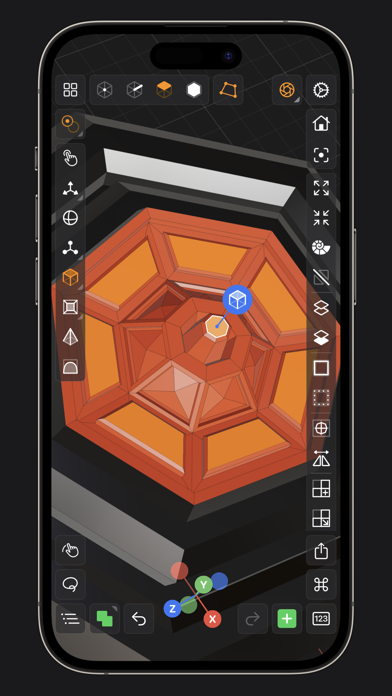




Description by Hi-Rez, LLC Written by the developer, not by AppBrain. Click to read.
CREATE, IMPORT, EDIT & EXPORT 3D MODELS
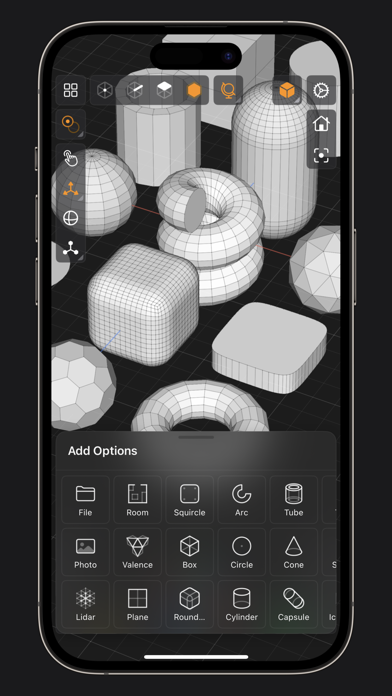
• 25 primitive shapes are built-in & ready to help you start modeling: plane, box, sphere, squircle, rounded box, arc, circle, cylinder, tube, cone, capsule, torus, icosphere, pipe, revolve, helix, voronoi, text, super shape, noise surfaces, torus knot, faceted gem & tube.
• Import existing models, reference images, lidar scans and room plans
• Imports: OBJ, STL, USD, USDZ
• Exports: PNG, SVG, OBJ, STL, USD, USDZ, GLTF, GLB
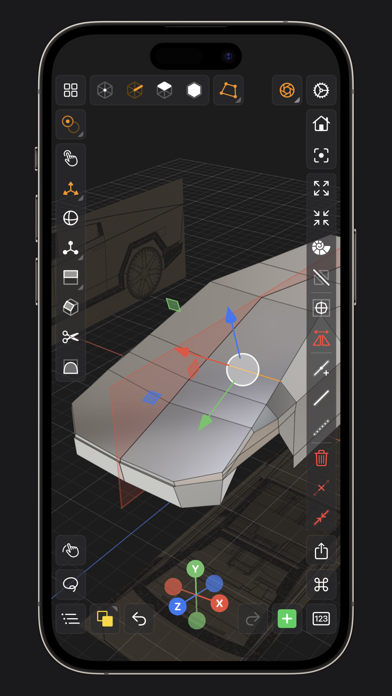
• Knife tool to create complex and detailed geometry
• Move, Rotate, & Scale gizmos make it easy to transform nodes, faces, edges & vertices
• Powerful modeling gizmos for extruding, insetting, beveling, poking, creasing & cutting
• Multiple selection & automatic loop selection help accelerate your modeling
• Tap on one of the gizmo handles to bring up an input field for precise transformations & mesh operations
• Robust snapping & alignment commands
• Selection operations: grow, shrink, select shell & deselect
• Mesh operations: duplicate, instance, set / center pivot, trim by plane, boolean, apply transform & subdivide
• Face operations: separate, combine, bridge, extract, poke, collapse, delete, dissolve, harden & soften
• Edge operations: extrude, insert vertex, collapse, dissolve, bridge, harden & soften
• Vertex operations: insert edge, dissolve, delete & merge
• Non-destructive & configurable mesh modifiers: mirror & subdivision
• Apply complex transformations using different gizmo pivot points & orientations
EASILY NAVIGATE & STAY IN FLOW WHILE DESIGNING
• Carefully crafted & fully optimized for iPhone & iPad
• Designed to minimize cognitive overload by only showing tools & commands that are contextually relevant
• Easily navigate to any part of your model by dragging and pinching: two finger pinch to zoom and roll, and one finger drag to rotate
• Pop into the standard orthographic views by tapping one of the handles of the orientation gizmo
• Use two & three finger tap gestures to undo & redo
• Select components by dragging or using the rectangular selection mode
• Your work is saved automatically every two minutes and every time you go back to the gallery
• Get an overview of your scene’s structure from the Outliner
• Long press on a node in the Outliner to easily rename, duplicate, instance, delete, parent & reorder any object in your scene
• Precisely adjust any node’s position, rotation & scale with the Inspector
• Adjust material properties, display & modifier options with the Inspector
STAY ORGANIZED ACROSS ALL YOUR DEVICES
• Preview, share, duplicate, delete & rename your models from the gallery
• iCloud syncing keeps all your models up to date, private & accessible across all your devices
PREVIEW, MEASURE, & RENDER YOUR CREATIONS
• 6 powerful rendering modes: Matcap, Modeling, Wireframe, Physically Based, X-Ray & Path Traced
• Export renders in any aspect ratio & scale
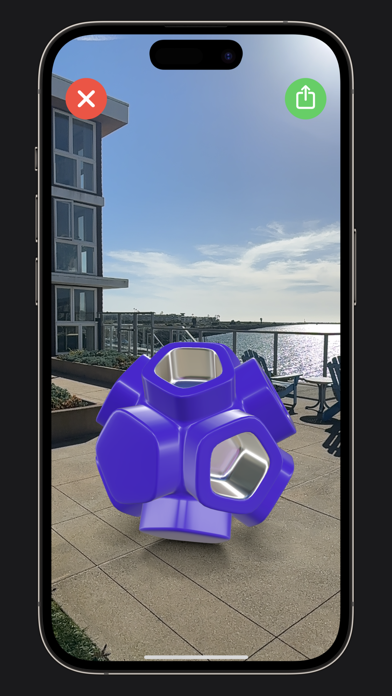
• Preview your model in AR in two taps
• Export your scene as a USDZ & be confident it’ll look consistent on all Apple devices
• Tweak your model’s material & see changes in real-time
• Tweak-able scene settings: camera field of view, background type, blurriness, intensity & rotation
• Get model measurements in one click
• Add persistent dimensions between any two surfaces in your scene
PURCHASE & COMPATIBILITY
• One time purchase unlocks both iPhone & iPad versions
• Apple Pencil supported on select iPads
• 120 FPS supported on devices with ProMotion displays
• Path Tracing is supported on iPads with M series chips & iPhones with A15 Bionic & later
• Lidar Scan & Room Plan is supported on devices with a lidar sensor
Safety and technology
Found in the app by AppBrain- Price
- $19.99
- App size
- 196.1 MB
- Content rating
- Everyone
Technologies used by Valence 3D
Releases
Updates seen on the App Store- Version
- 1.4.7
- Launched
- March 2024
No changelog data
Alternatives
Similar apps and more from Hi-Rez, LLCAlternatives to Valence 3D





Rankings
App Store top chartsApp Store Rankings for Valence 3D
About the app and developer
About Valence 3D
Valence 3D is a graphics & design app developed by Hi-Rez, LLC.
User Ratings
Valence 3D is rated 4.20 out of 5 stars. The rating is based on 120 ratings.
App Information
Valence 3D costs $19.99. The app size is 196.08 MB. The latest version available is 1.4.7. The last update was on October 4, 2026.
Technical Requirements
The app has a content rating of Everyone. The app has been available on the App Store since March 2024.
Developer information for Hi-Rez, LLC
Address:
Frequently asked questions about Valence 3D
Is Valence 3D free?
No. Valence 3D costs $19.99 on the App Store.
Is Valence 3D still available?
Yes. Valence 3D is on the App Store, and the last update we saw was on October 4, 2026.
How large is Valence 3D?
Valence 3D is 196.08 MB.
Is Valence 3D suitable for children?
App Store rates the content of Valence 3D as suitable for everyone.
How do people rate Valence 3D?
Valence 3D scores 4.20 out of 5 stars, from 121 ratings on the App Store.
Who made Valence 3D?
Valence 3D was developed by Hi-Rez, LLC. It is listed in the graphics & design category on the App Store.
What are the best alternatives to Valence 3D?
People looking at Valence 3D also look at these graphics & design apps: ArmorPaint, CozyBlanket, Uniform - 3D Editor, Axiom Solver, Octane X.