

VertexTimer
VertexTimer is made and published by Hiroki Sakaguchi. AppBrain is an independent app data site and isn't affiliated with Hiroki Sakaguchi. The app name, icon, screenshots and description belong to Hiroki Sakaguchi and are shown as published on the App Store.
AppBrain's verdict
- Last updated
- April 28, 2026
Rankings
App Store top chartsApp Store Rankings for VertexTimer
Competitors
Similar apps and more from Hiroki SakaguchiAlternatives to VertexTimer


More from Hiroki Sakaguchi


Releases
Updates seen on the App Store- Version
- 1.0.1
- Launched
- February 2026
No changelog data
User feedback
Ratings and reviews on the App StoreComments on VertexTimer for iOS
We don't have enough comments to show example comments. Please check back later.
Technology
Found in the app by AppBrain- Price
- Free
- App size
- 4.05 MB
- Content rating
- Everyone
Technologies used by VertexTimer
About the app and developer
About VertexTimer
VertexTimer is a productivity app developed by Hiroki Sakaguchi.
User Ratings
The app has no ratings yet.
App Information
VertexTimer is freely available from the App Store. The app size is 4.05 MB. The latest version available is 1.0.1. The last update was on April 28, 2026.
Technical Requirements
The app has a content rating of Everyone. The app has been available on the App Store since February 2026.
Developer information for Hiroki Sakaguchi
Address:
Frequently asked questions about VertexTimer
Is VertexTimer free?
Yes. VertexTimer is free on the App Store.
Is VertexTimer still available?
Yes. VertexTimer is on the App Store, and the last update we saw was on April 28, 2026.
How large is VertexTimer?
VertexTimer is 4.05 MB.
Is VertexTimer suitable for children?
App Store rates the content of VertexTimer as suitable for everyone.
Who made VertexTimer?
VertexTimer was developed by Hiroki Sakaguchi. It is listed in the productivity category on the App Store.
What are the best alternatives to VertexTimer?
People looking at VertexTimer also look at these productivity apps: Notepad with Browser - Sprout, Flow Timers, Sticky Notes Widget: FloatMemo, Checklist Maker-Grocery & Work, in – Notes, Journal & To-Dos.
Store listing
By Hiroki Sakaguchi, from the App Store


Description by Hiroki Sakaguchi Written by the developer, not by AppBrain. Click to read.
In meetings, presentations, lectures, or at the library—you can manage time accurately while staying considerate of everyone around you.
■ A silent timer you can trust
Timeboxing in meetings, keeping track during presentations, pacing lectures, focused study in a library.
Even in places where you can’t use sound, VertexTimer notifies you with vibration.
It can notify you in the background and even while your phone is locked.
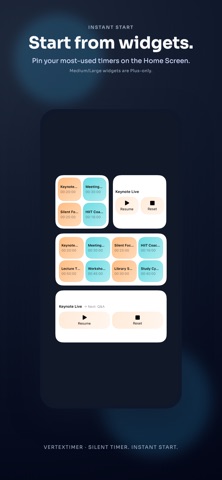
■ Start instantly from your Home Screen
Just tap a widget to start a timer without even opening the app.
“30 minutes” before a meeting, “Pomodoro 25 minutes” when you begin studying, “HIIT 45 seconds” for workouts—
your timers are right on the Home Screen, so you can act before you even have to think.
Supports three widget sizes: Small, Medium, and Large.
Choose the layout that fits your style (Medium/Large are available with the Plus plan).
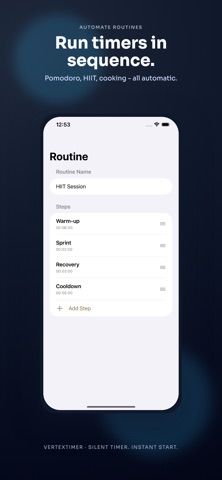
■ Automate complex schedules with Routines
With Routines, you can run multiple timers in sequence—perfect for workflows that have several steps.
[Pomodoro Technique]
Automatically chain “Focus 25 min → Break 5 min → Focus 25 min → Break 15 min” to stay in the zone.
[HIIT Training]
Run “Workout 45 sec → Rest 15 sec” automatically—great for gym sessions.
[Step-by-step Cooking]
Set timers per step like “Boil pasta 10 min → Make sauce 5 min → Plate 2 min.”
[Bedtime Routine]
Quietly manage “Reading 15 min → Stretching 10 min → Meditation 5 min”
so you can unwind at your pace without waking anyone up.
■ Three timer modes
[Tap (One-Tap) Mode]
Start a preset timer with one tap—the simplest, easiest mode.
[Key (Keypad) Mode]
Set time fast with number keys. Type “25” and tap the “min” button to start a 25-minute timer.
[Tilt Mode]
Start a timer just by tilting your iPhone right, left, forward, or backward.
Assign frequently used durations (5, 10, 25, 60 minutes, etc.) to each direction.
■ Preset & Routine management
[Save Timers]
Save frequently used timers and organize them by purpose
[Routines]
Run multiple timers in sequence.
Set a name and duration for each step, then run them in order.
■ Check progress even on the Lock Screen
Supports Dynamic Island and Live Activity.
■ Example use cases
[Meetings & Presentations]
For meetings with strict timeboxes or presentations with time limits.
Start instantly from a widget, keep an eye on remaining time via Dynamic Island.
Silent notifications help you manage time confidently without disturbing others.
[Library & Study Rooms]
Track study time without bothering anyone.
Vibration-only alerts keep you focused, and Pomodoro routines boost efficiency.
Run “25 min focus → 5 min break” automatically.
[Bedroom & Bedtime Routines]
Manage bedtime habits without waking your family.
Automate reading, stretching, meditation, and more with routines.
Stay on your own pace in a quiet environment.
[Gym & Workouts]
Great for HIIT or circuit training.
A routine like “45 sec workout → 15 sec rest” is incredibly handy.
Start instantly from a widget without breaking your flow.
[Parenting & Childcare]
For bedtime routines, feeding intervals, nap tracking, and more.
Measure time without sound—no need to worry about waking your baby.
■ Pricing
[Free Plan]
• 1 Tilt preset
• 1 Routine
• Unlimited single timers
• Small widget only
• All timer modes available
[Plus Plan]
• Unlimited presets
• Unlimited routines
• All widget sizes (Small / Medium / Large)
■ Recommended for
• Anyone who wants to manage meeting/presentation timeboxes
• Anyone using the Pomodoro technique to improve focus
• People who want a quiet bedtime routine timer in the bedroom
• Anyone who needs workout intervals at the gym
• Parents who want to manage time without waking their baby
■ Support
For questions or requests, feel free to contact us at:
https://kohakuwebdesign.net/apps/vertextimer#support
Terms of Use: https://www.apple.com/legal/internet-services/itunes/dev/stdeula/