Video Compressor MP4, MOV is a photo & video app developed by Anton Mikhailenko.
What is the rating of Video Compressor MP4, MOV?
Video Compressor MP4, MOV has no ratings yet.
Is Video Compressor MP4, MOV free?
Video Compressor MP4, MOV is free. The app size is 8.48 MB. The latest version available is 1.0.2. The last update was on November 5, 2026.
What are the requirements for Video Compressor MP4, MOV?
The app has a content rating of Everyone. The app has been available on the App Store since October 2026.
Video Compressor MP4, MOV is made and published by
Anton Mikhailenko.
AppBrain is an independent app data site and isn't affiliated with Anton Mikhailenko.
The app name, icon, screenshots and description belong to Anton Mikhailenko and are shown as published on the App Store.
Description by Anton Mikhailenko(from the App Store)
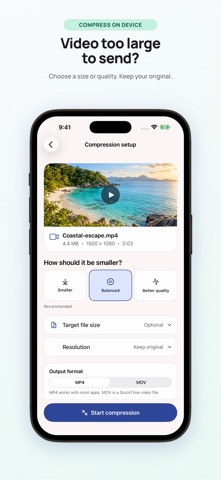
A video too large to send can still be worth keeping. Video Compressor creates a separate MP4 or MOV copy on your iPhone or iPad, leaving the original untouched. Import from Photos or Files, compress video, then compare the result before you save or share it.
Choose a quality preset, change the output resolution or enter a target file size in MB or GB. This video size reducer shows an estimate before you start. The target file size is a guide, not an exact promise; motion, sound and duration all affect the result.
Use the MP4 compressor to re-encode compatible clips as H.264, or choose MOV for the output. You can keep the audio or mute it. To reduce video size further, try a lower resolution or quality setting. The app never enlarges a video's resolution.
A smaller video file is easier to share. Play it back, check its actual size and save it to Photos or Files. Local history lets you reopen completed results. The MP4 compressor also reports when a clip is already well optimized, so you can decide whether the new copy is worth keeping.
The free version lets you compress video one at a time, with all compression settings available; ads may appear. Lifetime Pro is a one-time purchase that removes ads and unlocks batch compression for up to 10 videos, processed in order. Completed results stay available if a later item fails.
Video Compressor uses local compression: your videos are not uploaded to our servers. Ads, purchases and optional usage analytics may use the internet. You can turn analytics off in Settings; it never includes videos or filenames.
Keep the app open while processing. An interrupted job may need to restart. A video size reducer cannot make every clip smaller: an already optimized video may grow. Check the final size when you reduce video size, then keep the copy that suits you.
Each subscription will automatically renew 3 days before the expiration date for
the same time period. Subscriptions can be cancelled at any time before the renewal.