

Video Compressor Studio
Video Compressor Studio is made and published by Ramkumar Velmurugan. AppBrain is an independent app data site and isn't affiliated with Ramkumar Velmurugan. The app name, icon, screenshots and description belong to Ramkumar Velmurugan and are shown as published on the App Store.
AppBrain's verdict
- Last updated
- March 10, 2026
- Size
- 4.75 MB
User feedback
Ratings and reviews on the App StoreComments on Video Compressor Studio for iOS
We don't have enough comments to show example comments. Please check back later.
Store listing
By Ramkumar Velmurugan, from the App Store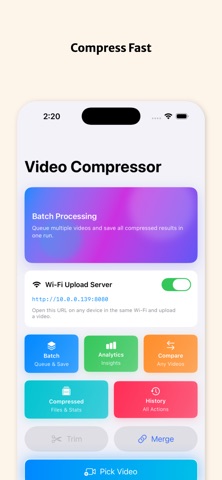




Description by Ramkumar Velmurugan Written by the developer, not by AppBrain. Click to read.
Reduce video size, free up storage, and share high-quality videos faster on social media and messaging apps.
Whether you are a creator, student, or everyday iPhone user, Video Compressor Studio gives you powerful tools in a clean, simple workflow.
Key Features
• Fast Video Compression
Compress large videos into smaller files while keeping clear quality.
• Quality & Bitrate Controls
Choose Low, Medium, or High quality and fine-tune bitrate for better size vs quality balance.
• Platform Presets
One-tap presets for Instagram, TikTok, YouTube, WhatsApp, and Twitter/X to match common upload requirements.
• Batch Processing
Compress multiple videos in one queue and track progress for each file.
• Trim Before Export
Cut unwanted parts before compression to save even more space.
• Merge Videos
Combine clips into one video before exporting.
• Before/After Comparison
Compare original and compressed videos with detailed file-size and quality metrics.
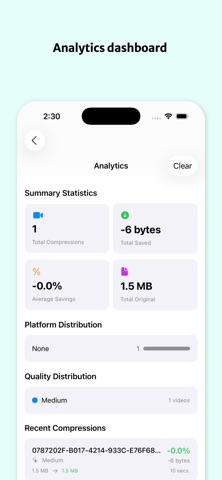
• Analytics & History
Track compression history, storage saved, and performance over time.
• Wi‑Fi Upload + QR Access
Upload videos from another device on the same network by scanning a QR code.
• Save & Share Anywhere
Save back to Photos or share instantly using the iOS share sheet.
Why Video Compressor Studio
Reduce video file size in seconds
Free up iPhone storage
Upload faster on slower networks
Keep control over quality
Built for creators and everyday users
Download Video Compressor Studio and make every video lighter, faster, and easier to share.
Safety and technology
Found in the app by AppBrain- Price
- Free
- App size
- 4.75 MB
- Content rating
- Everyone
Technologies used by Video Compressor Studio
Releases
Updates seen on the App Store- Version
- 4.0
- Launched
- March 2026
No changelog data
Alternatives
Similar apps and more from Ramkumar VelmuruganAlternatives to Video Compressor Studio


More from Ramkumar Velmurugan


Rankings
App Store top chartsApp Store Rankings for Video Compressor Studio
About the app and developer
About Video Compressor Studio
Video Compressor Studio is a productivity app developed by Ramkumar Velmurugan.
User Ratings
The app has no ratings yet.
App Information
Video Compressor Studio is freely available from the App Store. The app size is 4.75 MB. The latest version available is 4.0. The last update was on March 10, 2026.
Technical Requirements
The app has a content rating of Everyone. The app has been available on the App Store since March 2026.
Developer information for Ramkumar Velmurugan
Address:
Frequently asked questions about Video Compressor Studio
Is Video Compressor Studio free?
Yes. Video Compressor Studio is free on the App Store.
Is Video Compressor Studio still available?
Yes. Video Compressor Studio is on the App Store, and the last update we saw was on March 10, 2026.
How large is Video Compressor Studio?
Video Compressor Studio is 4.75 MB.
Is Video Compressor Studio suitable for children?
App Store rates the content of Video Compressor Studio as suitable for everyone.
Who made Video Compressor Studio?
Video Compressor Studio was developed by Ramkumar Velmurugan. It is listed in the productivity category on the App Store.
What are the best alternatives to Video Compressor Studio?
People looking at Video Compressor Studio also look at these productivity apps: Save Button for Safari, Smart Notes & Folders: Fog, Image Converter: Batch Resize, sort & find documents: DocSort, LockScreenNotes.