



AppBrain's verdict
- Rating on App Store
- 5.00
- 1 ratings
- Last updated
- November 12, 2026
- Size
- 19.1 MB
It doesn't have enough ratings yet to judge what users think.
User feedback
Ratings and reviews on the App StoreComments on ViewSide Link for iOS
We don't have enough comments to show example comments. Please check back later.
Store listing
By Hyun Sik Choi, from the App StoreDescription by Hyun Sik Choi Written by the developer, not by AppBrain. Click to read.
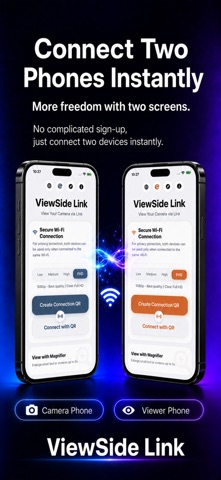
No registration or login is required. Simply connect using a QR code. Video and files are transferred directly between the two devices.
Try connecting and using ViewSide Link with any combination of iPhone and Android devices.
https://morerak.kr/link
-----------------
Notice
-----------------
Starting with version 1.2.1, the roles for video connection QR codes have changed. The phone that generates the QR code now becomes the Viewer, while the phone that scans the QR code becomes the Camera.
If you are using an older version, please update both devices to the latest version to ensure a smooth connection.
-----------------
Video Streaming
-----------------
On the phone you want to use to watch the video, tap "Generate Connection QR · Viewer".
On the phone you want to use as the camera, tap "Connect via QR · Camera" and scan the code to start capturing video immediately. You can then watch the live video on the phone that generated the QR code.
-----------------
File Transfer
-----------------
Photos and videos captured through the app are saved on the phone used as the camera.
To transfer saved photos or videos, open "File Transfer" on the home screen, select the files you want to send, and tap "Generate QR to Send".
On the receiving phone, tap "Scan QR · Receive" to scan the code, then tap "Receive" to start the transfer.
-----------------
Magnifier
-----------------
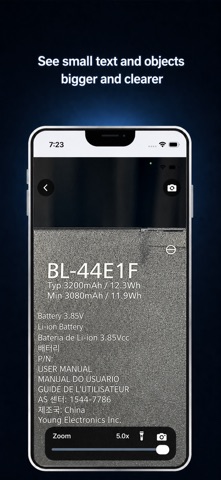
Open the Magnifier from the home screen to enlarge small text or fine details.
You can also freeze the screen, recognize text, and copy it.
-----------------
Settings
-----------------
Choose whether to use Wi-Fi only or allow mobile data connections.
Set the photo capture timer, the number of consecutive shots, and the interval between shots.
For video recording, you can set the delay before recording starts and the recording duration.
Select your preferred default video quality when launching the app, and customize or disable the watermark.
Safety and technology
Found in the app by AppBrain- Price
- Free
- App size
- 19.1 MB
- Content rating
- Everyone
Technologies used by ViewSide Link
Releases
Updates seen on the App Store- Version
- 1.2.1
- Launched
- July 2026
No changelog data
Alternatives
Similar apps and more from Hyun Sik ChoiAlternatives to ViewSide Link


Also available on Google Play

Rankings
App Store top chartsApp Store Rankings for ViewSide Link
About the app and developer
About ViewSide Link
ViewSide Link is an utilities app developed by Hyun Sik Choi.
User Ratings
ViewSide Link is rated 5.00 out of 5 stars. The rating is based on one rating ratings.
App Information
ViewSide Link is freely available from the App Store. The app size is 19.06 MB. The latest version available is 1.2.1. The last update was on November 12, 2026.
Technical Requirements
The app has a content rating of Everyone. The app has been available on the App Store since July 2026.
ViewSide Link is made and published by Hyun Sik Choi. AppBrain is an independent app data site and isn't affiliated with Hyun Sik Choi. The app name, icon, screenshots and description belong to Hyun Sik Choi and are shown as published on the App Store.
Developer information for Hyun Sik Choi
Address: