

VLC Remote
VLC Remote is made and published by Hobbyist Software Limited. AppBrain is an independent app data site and isn't affiliated with Hobbyist Software Limited. The app name, icon, screenshots and description belong to Hobbyist Software Limited and are shown as published on the App Store.
AppBrain's verdict
EstablishedLoved by users- Rating on App Store
- 4.73
- 599 ratings
- Last updated
- September 3, 2021
- Size
- 39.9 MB
Users love it: 4.7 stars from 599 ratings.
User feedback
Ratings and reviews on the App StoreComments on VLC Remote for iOS
We don't have enough comments to show example comments. Please check back later.
Store listing
By Hobbyist Software Limited, from the App Store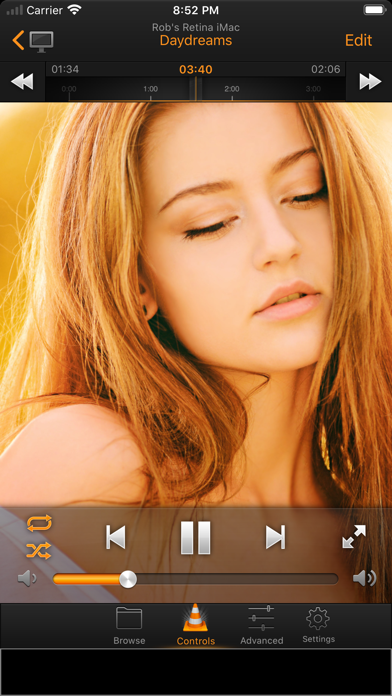


Description by Hobbyist Software Limited Written by the developer, not by AppBrain. Click to read.
Awarded Gizmodo's “Essential iPhone App” three years running. Awarded T3's “Best iPhone Apps”.
The free version is identical to the paid version except for two things:
1) The free version shows adverts.
2) The free version won't let you browse to open files from the remote. You'll have to get up of your sofa and do that manually until you upgrade!
“The new VLC Remote app is simply stunning! It works a treat and it feels professional and powerful. Love it.”
- Adam, London
“The update for the iPhone version is *amazing* - it looks so polished - not that I had any complaints before.”
- Rich
• Features •
— Easily control VLC from your sofa!
— Today widget for even faster access to your controls
— Works with VLC on your Mac, PC or Linux machine
— Automatically scans your local network for VLC players
— Universal app fully supported for iPhone and iPad
— Stop, Play and Pause
— Full DVD controls
— Control volume, position, next track and previous track
— Turn fullscreen on and off
— Use the graphical equaliser
— See your cover art
— Control subtitles, aspect ratio, audio track and delays
— Use the picker control for fine control of volume and position
— View the playlist and play files from it
— Free setup helper quickly configures VLC for use with the remote
VLC is a great, free and popular media player that can handle almost any file format.
VLC Remote® lets you sit back enjoy your movies and music while you control things from your easy chair.
It is a joy to use - no more reaching for the mouse when you want to pause your show, select the next episode, or play some different music.
• Reviews •
“Needless to say, we loved this app for everything it’s got.”
-AppsTouch.com
“Basically, if you use VLC and have an iPhone you will soon find that this is an essential app to enhance your home movie experience.”
- T3.com
“5/5 Simply put if you have an iPhone or iPod touch and use VLC on your computer then you need this app.”
-AppCrunch
“As far as I'm concerned, this is a necessary download! ... Works great, setup was super easy and I use this every day. MUST HAVE!!!”
-US Reviewer
• System Requirements •
- Supports VLC on Windows, Mac and Linux
- Free setup helper quickly configures VLC for use with the remote
- Supports VLC 2.0 and above
- Supports Windows, Vista, Windows 7 and Window 8
- Supports Mac OS 10.7 and above.
• Response to feedback •
-If you do have any problems connecting to VLC, then please just check the help instructions in the app. Feel free to drop me an email (my personal mail is in the app) if you need help.
Enjoy!
• Languages •
VLC Remote is currently translated to 22 languages. If you are willing to translate it to your language, or would like to improve the translations, please head over to http://translate.HobbyistSoftware.com
• Subscription Information •
VLC Remote is supported through an auto-renewing subscription which you can choose to purchase within the app.
• The subscription is called 'VLC Remote Annual Subscription'
• It is an annual subscription. It lets you use all commands including browsing for an unlimited number of devices.
• Payment will be charged to iTunes Account at confirmation of purchase
• Subscription automatically renews unless auto-renew is turned off at least 24-hours before the end of the current period
• Account will be charged for renewal within 24-hours prior to the end of the current period
• Subscriptions may be managed by the user and auto-renewal may be turned off by going to the user's Account Settings after purchase
• Terms of use are available at https://HobbyistSoftware.com/terms
• Privacy policy is available at https://HobbyistSoftware.com/privacy
Safety and technology
Found in the app by AppBrain- Price
- Free
- App size
- 39.9 MB
- Content rating
- Everyone
Technologies used by VLC Remote
Releases
Updates seen on the App Store- Version
- 10.70.3
- Launched
- before 2010
No changelog data
Alternatives
Similar apps and more from Hobbyist Software LimitedAlternatives to VLC Remote




More from Hobbyist Software Limited







Rankings
App Store top chartsApp Store Rankings for VLC Remote
About the app and developer
About VLC Remote
VLC Remote is an entertainment app developed by Hobbyist Software Limited.
What is the rating of VLC Remote?
VLC Remote is rated 4.73 out of 5 stars, based on 600 ratings.
Is VLC Remote free?
VLC Remote is free. The app size is 39.94 MB. The latest version available is 10.70.3. The last update was on September 3, 2021.
What are the requirements for VLC Remote?
The app has a content rating of Everyone. The app has been available on the App Store since before 2010.
Developer information for Hobbyist Software Limited
Address:
Frequently asked questions about VLC Remote
Is VLC Remote free?
Yes. VLC Remote is free on the App Store.
Is VLC Remote still available?
Yes. VLC Remote is on the App Store, and the last update we saw was on September 3, 2021.
How large is VLC Remote?
VLC Remote is 39.94 MB.
Is VLC Remote suitable for children?
App Store rates the content of VLC Remote as suitable for everyone.
How do people rate VLC Remote?
VLC Remote scores 4.73 out of 5 stars, from 599 ratings on the App Store.
Who made VLC Remote?
VLC Remote was developed by Hobbyist Software Limited. It is listed in the entertainment category on the App Store.
What are the best alternatives to VLC Remote?
People looking at VLC Remote also look at these entertainment apps: MX Player - Video Player, Video Player for iPhone All, KMPlayer, Smart Kodi Remote, nPlayer Lite.