

VN: Photo & Video Editor
VN: Photo & Video Editor is made and published by Ubiquiti Labs, LLC. AppBrain is an independent app data site and isn't affiliated with Ubiquiti Labs, LLC. The app name, icon, screenshots and description belong to Ubiquiti Labs, LLC and are shown as published on the App Store.
AppBrain's verdict
EstablishedLoved by usersTop 10- Rating on App Store
- 4.76
- 320,749 ratings
- Last updated
- October 1, 2026
- Size
- 594.5 MB
Users love it: 4.8 stars from 320,749 ratings. Its best ranking is #5 in Top Free, Photo & Video in India.
User feedback
Ratings and reviews on the App StoreComments on VN: Photo & Video Editor for iOS
We don't have enough comments to show example comments. Please check back later.
Store listing
By Ubiquiti Labs, LLC, from the App Store




Description by Ubiquiti Labs, LLC Written by the developer, not by AppBrain. Click to read.
[Smart Tools]
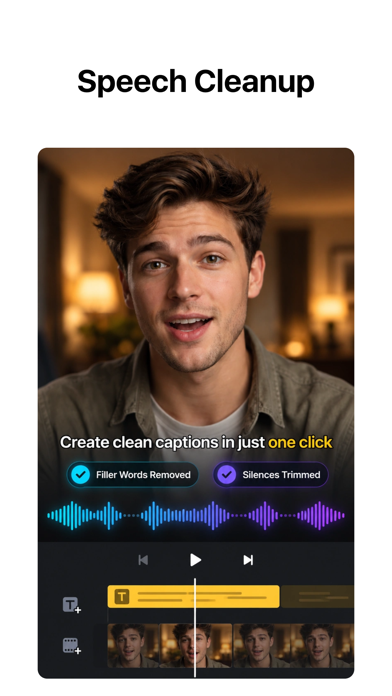
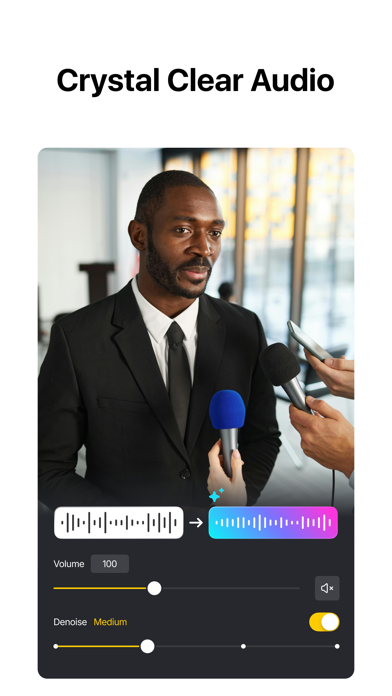
• Auto Captions. Automatically generate subtitles from audio—supports multiple languages, subtitle templates, and animated text styles—and intelligently detect and remove filler words and silent segments for tighter, faster talking-head edits.
• Text-to-Speech. Generate voiceovers for your videos without recording.
• Video/Photo Cutout. Remove backgrounds from videos and photos in one tap.
• Smooth Slow Motion. Frame interpolation for fluid slow-mo—even when slowing down standard frame rate footage.
[Video Editing]
• Trim & Merge. Cut clips with frame-accurate precision (0.05s) and merge them into a seamless timeline—with up to 30x zoom.
• Overlay. Add overlay videos, photos, stickers, and text on a multi-layer timeline.
• Masks. Apply masks to layers for precise, creative compositions.
• Reverse, Zoom & Freeze Frame. Play clips backward, add zoom motion, or freeze key moments.
• Add Text & Stickers. Customize text and stickers with keyframe animation.
• Music & Voice-over. Add music, sound effects, and record voice-overs directly in the app.
• Speed Control. Speed up or slow down clips with presets or advanced curve-based speed ramps.
• Keyframe Editing. Add custom keyframe animations with 19 built-in effects and adjustable curves.
• Beat Editing. Add markers to sync your clips with music beats.
• Non-destructive Editing. Save drafts anytime with full undo/redo support.
[Filters, Effects & Transitions]
• Cinematic Filters & LUTs. Apply built-in filters or import LUTs for a professional look.
• Transitions & Effects. Smooth transitions and diverse visual effects for polished edits.
[Quick Create]
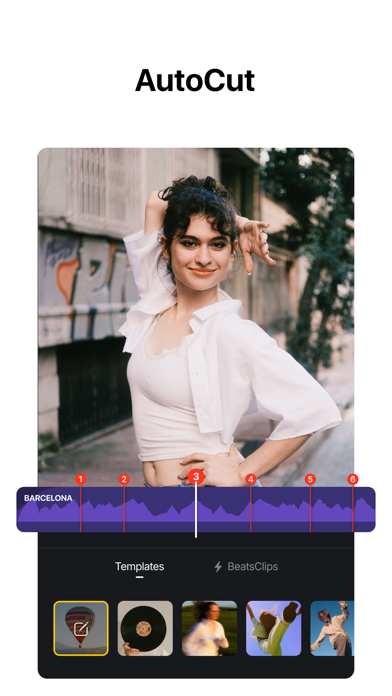
• BeatsClip. Generate beat-synced templates from your video or music—use them in the template or with AutoCut.
• AutoCut. Turn your footage into a finished edit automatically—select a BeatsClip template and sync clips to the beat.
• Story. Organize clips along a storyline first, then generate your video.
• Teleprompter. Read your script while recording talking-head videos—stay on track and never lose your flow.
[Templates]
• Custom Templates. Create your own templates and reuse them across projects to keep a consistent style and edit faster.
• Platform Templates. A rich library for every scenario—talking videos, Instagram Reels, Instagram Stories, Posts, YouTube videos, TikTok covers, YouTube thumbnails, festivals, business, and more.
[Photo Editing]
• Add text and stickers to photos, make fun story.
• Add filters and adjust brightness, contrast, etc.
[Photo Collage]
• Photo Collage Maker. Stitch multiple photos with rich layouts—cutout support for easy, personalized collages.
• Customize Collages. Add backgrounds, filters, Overlay, text, and stickers to create polished collages.
[Import & Assets]
• Easy Import. Add media via AirDrop, Wi-Fi, WhatsApp, Telegram, or Zip.
• Asset Library. Access stickers, fonts, filters, LUTs, and more.
[Share]
• High-Quality Export. Export up to 4K resolution at 60fps.
• HDR Editing. Support Dolby Vision HDR (iPhone 12+).
• Cross-Platform. Transfer projects via AirDrop or iCloud.
• Secure Mode. Protect drafts with passwords and expiration dates.
• Share to Social Apps. Share to YouTube, Instagram, TikTok, WhatsApp, and more.
Discord: https://discord.gg/eGFB2BW4uM
YouTube: @vnvideoeditor
Email: vn.support+ios@ui.com
Terms: https://www.ui.com/legal/termsofservice
Privacy: https://www.ui.com/legal/privacypolicy
Website: www.vlognow.me
Safety and technology
Found in the app by AppBrain- Price
- Free
- App size
- 594.5 MB
- Content rating
- Everyone
Technologies used by VN: Photo & Video Editor
Releases
Updates seen on the App Store- Version
- 2.22.0
- Launched
- April 2018
No changelog data
Alternatives
Similar apps and more from Ubiquiti Labs, LLC





Rankings
App Store top charts- Highest rank
- #5
- Chart
- Top Free
- Photo & Video
- Country
- India
App Store Rankings for VN: Photo & Video Editor
Top rankings
| Rank | Country | Category | List |
|---|---|---|---|
| 5 | India | Photo & Video | Top Free |
| 47 | United States | Photo & Video | Top Free |
| 16 | India | Photo & Video | Top Grossing |
| 18 | Saudi Arabia | Photo & Video | Top Free |
| 37 | Canada | Photo & Video | Top Free |
| 40 | Germany | Photo & Video | Top Free |
| 22 | Australia | Photo & Video | Top Free |
| 45 | France | Photo & Video | Top Free |
| 25 | Slovakia | Photo & Video | Top Free |
| 25 | Saudi Arabia | Photo & Video | Top Grossing |
Ranking history in India
About the app and developer
About VN: Photo & Video Editor
VN: Photo & Video Editor is a photo & video app developed by Ubiquiti Labs, LLC.
User Ratings
VN: Photo & Video Editor is rated 4.76 out of 5 stars. The rating is based on 320 thousand ratings.
App Information
VN: Photo & Video Editor is freely available from the App Store. The app size is 594.54 MB. The latest version available is 2.22.0. The last update was on October 1, 2026.
Technical Requirements
The app has a content rating of Everyone. The app has been available on the App Store since April 2018.
Developer information for Ubiquiti Labs, LLC
Address: