

Vocal Extractor -Karaoke maker
Vocal Extractor -Karaoke maker is made and published by Hikaru Tsuyumine. AppBrain is an independent app data site and isn't affiliated with Hikaru Tsuyumine. The app name, icon, screenshots and description belong to Hikaru Tsuyumine and are shown as published on the App Store.
AppBrain's verdict
EstablishedWell rated- Rating on App Store
- 4.30
- 498 ratings
- Last updated
- October 23, 2026
Users rate it well: 4.3 stars from 498 ratings.
Rankings
App Store top chartsApp Store Rankings for Vocal Extractor -Karaoke maker
Competitors
Similar apps and more from Hikaru TsuyumineAlternatives to Vocal Extractor -Karaoke maker








More from Hikaru Tsuyumine


Releases
Updates seen on the App Store- Version
- 6.1
- Launched
- November 2018
No changelog data
User feedback
Ratings and reviews on the App StoreComments on Vocal Extractor -Karaoke maker for iOS
We don't have enough comments to show example comments. Please check back later.
Technology
Found in the app by AppBrain- Price
- Free
- App size
- 457.4 MB
- Content rating
- Everyone
Technologies used by Vocal Extractor -Karaoke maker
About the app and developer
About Vocal Extractor -Karaoke maker
Vocal Extractor -Karaoke maker is a music app developed by Hikaru Tsuyumine.
User Ratings
Vocal Extractor -Karaoke maker is rated 4.30 out of 5 stars. The rating is based on 500 ratings.
App Information
Vocal Extractor -Karaoke maker is freely available from the App Store. The app size is 457.45 MB. The latest version available is 6.1. The last update was on October 23, 2026.
Technical Requirements
The app has a content rating of Everyone. The app has been available on the App Store since November 2018.
Developer information for Hikaru Tsuyumine
Address:
Frequently asked questions about Vocal Extractor -Karaoke maker
Is Vocal Extractor -Karaoke maker free?
Yes. Vocal Extractor -Karaoke maker is free on the App Store.
Is Vocal Extractor -Karaoke maker still available?
Yes. Vocal Extractor -Karaoke maker is on the App Store, and the last update we saw was on October 23, 2026.
How large is Vocal Extractor -Karaoke maker?
Vocal Extractor -Karaoke maker is 457.45 MB.
Is Vocal Extractor -Karaoke maker suitable for children?
App Store rates the content of Vocal Extractor -Karaoke maker as suitable for everyone.
How do people rate Vocal Extractor -Karaoke maker?
Vocal Extractor -Karaoke maker scores 4.30 out of 5 stars, from 498 ratings on the App Store.
Who made Vocal Extractor -Karaoke maker?
Vocal Extractor -Karaoke maker was developed by Hikaru Tsuyumine. It is listed in the music category on the App Store.
What are the best alternatives to Vocal Extractor -Karaoke maker?
People looking at Vocal Extractor -Karaoke maker also look at these music apps: Vocal Separator - Audio Editor, Vocal Remover AI Splitting, Vocal Remover for Karaoke, SplitHit Vocal Remover, Remove Vocals-vocal extractor.
Store listing
By Hikaru Tsuyumine, from the App Store
Description by Hikaru Tsuyumine Written by the developer, not by AppBrain. Click to read.
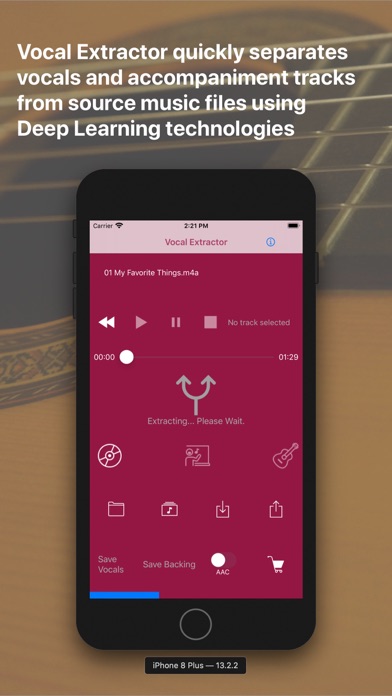
Vocal Extractor separates songs in your Music Library into vocals and accompaniment with just a tap of a button on the main screen (*1), instantly creating karaoke and a cappella tracks.
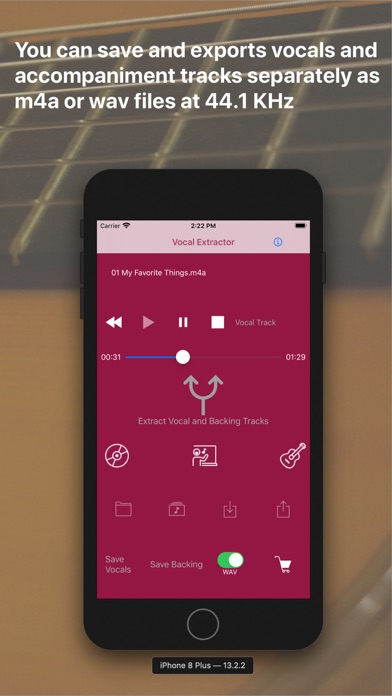
The generated vocal and backing (karaoke) tracks can be saved as files and exported to iCloud, Dropbox, Google Drive, and other platforms. This allows you to use the isolated tracks in other applications or on different platforms (*2).
Unlike traditional apps based on OOPS (Out of Phase Stereo) technology, Vocal Extractor leverages AI and deep learning to separate vocals from songs, including monaural recordings and tracks where the vocals are not center-panned—cases where traditional apps cannot remove vocals.
You can import music files in mp3, m4a, or wav formats from iCloud, Dropbox, Google Drive, and other sources. This includes live recordings created with other apps, allowing you to remove or extract vocals from them.
The embedded player allows you to toggle between the original, vocal, or backing tracks while playing the audio.
*1. Only songs downloaded to your device and not protected by DRM can be used as source data.
*2. Saved output files will have a sampling rate of 44.1kHz and be in m4a or wav format, either mono or stereo. Saving files is an in-app purchase feature. We recommend testing the vocal separation quality in the embedded player before purchasing.
How to Use
1.Launch the App
After the launch screen, the main screen will appear. Tap the Music Library button, select a song, and load it into the app.
2.Extract Vocals
Tap the Vocal Extract button in the center of the main screen. The extraction process will begin, and once completed, the Vocal, Backing, and Save buttons will become active.
3.Playback Tracks
Select either the Original, Vocal, or Backing track and tap the Play Back button to listen to the chosen track.
4.Save Tracks
After extraction, the Save Vocal and Save Backing buttons will be enabled. The first time you tap one of these buttons, the in-app purchase screen will appear. Before purchasing, we recommend confirming the quality of the vocal separation in the embedded player. Once purchased, the in-app purchase screen will no longer appear, and you can save files after confirming via a pop-up.
5.File Naming
Saved files will be named with the original file name (excluding the suffix) plus "_vocal.m4a" or "_backing.m4a". File renaming is not supported in this version. Output files are in 44.1kHz m4a or wav format.
6.Export Files
To export files from the app container, tap the Export button. A list of saved files will appear. Select a file and tap the Export menu in the navigation bar. The document provider screen will appear, allowing you to choose a location to save the file. A pop-up will confirm when the export has started successfully. Exporting occurs in the background.
7.Import Source Files
You can use m4a, mp3, and wav files as source data. Place these files in iCloud, Dropbox, Google Drive, or another document provider configured on your iPhone. Then, tap the Import button to add the file to the app's container.
8.Load Imported Files
After importing a file, tap the File button to see a list of imported files. Select a file and tap the Load menu in the navigation bar to load the content for extraction or playback.
9.Document Provider Compatibility
Import and export functions only work with document providers properly configured on your device.
For more information, visit http://vocalextractor.com/en/.
Some icons used on the main screen are sourced from Icons8. https://icons8.com