

Voice Notebook - audio to text
Voice Notebook - audio to text is made and published by Alexei Shechkov. AppBrain is an independent app data site and isn't affiliated with Alexei Shechkov. The app name, icon, screenshots and description belong to Alexei Shechkov and are shown as published on the App Store.
AppBrain's verdict
Established- Rating on App Store
- 4.34
- 89 ratings
- Last updated
- August 19, 2026
- Size
- 22.1 MB
It doesn't have enough ratings yet to judge what users think.
User feedback
Ratings and reviews on the App StoreComments on Voice Notebook - audio to text for iOS
We don't have enough comments to show example comments. Please check back later.
Store listing
By Alexei Shechkov, from the App Store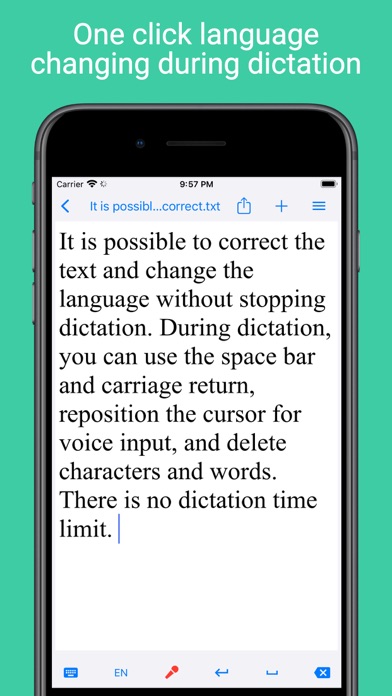


Description by Alexei Shechkov Written by the developer, not by AppBrain. Click to read.
There are three modes for transcribing audio files in the App: traditional and two accelerated modes for devices running iOS 26.
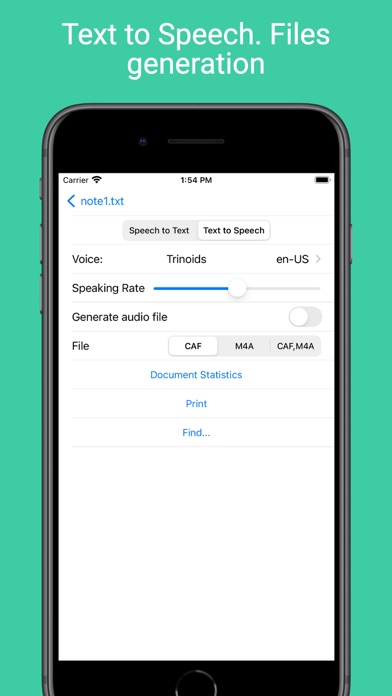
The App can read texts and generate audio files using TTS for selected voice and speaking rate. Speech Synthesis Markup Language (SSML) cab be used in source text.
There are two modes for enter text by voice: Dictation and Speech to Text. Speech to Text mode is for recording meeting or make live captions. Dictation mode is for voice editing and text correction. In Dictation mode language changing without stopping dictation are possible.
Text entered by voice can be saved in a file or sent to another program. The note files are saved in the folder on the device and available for users. The list of voice notes can be sorted by date or alphabetically.
Backup notes feature is implemented.
When translating audio files into text, time stamps can be inserted and the resulting transcription can be translated into the Youtube subtitle format. A listening mode with highlighting the timestamps of the spoken sentences is provided for correction the resulting transcription.
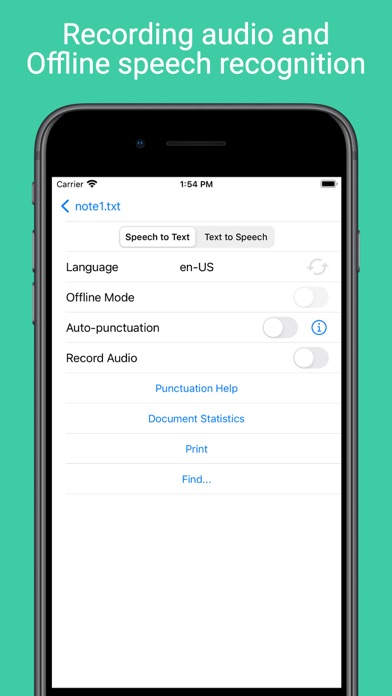
For most devices (not very old) transcribing audio files and speech to text can be done even in offline mode (without Internet).
For devices running iOS 16 and higher, auto-punctuation mode is possible for languages in which it is supported.
For devices running iOS 17 and higher, it is possible to use custom dictionaries that allow you to enter words and phrases by voice that are not recognized normally. You can create an unlimited number of custom dictionaries.
For devices running iOS 16 and higher the app shortcut to add new note and start recognition is implemented. The shortcut can be called with Siri.
The Apple Watch app is included, where you can take both audio and text notes by voice and sync them with the main app.
The option to print and find notes has been implemented.
Dark mode is supported.
Premium mode will remove ads in the Speech screen, enable "No Sleeping" switch (auto-lock screen) and bluetooth support. Also the time limit for the length of transcribing files will be removed. Removes the limitation on the text length when generating an audio file during speech synthesis. Unlocks the "Open" button on the user's dictionary page.
email: ios@voicenotebook.com
Terms of Use is located in https://voicenotebook.com/en/ios/terms/
Safety and technology
Found in the app by AppBrain- Price
- Free
- App size
- 22.1 MB
- Content rating
- Everyone
Technologies used by Voice Notebook - audio to text
Releases
Updates seen on the App Store- Version
- 5.29
- Launched
- August 2018
No changelog data
Alternatives
Similar apps and more from Alexei ShechkovAlternatives to Voice Notebook - audio to text





More from Alexei Shechkov



Rankings
App Store top chartsApp Store Rankings for Voice Notebook - audio to text
About the app and developer
About Voice Notebook - audio to text
Voice Notebook - audio to text is a productivity app developed by Alexei Shechkov.
User Ratings
Voice Notebook - audio to text is rated 4.34 out of 5 stars. The rating is based on 89 ratings.
App Information
Voice Notebook - audio to text is freely available from the App Store. The app size is 22.09 MB. The latest version available is 5.29. The last update was on August 19, 2026.
Technical Requirements
The app has a content rating of Everyone. The app has been available on the App Store since August 2018.
Developer information for Alexei Shechkov
Address: