Download Android Apps and Games
AppBrain
  • Apps
  • Apps being viewed right now Trending apps today Most popular apps All-time most downloaded apps Top rated apps
  • Intelligence ▾
    Intelligence overview → Track any Android app or your whole market
    Track & analyze
    Keyword Tracker & OptimizerTrack & improve Play rankings App Performance ReportOne-off PDF for any app StatisticsFree Android & Play market stats
    Promote your app
    Featured Apps App Links
  • Intelligence
  • Pricing
  • Dashboard
  • Sign up
  • Log in
Last updated on: 2026-07-11
App Store Apps > Productivity > Voice to PDF
Voice to PDF icon

Voice to PDF

1.0
Bee Evolved LLC
0.00
0 reviews
$29.99

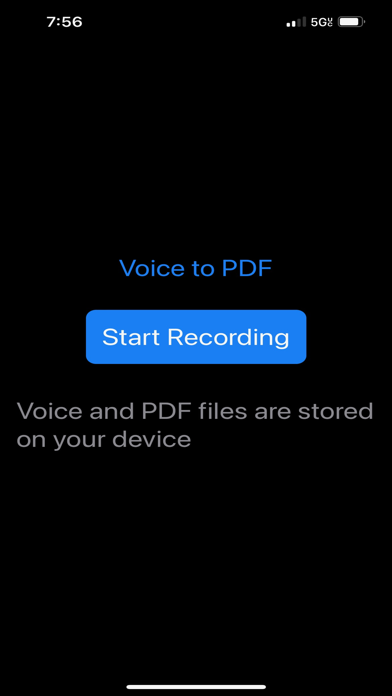
Voice to PDF Screenshot 1 of 4
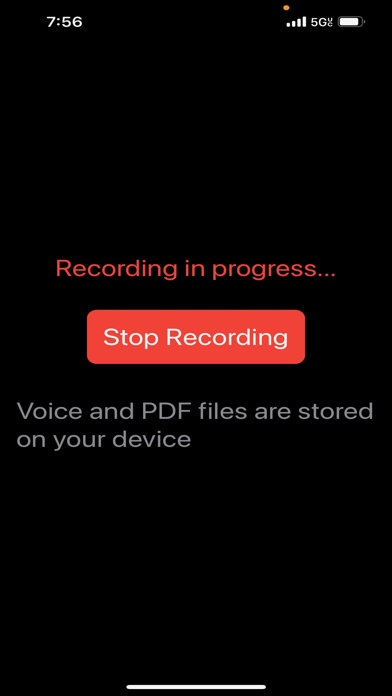
Voice to PDF Screenshot 2 of 4
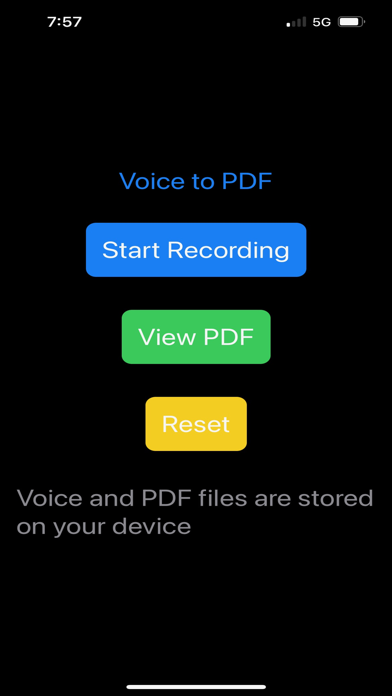
Voice to PDF Screenshot 3 of 4
Voice to PDF Screenshot 4 of 4
Download from the App Store

About Voice to PDF

Voice to PDF is an overall app developed by Bee Evolved LLC.

Download Statistics

User Ratings

The app has no ratings yet.

App Information

Voice to PDF costs $29.99 to download. The APK download size is 423.00 kB. The latest version available is 1.0. The last update was on July 10, 2023.

Technical Requirements

The app has a content rating of Everyone. The app has been available on Google Play July 2023.

Description
Introducing Voice to PDF – the ultimate audio recording companion that ensures your data remains safe and secure. With a focus on privacy and local storage, Voice to PDF provides a seamless and secure solution for converting audio recordings into PDF files, right on your device.

Local processing:
All data processing and conversion tasks are done on your device, without relying on external servers or a cloud-based services. This means that when you record audio and convert it to PDF, all the computational work happens on your device itself. local processing, Voice to PDF ensures that your sensitive data remains secure and private. None of your recordings or transcriptions are sent over the internet for processing, minimizing the risk of unauthorized access or data breaches.
Capture and Convert with Confidence:
Record your ideas, meetings, or lectures effortlessly, knowing that your audio recordings are stored securely on your device. Voice to PDF employs advanced speech recognition technology to convert your recordings into accurate and editable text, without ever sending your data to external servers.

Your Data, Your Control:
Unlike other apps, Voice to PDF prioritizes your privacy. All processing, conversion, and storage take place locally on your device, ensuring that your sensitive information never leaves your control. Feel confident that your recordings and transcriptions remain confidential and secure.

Offline Access, Uninterrupted Productivity:
Enjoy the freedom to record and convert audio even without an internet connection. Voice to PDF works offline, allowing you to capture and convert wherever you are, without relying on an internet connection. Maintain your productivity without compromise.


IMPORTANT Usage Notice: Upon launching Voice to PDF, simply the press "Start" and "Stop" recording buttons quickly to initiate functionality. This action prompts your device to awaken its processes in preparation for recording and PDF conversion Remember to perform this step each time you fully close the app then reopen it. After this step your device is awake and ready to convert Voice to PDF.

Usage:
The Current version of Voice to PDF records up to 1 hour of voice per session.

Using Voice to PDF is simple and intuitive.
Here's a step-by-step guide on how to use the app:

Record your audio: Tap the "Start Recording" button to begin capturing voice.

Stop the recording: When you're finished , tap the "Stop Recording" button. The app will save your audio securely on your device.

Wait for conversion: The app will automatically convert your spoken words into text using powerful technology. This process happens right on your device, so your data stays private.

View your PDF: Tap the "View PDF" button to open and view the generated PDF document. You can read, review

Manage your files securely: Voice to PDF seamlessly integrates with Apple's secure file manager. To

Access your files, follow these steps:

Open the "Files" app on your Apple device. It's the built-in file manager provided by Apple.

Tap the "Browse" tab at the bottom of the app.

Under the "Locations" section, select "On My iPhone/iPad" to access files stored locally on your device.

From there, navigate to the "Voice to PDF" folder, where you'll find your audio recordings and PDF files generated by the app.

Reset and start fresh: If you want to clear your current recording and start anew, tap the "Reset" button. This will reset the app's state and allow you to begin another recording session.
Show more Show less

More data about Voice to PDF

Price $29.99
Rating No ratings
Ranking Not ranked
Version 1.0
App download size 423.0 KB
Suitable for Everyone

Alternative downloads for the Voice to PDF app

Agent Tools by StreetEasy icon Agent Tools by StreetEasy
StreetEasy, Inc.
2.2
Free
27 ratings
Arbonne My Office icon Arbonne My Office
Arbonne
3.6
Free
22 ratings
Superhuman Mail icon Superhuman Mail
Superhuman Labs
4.6
Free
3.5K ratings
The Scheduling App icon The Scheduling App
Review Wave
4.8
Free
2.0K ratings
ArcGIS Field Maps icon ArcGIS Field Maps
ESRI
2.4
Free
33 ratings

More from Bee Evolved LLC

Solo Cat icon Solo Cat
Bee Evolved LLC
4.0
Free
4 ratings
Mine Ops icon Mine Ops
Bee Evolved LLC
5.0
Free
2 ratings
Bitcoin UI icon Bitcoin UI
Bee Evolved LLC
5.0
Free
1 ratings
Apiary Notes icon Apiary Notes
Bee Evolved LLC
0.0
$19.99
Livestock NFC icon Livestock NFC
Bee Evolved LLC
0.0
Free

Changelog of Voice to PDF

No changelog data

Developer information for Bee Evolved LLC

Bee Evolved LLC

Address:

Share Voice to PDF

Comments on Voice to PDF for iOS

We don't have enough comments to show example comments. Please check back later.

App Store Rankings for Voice to PDF

This app is not ranked

Technologies used by Voice to PDF

Agent Tools by StreetEasy icon Agent Tools by StreetEasy
Arbonne My Office icon Arbonne My Office
Superhuman Mail icon Superhuman Mail
The Scheduling App icon The Scheduling App
ArcGIS Field Maps icon ArcGIS Field Maps

Back to top
AppBrain Intelligence premium content

Subscribe now to get full and unlimited access to AppBrain Intelligence. You'll have access to:

  • App Intelligence dashboard (performance timeline, competitor comparison, country rankings, insight cards)
  • Detailed ranking data per app
  • Full timeline per developer
  • Device market shares data per country
  • Unlimited keyword tracking
1 Month

$75/mo
(billed every month)

SAVE 0%
Subscribe
3 Months

$65/mo
($195 billed every 3 months)

SAVE 13%
Subscribe
1 Year

$57.50/mo
($690 billed every year)

SAVE 23%
Subscribe
Each subscription will automatically renew 3 days before the expiration date for the same time period. Subscriptions can be cancelled at any time before the renewal.

AppBrain is a directory focused on discovering great apps and games. We give statistics, rankings and search options that Google Play and the App Store don't have. All trademarks are owned by their respective owners. AppBrain doesn't offer APKs or binaries, and always lets users install the official version from Google Play or the App Store.

More apps

  • Top Android apps being viewed
  • View Car Launcher
  • AI Video Maker: HoneyAI Android App
  • Fly 98.5

Android Statistics

  • Android statistics
  • Google Play Developer stats
  • Trending Android Apps
  • Top popular Apps
  • Buy the best Android phone

About AppBrain

  • Contact
  • Privacy
  • Documentation
  • DMCA takedowns
  • Articles
  • Blog
  • How to improve the earnings of your ad units
© 2010-2026 - AppBrain