

VoiceToMD is made and published by Chris Whitling. AppBrain is an independent app data site and isn't affiliated with Chris Whitling. The app name, icon, screenshots and description belong to Chris Whitling and are shown as published on the App Store.
AppBrain's verdict
- Last updated
- July 16, 2026
- Size
- 35.9 MB
User feedback
Ratings and reviews on the App StoreComments on VoiceToMD for iOS
We don't have enough comments to show example comments. Please check back later.
Store listing
By Chris Whitling, from the App Store


Description by Chris Whitling Written by the developer, not by AppBrain. Click to read.
VoiceToMD isn't where your notes live. It's how they get there.
— ON-DEVICE TRANSCRIPTION —
Your iPhone does the work. Every transcription runs locally on the device in your hand—no servers, no API calls, no internet required once the app is set up. Audio stays where it was captured.
Three transcription qualities to pick from, scaled to your iPhone. The app recommends the right one during setup; you can switch any time.
— EVERY LANGUAGE YOU SPEAK —
Speak any language. The app recognizes it automatically—Spanish, Mandarin, Japanese, Arabic, Hindi, and dozens more. All processed on your iPhone, never sent anywhere.
— PRESS ONCE. DONE. —
Bind the Action Button on iPhone 15 Pro or later. Press it on a locked phone. FaceID authenticates and recording starts before you finish raising the phone. The lock-screen Live Activity carries you through Pause, Stop, Send, and Hold—without ever opening the app.
Also: Control Center widget, and iOS Shortcuts. All quick-capture surfaces deliver directly to your default profile's destinations.
— YOUR DESTINATIONS —
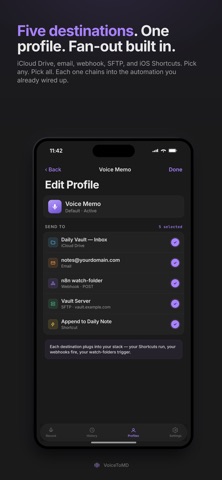
Five destination types:
- iCloud Drive folder—markdown files land in any folder you pick
- Email—your default mail client, transcript and attachment pre-populated
- Webhook—HTTPS POST with bearer-token auth and a configurable body
- SFTP—host, port, key or password authentication, base path you control
- iOS Shortcut—pass the markdown to any Shortcut you've built
Configure multiple destinations per profile. One capture fans out to all of them—your notes app and your automation pipeline, your inbox and your shortcuts—simultaneously, in one tap.
— MARKDOWN ANY APP CAN READ —
Every note ships with YAML frontmatter—title, created timestamp, profile, destination, duration, audio path. Paragraph breaks fall where the speech actually paused. Speaker labels appear when more than one voice is in the room. Drop into Apple Notes, Obsidian, Notion, or any other app or pipeline without preprocessing.
— PROFILES —
Configure multiple profiles, each with its own destinations, audio settings, transcription quality, vocabulary priming, and formatting rules. Quick-capture surfaces use your default profile; switch the active profile in one tap.
Safety and technology
Found in the app by AppBrain- Price
- Free
- App size
- 35.9 MB
- Content rating
- Everyone
Technologies used by VoiceToMD
Releases
Updates seen on the App Store- Version
- 1.5
- Launched
- May 2026
No changelog data
Alternatives
Similar apps and more from Chris WhitlingAlternatives to VoiceToMD


More from Chris Whitling


Rankings
App Store top chartsApp Store Rankings for VoiceToMD
About the app and developer
About VoiceToMD
VoiceToMD is a productivity app developed by Chris Whitling.
What is the rating of VoiceToMD?
VoiceToMD has no ratings yet.
Is VoiceToMD free?
VoiceToMD is free. The app size is 35.90 MB. The latest version available is 1.5. The last update was on July 16, 2026.
What are the requirements for VoiceToMD?
The app has a content rating of Everyone. The app has been available on the App Store since May 2026.
Developer information for Chris Whitling
Address:
Frequently asked questions about VoiceToMD
Is VoiceToMD free?
Yes. VoiceToMD is free on the App Store.
Is VoiceToMD still available?
Yes. VoiceToMD is on the App Store, and the last update we saw was on July 16, 2026.
How large is VoiceToMD?
VoiceToMD is 35.90 MB.
Is VoiceToMD suitable for children?
App Store rates the content of VoiceToMD as suitable for everyone.
Who made VoiceToMD?
VoiceToMD was developed by Chris Whitling. It is listed in the productivity category on the App Store.
What are the best alternatives to VoiceToMD?
People looking at VoiceToMD also look at these productivity apps: Dossier - dossier, BrainDump - Voice to Notion, Levely: Focused Practice, LLT Mobile, Karl: Voice Meeting Notes Pro.