

Vueroid Cloud
Vueroid Cloud is made and published by NC& Co., Ltd. AppBrain is an independent app data site and isn't affiliated with NC& Co., Ltd. The app name, icon, screenshots and description belong to NC& Co., Ltd. and are shown as published on the App Store.
AppBrain's verdict
- Last updated
- February 19, 2025
Rankings
App Store top chartsApp Store Rankings for Vueroid Cloud
Competitors
Similar apps and more from NC& Co., Ltd.Alternatives to Vueroid Cloud



More from NC& Co., Ltd.


Releases
Updates seen on the App Store- Version
- 1.0.4
- Launched
- December 2024
No changelog data
User feedback
Ratings and reviews on the App StoreComments on Vueroid Cloud for iOS
We don't have enough comments to show example comments. Please check back later.
Technology
Found in the app by AppBrain- Price
- Free
- App size
- 115.1 MB
- Content rating
- Everyone
Technologies used by Vueroid Cloud
About the app and developer
About Vueroid Cloud
Vueroid Cloud is an utilities app developed by NC& Co., Ltd.
What is the rating of Vueroid Cloud?
Vueroid Cloud has no ratings yet.
Is Vueroid Cloud free?
Vueroid Cloud is free. The app size is 115.10 MB. The latest version available is 1.0.4. The last update was on February 19, 2025.
What are the requirements for Vueroid Cloud?
The app has a content rating of Everyone. The app has been available on the App Store since December 2024.
Developer information for NC& Co., Ltd.
Address:
Frequently asked questions about Vueroid Cloud
Is Vueroid Cloud free?
Yes. Vueroid Cloud is free on the App Store.
Is Vueroid Cloud still available?
Yes. Vueroid Cloud is on the App Store, and the last update we saw was on February 19, 2025.
How large is Vueroid Cloud?
Vueroid Cloud is 115.10 MB.
Is Vueroid Cloud suitable for children?
App Store rates the content of Vueroid Cloud as suitable for everyone.
Who made Vueroid Cloud?
Vueroid Cloud was developed by NC& Co., Ltd. It is listed in the utilities category on the App Store.
What are the best alternatives to Vueroid Cloud?
People looking at Vueroid Cloud also look at these utilities apps: AUTHOR FLASHER, Keetec BT, AudioToolsMax - Audio Test, Author BT Update, MVT-9.
Store listing
By NC& Co., Ltd., from the App Store
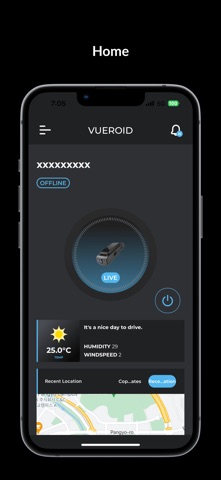
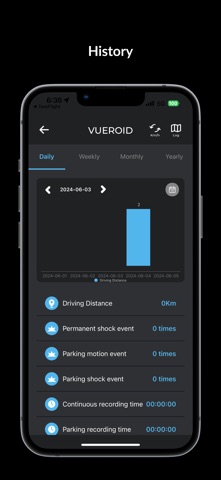


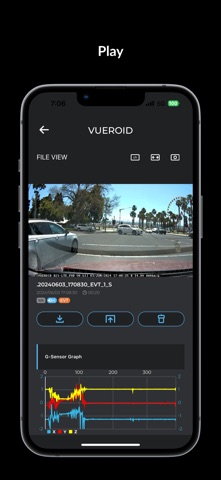
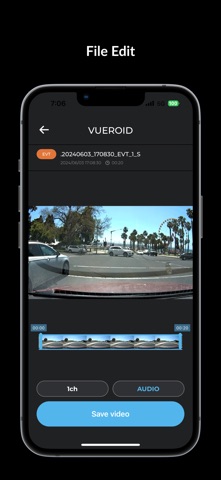
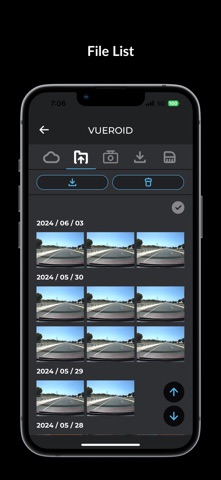

Description by NC& Co., Ltd. Written by the developer, not by AppBrain. Click to read.
A Vueroid dash cam with built-in LTE can also be connected, but a Cloud account is required.
▶ Create a cloud account for Vueroid dash cam with built-in LTE (in app or website: https://www.vueroid-cloud.com/)
▶ Live View
You can directly view live video from Vueroid dashcam.
- Left/right inversion of video
- All connected camera screens can be viewed, horizontal view possible
- ADAS calibration
▶ File view
The file list in the file view section is the recording files for each mode recorded by the Vueroid dashcam.
Video files from external storage devices can be played via USB
Downloaded video files can be played
“Drive” is a typical video.
“Event” is a video of an impact event occurring while driving.
“Park” is the video recorded when parking mode is activated, and “Event Park” video is the video recorded when shaking of the vehicle is detected in parking mode.
“Manual” is video recorded in manual recording mode.
"PHONE" allows you to check and edit videos using the downloaded video list.
“External” allows you to play videos from an external storage device via USB.
Connect the SDCard directly to your smartphone using a USB dongle.
“Auto Upload” refers to video automatically uploaded to the Cloud.
“Cloud” is video stored in the cloud for long-term storage.
▶ Driving record
Driving records are safely stored inside the Vueroid dash cam mobile viewer, and you can check the situation and status through the saved driving records.
We recommend that you compare the time and distance to your destination every day and select a good route depending on the situation.
In the trip log, topics (e.g. "Driving", "Parking") are highlighted in different colors, making it easier to identify recorded items.
▶ Settings
Quality of recorded video, sensitivity of parking mode G-sensor, motion detection sensitivity,
Set power-off time to prevent vehicle battery drain
This menu also allows you to customize how your Vueroid dashcam interacts with you.
You can change it by selecting different languages.
※ The applicable functions of this mobile app may differ slightly depending on the Vueroid dash cam model.
If you have any questions or problems while using the mobile app, please contact info@nconnect.co.kr.