



AppBrain's verdict
- Last updated
- July 28, 2026
- Size
- 80.5 MB
User feedback
Ratings and reviews on the App StoreComments on WakeClock: Alarm Challenge for iOS
We don't have enough comments to show example comments. Please check back later.
Store listing
By Luong Phuc Thien, from the App StoreDescription by Luong Phuc Thien Written by the developer, not by AppBrain. Click to read.
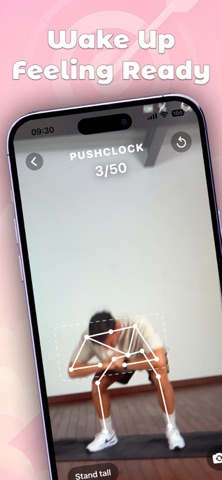
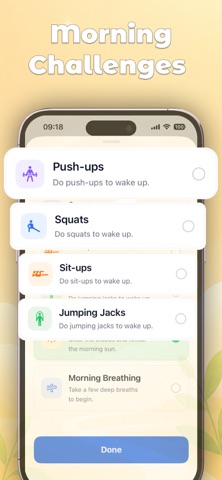
Unlike a normal alarm clock, WakeClock turns your wake-up moment into an interactive challenge. To stop the alarm, complete a simple mission and activate your mind before starting your morning.
Whether you want to stop oversleeping, build a better morning routine, or make waking up more engaging, WakeClock helps you create a healthier wake-up habit.
Features:
• Smart alarm experience
Set alarms that encourage you to get up instead of hitting snooze repeatedly.
• Wake-up challenges
Complete interactive actions before turning off your alarm and become fully awake.
• Custom alarm schedules
Create alarms that match your daily routine and lifestyle.
• Better morning habits
Build consistency and make your mornings more productive.
• Simple and focused design
Enjoy a clean alarm experience without unnecessary distractions.
Wake up differently with WakeClock. Turn every alarm into a small challenge and make your mornings more active, focused, and productive.
Safety and technology
Found in the app by AppBrain- Price
- Free
- App size
- 80.5 MB
- Content rating
- Everyone
Technologies used by WakeClock: Alarm Challenge
Releases
Updates seen on the App Store- Version
- 1.0.2
- Launched
- July 2026
No changelog data
Alternatives
Similar apps and more from Luong Phuc ThienAlternatives to WakeClock: Alarm Challenge


More from Luong Phuc Thien


Rankings
App Store top chartsApp Store Rankings for WakeClock: Alarm Challenge
About the app and developer
About WakeClock: Alarm Challenge
WakeClock: Alarm Challenge is a productivity app developed by Luong Phuc Thien.
User Ratings
The app has no ratings yet.
App Information
WakeClock: Alarm Challenge is freely available from the App Store. The app size is 80.52 MB. The latest version available is 1.0.2. The last update was on July 28, 2026.
Technical Requirements
The app has a content rating of Everyone. The app has been available on the App Store since July 2026.
WakeClock: Alarm Challenge is made and published by Luong Phuc Thien. AppBrain is an independent app data site and isn't affiliated with Luong Phuc Thien. The app name, icon, screenshots and description belong to Luong Phuc Thien and are shown as published on the App Store.
Developer information for Luong Phuc Thien
Address:
Frequently asked questions about WakeClock: Alarm Challenge
Is WakeClock: Alarm Challenge free?
Yes. WakeClock: Alarm Challenge is free on the App Store.
Is WakeClock: Alarm Challenge still available?
Yes. WakeClock: Alarm Challenge is on the App Store, and the last update we saw was on July 28, 2026.
How large is WakeClock: Alarm Challenge?
WakeClock: Alarm Challenge is 80.52 MB.
Is WakeClock: Alarm Challenge suitable for children?
App Store rates the content of WakeClock: Alarm Challenge as suitable for everyone.
Who made WakeClock: Alarm Challenge?
WakeClock: Alarm Challenge was developed by Luong Phuc Thien. It is listed in the productivity category on the App Store.
What are the best alternatives to WakeClock: Alarm Challenge?
People looking at WakeClock: Alarm Challenge also look at these productivity apps: SplitPDF -iReadPDF, Let's Tolk - Offline Translate, SmartLess: Quiet Phone, Multi Browser: 4-Split Screen, Sawti: Arabic Voice to Text.