

WakeDate: Date Alarm Clock
WakeDate: Date Alarm Clock is made and published by Karolis Valatka. AppBrain is an independent app data site and isn't affiliated with Karolis Valatka. The app name, icon, screenshots and description belong to Karolis Valatka and are shown as published on the App Store.
AppBrain's verdict
- Rating on App Store
- 2.00
- 1 ratings
- Last updated
- October 28, 2026
It doesn't have enough ratings yet to judge what users think.
Rankings
App Store top chartsApp Store Rankings for WakeDate: Date Alarm Clock
Competitors
Similar apps and more from Karolis ValatkaMore from Karolis Valatka


Releases
Updates seen on the App Store- Version
- 1.2
- Launched
- July 2026
No changelog data
User feedback
Ratings and reviews on the App StoreComments on WakeDate: Date Alarm Clock for iOS
We don't have enough comments to show example comments. Please check back later.
Technology
Found in the app by AppBrain- Price
- $4.99
- App size
- 5.19 MB
- Content rating
- Everyone
Technologies used by WakeDate: Date Alarm Clock
About the app and developer
About WakeDate: Date Alarm Clock
WakeDate: Date Alarm Clock is an utilities app developed by Karolis Valatka.
User Ratings
WakeDate: Date Alarm Clock is rated 2.00 out of 5 stars. The rating is based on one rating ratings.
App Information
WakeDate: Date Alarm Clock costs $4.99. The app size is 5.19 MB. The latest version available is 1.2. The last update was on October 28, 2026.
Technical Requirements
The app has a content rating of Everyone. The app has been available on the App Store since July 2026.
Developer information for Karolis Valatka
Address:
Store listing
By Karolis Valatka, from the App Store


Description by Karolis Valatka Written by the developer, not by AppBrain. Click to read.
WHAT YOU GET
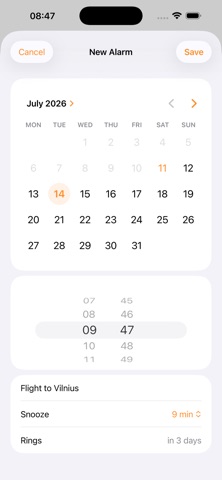
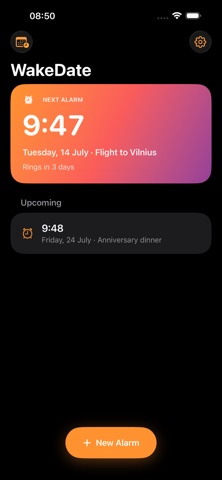
A real alarm for any date. Next Tuesday, next month, the morning of your flight. Pick the date, pick the time, done.
Your sound. Ten built-in alarm sounds, or import any mp3, m4a or wav from Files. Vibrate only if you share a room.
Calendar rules. Turn events into alarms automatically, like "ring 20 minutes before every event in my Work calendar". New events get alarms without you touching anything.
Duplicate and search. Swipe right to copy an alarm, pull down to find one by name.
Snooze on your terms. Choose the snooze length per alarm, with a live countdown on your Lock Screen and Dynamic Island.
A next alarm widget. See what is coming right on your Home Screen.
Timezone honesty. Alarms ring at the moment you picked, and WakeDate shows the original timezone if yours has changed since.