

Watch Reader - txt file
Watch Reader - txt file is made and published by kim juyoung. AppBrain is an independent app data site and isn't affiliated with kim juyoung. The app name, icon, screenshots and description belong to kim juyoung and are shown as published on the App Store.
AppBrain's verdict
- Best rank
- #27
- Top Paid, South Korea
- Rating on App Store
- 5.00
- 3 ratings
- Last updated
- October 3, 2026
It doesn't have enough ratings yet to judge what users think. Its best ranking is #27 in Top Paid, Books in South Korea.
Rankings
App Store top charts- Highest rank
- #27
- Chart
- Top Paid
- Books
- Country
- South Korea
App Store Rankings for Watch Reader - txt file
Top rankings
| Rank | Country | Category | List |
|---|---|---|---|
| 27 | South Korea | Books | Top Paid |
| 56 | Slovakia | Books | Top Paid |
| 78 | Czech Republic | Books | Top Paid |
| 93 | Italy | Books | Top Paid |
Ranking history in South Korea
Competitors
Similar apps and more from kim juyoungAlternatives to Watch Reader - txt file








More from kim juyoung



Releases
Updates seen on the App Store- Version
- 1.27
- Launched
- April 2023
No changelog data
User feedback
Ratings and reviews on the App StoreComments on Watch Reader - txt file for iOS
We don't have enough comments to show example comments. Please check back later.
Technology
Found in the app by AppBrain- Price
- $3.99
- App size
- 68.8 MB
- Content rating
- Everyone
Technologies used by Watch Reader - txt file
About the app and developer
About Watch Reader - txt file
Watch Reader - txt file is a books app developed by kim juyoung.
User Ratings
Watch Reader - txt file is rated 5.00 out of 5 stars. The rating is based on 3 ratings.
App Information
Watch Reader - txt file costs $3.99. The app size is 68.76 MB. The latest version available is 1.27. The last update was on October 3, 2026.
Technical Requirements
The app has a content rating of Everyone. The app has been available on the App Store since April 2023.
Developer information for kim juyoung
Address:
Frequently asked questions about Watch Reader - txt file
Is Watch Reader - txt file free?
No. Watch Reader - txt file costs $3.99 on the App Store.
Is Watch Reader - txt file still available?
Yes. Watch Reader - txt file is on the App Store, and the last update we saw was on October 3, 2026.
How large is Watch Reader - txt file?
Watch Reader - txt file is 68.76 MB.
Is Watch Reader - txt file suitable for children?
App Store rates the content of Watch Reader - txt file as suitable for everyone.
How do people rate Watch Reader - txt file?
Watch Reader - txt file scores 5.00 out of 5 stars, from 3 ratings on the App Store.
Who made Watch Reader - txt file?
Watch Reader - txt file was developed by kim juyoung. It is listed in the books category on the App Store.
What are the best alternatives to Watch Reader - txt file?
People looking at Watch Reader - txt file also look at these books apps: Check Bible, TTReader - Text Reader, OCR, Wear Reader, TecViewer - Text Viewer, eView - Reader epub,html,txt.
Store listing
By kim juyoung, from the App Store

Description by kim juyoung Written by the developer, not by AppBrain. Click to read.
You can view the txt file you have by sending it to the watch.
First check if you have a watch.
(Supported from devices with WatchOS 9.0 or higher installed)
It is possible to run the watch app alone, but
The phone app is required to import files to the watch app.
The steps to import the file are as follows.
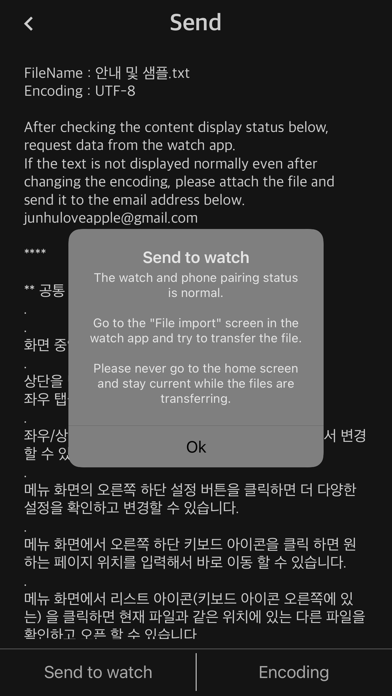
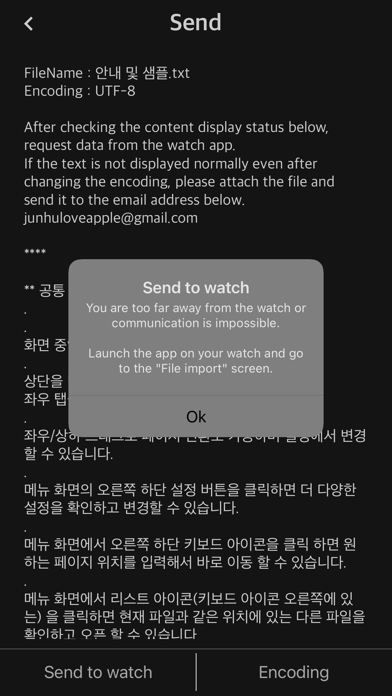
1. The phone app checks some text contents in advance and waits to send the file to the watch app.
2. Launch the watch app and import the file to the watch app through “Import File”.
3. iPhone/iPad and Watch must be in close proximity when transferring files using the watch app.
** Watch App Features **
- Supported from devices with WatchOS 9.0 or higher installed (WatchOS 9.0+)
- txt file
- ePub: Display only text (not supported: image, audio, style (css), chapter)
- Font: Watch default font
- External font file: Transfer and apply font files in otf and ttf formats to the watch app
- font size
- letter spacing
- line spacing
- indent
- Alignment (left, right, center, and justification are not supported)
- Text color & recommended text color
- Background color & recommended background color
- Top information: Select one of non-display, progress, and battery
- TTS: Background playback after Bluetooth connection
- iCloud sync: sync last read location
- App lock: If a password is set for the watch app
- Clear all caches
- Reset settings
- Remove continuous blank lines from original file (automatic)
- Remove blank lines
- Remove a file from the watch app: Swipe left in the file list
- App language: Auto / English / Japanese / Korean
- Search (Location: Settings - Search)
- Designate long-click operation: Unused/TTS/Search
- App brightness
- Internal speaker playback (background playback is not possible when the internal speaker is set)
** Phone App Features **
- Send files to the watch app
- file management
- Webdav, SMB, FTP, Synology NAS
- If you experience significant noise or stuttering during TTS playback while using AirPods or Bluetooth headsets/earphones, please disconnect them from any other iPhone, iPad, or Bluetooth device and connect them exclusively to your Apple Watch.
** Search for "Watch Reader" on YouTube for a demonstration video