

WatchPDF is made and published by kim juyoung. AppBrain is an independent app data site and isn't affiliated with kim juyoung. The app name, icon, screenshots and description belong to kim juyoung and are shown as published on the App Store.
AppBrain's verdict
- Rating on App Store
- 5.00
- 1 ratings
- Last updated
- November 20, 2024
- Size
- 16.4 MB
It doesn't have enough ratings yet to judge what users think.
User feedback
Ratings and reviews on the App StoreComments on WatchPDF for iOS
We don't have enough comments to show example comments. Please check back later.
Store listing
By kim juyoung, from the App Store


Description by kim juyoung Written by the developer, not by AppBrain. Click to read.
View PDF files by inserting them into your Apple Watch.
You can check PDF files anytime, anywhere on your Apple Watch.
The watch app can be run alone, but
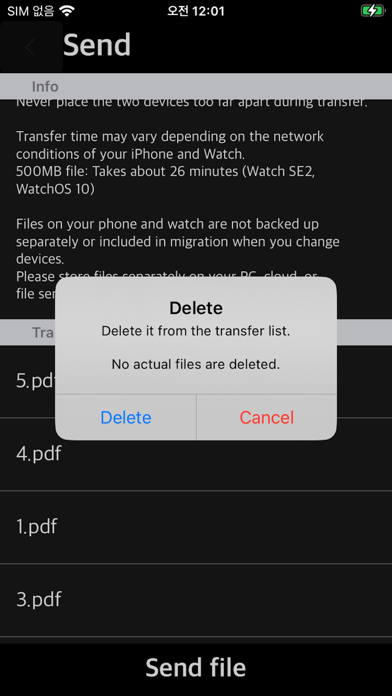
To send PDF files to Apple Watch, you need the iPhone app.
Please make sure you have an Apple Watch before purchasing the app.
The iPhone app does not support viewing PDF files.
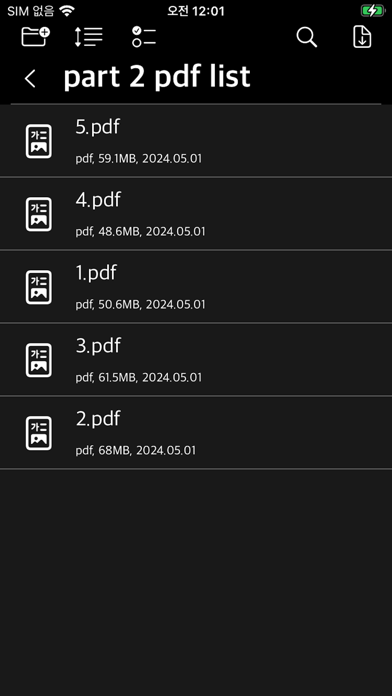
The iPhone app sends PDF files to a connected Apple Watch.
*Features*
- Device: Apple Watch (WatchOS 10+), iPhone (iOS 17+)
- File: PDF
- Zoom in and out: Zoom in and out of content using the zoom in/zoom out buttons.
- Page mode: Switch pages back and forth and go to a specific page
- Vertical mode: Navigate pages by scrolling up and down in the list
- Support for password-locked PDFs
- Runs alone on Apple Watch, iPhone app required for file transfer
- Touch the content screen to hide and display various menus and buttons
- App screen brightness
- App Lock: Only possible when the watch is password-protected
** Phone Streaming **
- Browse and open files inside nearby iPhone app from paired Apple Watch app, and switch pages
- Access, browse, and open files on your iPhone from your watch without transferring them to your watch
- Paired iPhone and Apple Watch must be in close proximity, and install and run the app on iPhone
- Page quality will be adjusted.
** Search "WatchPDF" on YouTube to watch a usage video. **
Our app does not provide separate PDF files. PDF files can be viewed by inserting the file stored by the app user into the app.
Safety and technology
Found in the app by AppBrain- Price
- $4.99
- App size
- 16.4 MB
- Content rating
- Everyone
Technologies used by WatchPDF
Releases
Updates seen on the App Store- Version
- 1.14
- Launched
- May 2024
No changelog data
Alternatives
Similar apps and more from kim juyoungMore from kim juyoung




Rankings
App Store top chartsApp Store Rankings for WatchPDF
About the app and developer
About WatchPDF
WatchPDF is an utilities app developed by kim juyoung.
User Ratings
WatchPDF is rated 5.00 out of 5 stars. The rating is based on one rating ratings.
App Information
WatchPDF costs $4.99. The app size is 16.37 MB. The latest version available is 1.14. The last update was on November 20, 2024.
Technical Requirements
The app has a content rating of Everyone. The app has been available on the App Store since May 2024.
Developer information for kim juyoung
Address:
Frequently asked questions about WatchPDF
Is WatchPDF free?
No. WatchPDF costs $4.99 on the App Store.
Is WatchPDF still available?
Yes. WatchPDF is on the App Store, and the last update we saw was on November 20, 2024.
How large is WatchPDF?
WatchPDF is 16.37 MB.
Is WatchPDF suitable for children?
App Store rates the content of WatchPDF as suitable for everyone.
How do people rate WatchPDF?
WatchPDF has one rating of 5.00 stars on the App Store.
Who made WatchPDF?
WatchPDF was developed by kim juyoung. It is listed in the utilities category on the App Store.