

WebSafe 365
WebSafe 365 is made and published by Innovotech Solutions LTD. AppBrain is an independent app data site and isn't affiliated with Innovotech Solutions LTD. The app name, icon, screenshots and description belong to Innovotech Solutions LTD and are shown as published on the App Store.
AppBrain's verdict
Established- Rating on App Store
- 1.00
- 1 ratings
- Last updated
- March 24, 2022
It doesn't have enough ratings yet to judge what users think.
Rankings
App Store top chartsApp Store Rankings for WebSafe 365
Competitors
Similar apps and more from Innovotech Solutions LTD






Releases
Updates seen on the App Store- Version
- 1.0.15
- Launched
- October 2021
No changelog data
User feedback
Ratings and reviews on the App StoreComments on WebSafe 365 for iOS
We don't have enough comments to show example comments. Please check back later.
Technology
Found in the app by AppBrain- Price
- Free
- App size
- 61.2 MB
- Content rating
- Everyone
Technologies used by WebSafe 365
About the app and developer
About WebSafe 365
WebSafe 365 is a productivity app developed by Innovotech Solutions LTD.
User Ratings
WebSafe 365 is rated 1.00 out of 5 stars. The rating is based on one rating ratings.
App Information
WebSafe 365 is freely available from the App Store. The app size is 61.23 MB. The latest version available is 1.0.15. The last update was on March 24, 2022.
Technical Requirements
The app has a content rating of Everyone. The app has been available on the App Store since October 2021.
Developer information for Innovotech Solutions LTD
Address:
Store listing
By Innovotech Solutions LTD, from the App Store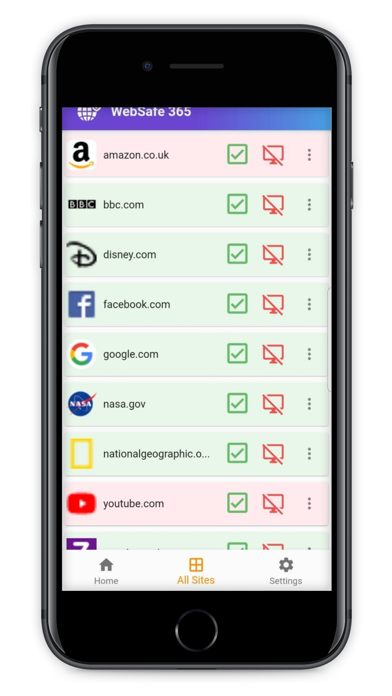
Description by Innovotech Solutions LTD Written by the developer, not by AppBrain. Click to read.
With 3 easy steps, you can control kids desktop web browser from your mobile.
Once setup is complete, all websites on kid’s chrome browser will be blocked by default.
When a kid wants to access a website, they will be given an option to request the permission from parents WebSafe 365 mobile app.
If your kid click 'ask permission' on their desktop browser, you will get a mobile app notification. You can then decide to give access or reject access to a website using WebSafe 365 mobile app. If you accept the permission, kids web browser will redirect to the website automatically, otherwise website will remain blocked.
• You can also set time limits on how long your kid should access a website. Such as 30 mins, 1 hour, 3 hours, 1 day etc. After this period website will be blocked again.
• You can manage list of websites kids require access on their desktop computer through our mobile app.
WebSafe 365 browser extension is compatible with Chrome, Microsoft EDGE desktop web browsers on Mac/Windows and Chrome Book OS.
*** SETUP GUIDE
1. Install our WebSafe 365 chrome browser extension on your kid’s computer. - https://chrome.google.com/webstore/detail/websafe365/caalgailaopfobcgmhcglflekfefpcdn
2. install WebSafe 365 mobile app(this app) on parents’ mobile.
3. Scan the QR code using WebSafe 365 mobile app to link the kids desktop browser and your mobile app.
*** PRICING
• WebSafe 365 mobile app is free.
• Chrome web browser extension is free to try for 7 days.