

Weeklo: Weekly Planner & ToDo
Weeklo: Weekly Planner & ToDo is made and published by Homam Spartali. AppBrain is an independent app data site and isn't affiliated with Homam Spartali. The app name, icon, screenshots and description belong to Homam Spartali and are shown as published on the App Store.
AppBrain's verdict
- Rating on App Store
- 4.37
- 30 ratings
- Last updated
- September 26, 2026
It doesn't have enough ratings yet to judge what users think.
Rankings
App Store top chartsApp Store Rankings for Weeklo: Weekly Planner & ToDo
Competitors
Similar apps and more from Homam SpartaliAlternatives to Weeklo: Weekly Planner & ToDo


More from Homam Spartali


Also available on Google Play

Releases
Updates seen on the App Store- Version
- 2.0.6
- Launched
- December 2025
No changelog data
User feedback
Ratings and reviews on the App StoreComments on Weeklo: Weekly Planner & ToDo for iOS
We don't have enough comments to show example comments. Please check back later.
Technology
Found in the app by AppBrain- Price
- Free
- App size
- 94.9 MB
- Content rating
- Everyone
Technologies used by Weeklo: Weekly Planner & ToDo
About the app and developer
About Weeklo: Weekly Planner & ToDo
Weeklo: Weekly Planner & ToDo is a productivity app developed by Homam Spartali.
What is the rating of Weeklo: Weekly Planner & ToDo?
Weeklo: Weekly Planner & ToDo is rated 4.37 out of 5 stars, based on 30 ratings.
Is Weeklo: Weekly Planner & ToDo free?
Weeklo: Weekly Planner & ToDo is free. The app size is 94.88 MB. The latest version available is 2.0.6. The last update was on September 26, 2026.
What are the requirements for Weeklo: Weekly Planner & ToDo?
The app has a content rating of Everyone. The app has been available on the App Store since December 2025.
Developer information for Homam Spartali
Address:
Frequently asked questions about Weeklo: Weekly Planner & ToDo
Is Weeklo: Weekly Planner & ToDo free?
Yes. Weeklo: Weekly Planner & ToDo is free on the App Store.
Is Weeklo: Weekly Planner & ToDo still available?
Yes. Weeklo: Weekly Planner & ToDo is on the App Store, and the last update we saw was on September 26, 2026.
How large is Weeklo: Weekly Planner & ToDo?
Weeklo: Weekly Planner & ToDo is 94.88 MB.
Is Weeklo: Weekly Planner & ToDo suitable for children?
App Store rates the content of Weeklo: Weekly Planner & ToDo as suitable for everyone.
How do people rate Weeklo: Weekly Planner & ToDo?
Weeklo: Weekly Planner & ToDo scores 4.37 out of 5 stars, from 30 ratings on the App Store.
Who made Weeklo: Weekly Planner & ToDo?
Weeklo: Weekly Planner & ToDo was developed by Homam Spartali. It is listed in the productivity category on the App Store.
What are the best alternatives to Weeklo: Weekly Planner & ToDo?
People looking at Weeklo: Weekly Planner & ToDo also look at these productivity apps: Weekly Planner - Weekie, 52 Week Planner: To-Do List, Daily Planner: Week Organizer, Weekly Calendar App, Weekly Planner - WeeklyMemo.
Store listing
By Homam Spartali, from the App Store



Description by Homam Spartali Written by the developer, not by AppBrain. Click to read.
Start with seconds using the sleek 'whole week' view. Create tasks with one tap, drag & drop to reschedule, and use AI Magic to automatically add emojis to your list. Navigate weeks with a unique 3D page-flip animation and switch custom planners with vertical swipes. Weeklo is completely ad-free, even for free users—because your time matters.
Key Features:
• Intuitive & Flexible Weekly Schedule
Visualize your entire week at a glance. Unlike standard todo list apps, Weeklo’s weekly grid view helps you manage your weekly timetable effectively. Drag tasks across days or weeks to reschedule them instantly in our weekly organizer. Choose your week’s start day and adjust text size to match your preferences.
• AI Planner & Emojis
Tap the “Magic Wand” and let our AI weekly planner automatically generate relevant emojis for your tasks. Instantly scan your agenda with visual cues—perfect for ADHD weekly planner needs.
• Real-Time Sync & Collaboration
Seamlessly sync your schedule across all your devices and platforms. Share planners with Editor or Viewer access to collaborate with friends or colleagues in real time.
• Monthly Overview Calendar
A fully interactive calendar view that lets you see your whole month at a glance and jump instantly to specific dates.
• Multiple Planners
Separate your life into focused planners. Create a Work Planner with a Mon-Thu plan, a Study Planner for students, a Meal Planner, or a Personal Diary. Switch between planners instantly with vertical scrolling and visually distinguish them using custom colors.
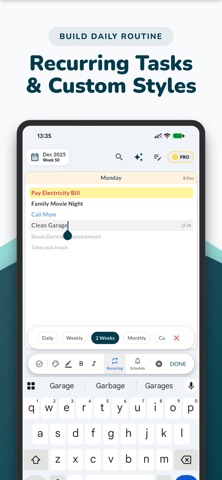
• Smart Recurring Tasks
Build habits and routines effortlessly. Whether it’s a daily routine, weekly meeting, or monthly bill, Weeklo supports flexible and advanced recurrence rules.
• Rich Text Notes
More than just a checklist tracker. Use the notes section for brain dumps with rich text (bold, italic, lists). Pin notes to the top, toggle grid/list layouts, and format with custom colors.
• Aesthetic & Customizable
Choose between Light and Dark modes and enjoy a soft pastel color palette. Customize your weekly organizer to match your personal style.
• Calendar Import
Import events from your iOS Calendar to keep your daily planner and agenda planner perfectly in sync.
• Powerful Reminders
Stay productive with flexible reminders and multiple notifications that keep your to-do list and routines on track.
• App Lock
Protect your personal diary and weekly plans using Face ID or Touch ID.
• Local & Cloud Backup
Back up and restore your planners, notes, and tasks locally or via iCloud.
• Planner Templates & PDFs
Print or export your weekly plan as a beautiful PDF file — choose from a variety of elegant templates.
• Interactive Planner Widget
Add our interactive widget to your Home Screen for a quick look at your daily tasks. Mark them as completed instantly without opening the app.
Whether you’re looking for a productivity planner, meal planner, fitness planner, or a simple daily planner, Weeklo is the most intuitive planner for a more organized life.
Support:
support@weeklo.app
Terms of Use (EULA):
https://www.apple.com/legal/internet-services/itunes/dev/stdeula/