



AppBrain's verdict
- Rating on App Store
- 4.50
- 2 ratings
- Last updated
- November 2, 2026
- Size
- 28.1 MB
It doesn't have enough ratings yet to judge what users think.
User feedback
Ratings and reviews on the App StoreComments on WiFi Network Signal Tools for iOS
We don't have enough comments to show example comments. Please check back later.
Store listing
By xita apps, from the App StoreDescription by xita apps Written by the developer, not by AppBrain. Click to read.
Whether you are dealing with slow internet, weak WiFi signal, or want to understand your network better, this app provides essential tools for everyday WiFi and internet monitoring.
Speedometer – Internet Speed Test & IP Configuration
Test your internet connection quickly and accurately with the built-in speedometer:
• Run fast and reliable internet speed tests
• Check download speed, upload speed, and connection quality
• Perform speed test on WiFi or mobile network
• View IP address and network configuration details
• Monitor real-time internet performance and stability
Ideal for checking WiFi speed at home, office, or public networks.
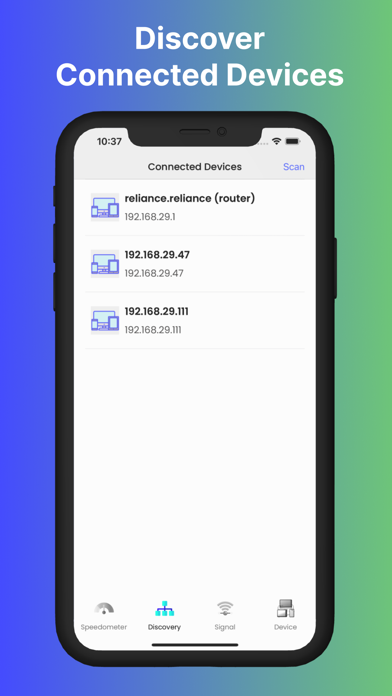
Discovery – Find Connected Devices on Your Network
Use the discovery tool to see all devices connected to your WiFi network:
• Discover phones, laptops, TVs, and smart devices on the network
• View connected device count and network presence
• Monitor your WiFi network activity easily
• Improve basic network awareness and control
Helpful for understanding who is connected to your WiFi network.
Signal – WiFi Signal Strength Checker
Analyze your WiFi connection using accurate signal tools:
• Check WiFi signal strength in real time
• Monitor signal levels across different locations
• Identify weak signal zones and dead spots
• Improve WiFi placement and coverage
Perfect for optimizing WiFi performance in homes and offices.
Devices – Network & Device Information
Access detailed information about your device and network:
• View device model, hardware, and system details
• Check network status, IP address, and connection info
• Useful for diagnostics and troubleshooting
• Clean and easy-to-read device data
Why Choose WiFi Network Signal Tools
• Accurate internet speed test and speed checker
• Reliable WiFi signal strength monitoring
• Easy network discovery and connected device view
• Detailed device info and IP configuration
• Lightweight, fast, and user-friendly design
Designed for Everyday WiFi & Internet Monitoring
WiFi Network Signal Tools is suitable for anyone who wants to:
• Test internet speed
• Check WiFi signal strength
• Monitor WiFi network performance
• Discover connected devices
• View network and device information
No complicated setup. Just open the app and start analyzing your network.
Download WiFi Network Signal Tools Today
Take control of your WiFi and internet experience with WiFi Network Signal Tools. Run internet speed tests, monitor WiFi signal strength, discover connected devices, and view network information in one easy-to-use app.
Download now and manage your WiFi, network, and internet performance with confidence.
Privacy Policy: https://sites.google.com/view/wifi-tools-for-wifi-connection
Terms of Use: https://www.apple.com/legal/internet-services/itunes/dev/stdeula/
Safety and technology
Found in the app by AppBrain- Price
- Free
- App size
- 28.1 MB
- Content rating
- High
Technologies used by WiFi Network Signal Tools
Releases
Updates seen on the App Store- Version
- 3.2
- Launched
- June 2024
No changelog data
Alternatives
Similar apps and more from xita appsAlternatives to WiFi Network Signal Tools



More from xita apps


Rankings
App Store top chartsApp Store Rankings for WiFi Network Signal Tools
About the app and developer
About WiFi Network Signal Tools
WiFi Network Signal Tools is an utilities app developed by xita apps.
What is the rating of WiFi Network Signal Tools?
WiFi Network Signal Tools is rated 4.50 out of 5 stars, based on 2 ratings.
Is WiFi Network Signal Tools free?
WiFi Network Signal Tools is free. The app size is 28.05 MB. The latest version available is 3.2. The last update was on November 2, 2026.
What are the requirements for WiFi Network Signal Tools?
The app has a content rating of High Maturity. The app has been available on the App Store since June 2024.
WiFi Network Signal Tools is made and published by xita apps. AppBrain is an independent app data site and isn't affiliated with xita apps. The app name, icon, screenshots and description belong to xita apps and are shown as published on the App Store.
Developer information for xita apps
Address:
Frequently asked questions about WiFi Network Signal Tools
Is WiFi Network Signal Tools free?
Yes. WiFi Network Signal Tools is free on the App Store.
Is WiFi Network Signal Tools still available?
Yes. WiFi Network Signal Tools is on the App Store, and the last update we saw was on November 2, 2026.
How large is WiFi Network Signal Tools?
WiFi Network Signal Tools is 28.05 MB.
Is WiFi Network Signal Tools suitable for children?
App Store gives WiFi Network Signal Tools a high maturity rating. It is meant for adults.
How do people rate WiFi Network Signal Tools?
WiFi Network Signal Tools scores 4.50 out of 5 stars, from 2 ratings on the App Store.
Who made WiFi Network Signal Tools?
WiFi Network Signal Tools was developed by xita apps. It is listed in the utilities category on the App Store.
What are the best alternatives to WiFi Network Signal Tools?
People looking at WiFi Network Signal Tools also look at these utilities apps: NFConnect WiFi, AudioConfig, UXview, MyEV Myanmar, WiFi Password Finder & Connect.