

WiFiScout is made and published by Triston Batiste. AppBrain is an independent app data site and isn't affiliated with Triston Batiste. The app name, icon, screenshots and description belong to Triston Batiste and are shown as published on the App Store.
AppBrain's verdict
- Last updated
- March 12, 2026
Rankings
App Store top chartsApp Store Rankings for WiFiScout
This app is not ranked
Competitors
Similar apps and more from Triston BatisteAlternatives to WiFiScout


Releases
Updates seen on the App Store- Version
- 1.0
- Launched
- March 2026
No changelog data
User feedback
Ratings and reviews on the App StoreComments on WiFiScout for iOS
We don't have enough comments to show example comments. Please check back later.
Technology
Found in the app by AppBrain- Price
- Free
- App size
- 3.31 MB
- Content rating
- Everyone
Technologies used by WiFiScout
About the app and developer
About WiFiScout
WiFiScout is an utilities app developed by Triston Batiste.
What is the rating of WiFiScout?
WiFiScout has no ratings yet.
Is WiFiScout free?
WiFiScout is free. The app size is 3.31 MB. The latest version available is 1.0. The last update was on March 12, 2026.
What are the requirements for WiFiScout?
The app has a content rating of Everyone. The app has been available on the App Store since March 2026.
Developer information for Triston Batiste
Address:
Store listing
By Triston Batiste, from the App Store

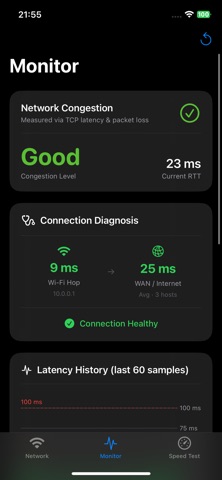
Screenshots by Triston Batiste, from the the App Store listing
Description by Triston Batiste Written by the developer, not by AppBrain. Click to read.
WiFi Scout gives you a real-time picture of your wireless connection quality — without any account, subscription, or data collection.
Monitor your connection
Live latency chart, jitter, and packet loss updated every 2 seconds. A clear congestion level (Excellent → Poor) tells you at a glance whether your Wi-Fi is performing well.
Know where the problem is
WiFi Scout separates your Wi-Fi hop from your WAN connection — so you can immediately tell whether slow speeds are caused by local channel congestion or your ISP.
Speed Test
Download and upload speeds measured via Cloudflare's global network using parallel streams for accurate results. No ads, no upsells.
Network details
SSID, BSSID, estimated frequency band (2.4 / 5 / 6 GHz), and connection quality based on gateway response time.
100% on-device. Nothing is ever transmitted or stored.
Monitor your connection
Live latency chart, jitter, and packet loss updated every 2 seconds. A clear congestion level (Excellent → Poor) tells you at a glance whether your Wi-Fi is performing well.
Know where the problem is
WiFi Scout separates your Wi-Fi hop from your WAN connection — so you can immediately tell whether slow speeds are caused by local channel congestion or your ISP.
Speed Test
Download and upload speeds measured via Cloudflare's global network using parallel streams for accurate results. No ads, no upsells.
Network details
SSID, BSSID, estimated frequency band (2.4 / 5 / 6 GHz), and connection quality based on gateway response time.
100% on-device. Nothing is ever transmitted or stored.