

PingKit: Network Scanner
PingKit: Network Scanner is made and published by PAUL SNYMAN. AppBrain is an independent app data site and isn't affiliated with PAUL SNYMAN. The app name, icon, screenshots and description belong to PAUL SNYMAN and are shown as published on the App Store.
AppBrain's verdict
- Rating on App Store
- 4.89
- 9 ratings
- Last updated
- October 14, 2026
It doesn't have enough ratings yet to judge what users think.
Rankings
App Store top chartsApp Store Rankings for PingKit: Network Scanner
Competitors
Similar apps and more from PAUL SNYMANAlternatives to PingKit: Network Scanner





More from PAUL SNYMAN

Releases
Updates seen on the App Store- Version
- 3.3.0
- Launched
- February 2026
No changelog data
User feedback
Ratings and reviews on the App StoreComments on PingKit: Network Scanner for iOS
We don't have enough comments to show example comments. Please check back later.
Technology
Found in the app by AppBrain- Price
- Free
- App size
- 36.6 MB
- Content rating
- Everyone
Technologies used by PingKit: Network Scanner
About the app and developer
About PingKit: Network Scanner
PingKit: Network Scanner is an utilities app developed by PAUL SNYMAN.
User Ratings
PingKit: Network Scanner is rated 4.89 out of 5 stars. The rating is based on 9 ratings.
App Information
PingKit: Network Scanner is freely available from the App Store. The app size is 36.57 MB. The latest version available is 3.3.0. The last update was on October 14, 2026.
Technical Requirements
The app has a content rating of Everyone. The app has been available on the App Store since February 2026.
Developer information for PAUL SNYMAN
Address:
Store listing
By PAUL SNYMAN, from the App Store




Description by PAUL SNYMAN Written by the developer, not by AppBrain. Click to read.
PingKit answers the question you actually have. It checks your device, your network, your router and the internet beyond it, then tells you in plain language where the problem is. Ask "Why is my internet slow?" and get a real answer instead of a number.
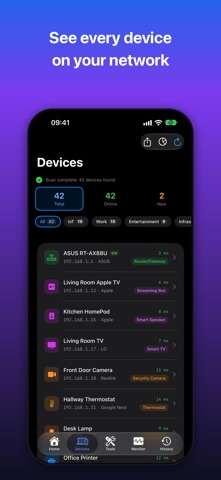
Devices on your network are found automatically and named from what they announce. No jargon, no guesswork.
19 professional-grade network tools, completely free.
AI THAT EXPLAINS YOUR NETWORK:
Answers are written on your iPhone by Apple Intelligence, or by Apple Private Cloud Compute, wherever your iPhone and your language allow. PingKit's own service is the last resort, and PingKit asks your permission before it ever receives anything. Every AI feature is free without a subscription: answers written on your iPhone are unlimited, and PingKit's own service gives you 15 a week, up to 5 a day.
NEW IN 3.3:
• More devices get a name: PingKit asks each device for the name it announces, so smart plugs, bulbs, TVs and consoles that never showed a name do.
• Labels stay with the device: a device keeps its name and label when its address changes.
• Thread and Matter devices appear, scans are faster and quieter, and the Mac Agent's hardware addresses are shown as such.
SIRI & SHORTCUTS:
Speed test, "How's My Wi-Fi?", a gaming check, wake your computer, ping, port scan and DNS lookup, straight from Siri, Spotlight and Shortcuts.
19 FREE TOOLS:
Smart Diagnostics, Speed Test, Ping, Visual Traceroute, MTR, Connection Monitor, Port Scanner, Bonjour Browser, Security Scan, Device Discovery, My Network, DNS Lookup, Whois, IP Geolocation, SSL Inspector, HTTP Analyzer, Subnet Calculator, Wake-on-LAN, Network Interfaces.
MONITOR TAB:
Live connection, Uptime Watch, Cert Monitor, Mac Agent, scheduled speed tests and reports in one place. Cert Monitor and Uptime Watch each include one permanently free slot.
GUARDIAN ($2.99/mo):
• Where the problem is: your device, your network, your router, your ISP, or beyond
• Session Watch: game regions, two-hour sessions, lag under load, and where the lag is
• Router mode: every port your router forwards from the internet
• Cameras on your network, and whether each answers from the internet
• Wake from anywhere through your Mac, with a Control Center button per device
• Watch Mode, trends per network, and what changed since your last checkup
• Fix It walkthrough: an ordered checklist for your exact router
• Uptime Watch: 10 sites or TCP ports checked every 5 minutes, with down/recovered alerts
• Cert Monitor: 5 domains, with expiry alerts
• Monitoring through the companion Mac Agent while your Mac is awake: a morning briefing, alerts for the devices you choose, and a scan or speed test from anywhere
• Apple Private Cloud Compute: answers questions too large for the model on your iPhone to hold on its own
• Private iCloud sync between the Mac Agent and your iPhone
GUARDIAN PLUS ($9.99/mo):
• Cert Monitor: 50 domains
• Alerts by email, with a Monday summary, or to a webhook
• Sleep, restart and shut down your Macs and Linux machines
• Four- and eight-hour gaming sessions, and your history as a spreadsheet
• Several Macs, and 90 days of history
• Scheduled reports and the signed ISO 27001 Compliance PDF
• Everything in Guardian
NOW IN 27 LANGUAGES.
PRIVACY FIRST:
All 19 diagnostic tools run on your device. No accounts, no tracking, no advertising. The Mac Agent syncs through your personal iCloud. When an answer needs PingKit's own service, PingKit asks first, and you can withdraw that permission at any time.
PingKit Guardian: $2.99/mo or $24.99/yr.
Guardian Plus: $9.99/mo or $79.99/yr.
1-week free trial on every plan. Cancel anytime.
Terms of Use: https://www.apple.com/legal/internet-services/itunes/dev/stdeula/
Privacy Policy: https://pingkit.app/privacy-policy.html
Terms of Service: https://pingkit.app/terms-of-service.html