AppBrain
AppBrain
  • Apps
  • Apps being viewed right now Trending apps today Most popular apps All-time most installed apps Top rated apps iPhone and iPad apps
  • Intelligence ▾
    Intelligence overview → Track any Android app or your whole market
    Track & analyze
    Keyword Tracker & OptimizerTrack & improve Play rankings App Performance ReportOne-off PDF for any app StatisticsFree Android & Play market stats
    Promote your app
    Featured Apps App Links
  • Intelligence
  • Pricing
  • Dashboard
  • Sign up
  • Log in
App Store Apps > Productivity > Wodomo 3D - Home improvement
Wodomo 3D - Home improvement icon

Wodomo 3D - Home improvement

1.17.0
ASSYSTO
4.00
4 reviews
Free

Wodomo 3D - Home improvement Screenshot 1 of 5
Wodomo 3D - Home improvement Screenshot 2 of 5
Wodomo 3D - Home improvement Screenshot 3 of 5
Wodomo 3D - Home improvement Screenshot 4 of 5
Wodomo 3D - Home improvement Screenshot 5 of 5
Screenshots by ASSYSTO, from the the App Store listing
View on the App Store

About Wodomo 3D - Home improvement

Wodomo 3D - Home improvement is a productivity app developed by ASSYSTO.

What is the rating of Wodomo 3D - Home improvement?

Wodomo 3D - Home improvement is rated 4.00 out of 5 stars, based on 4 ratings.

Is Wodomo 3D - Home improvement free?

Wodomo 3D - Home improvement is free. The app size is 73.46 MB. The latest version available is 1.17.0. The last update was on September 22, 2022.

What are the requirements for Wodomo 3D - Home improvement?

The app has a content rating of Everyone. The app has been available on the App Store since May 2021.

Wodomo 3D - Home improvement is made and published by ASSYSTO. AppBrain is an independent app data site and isn't affiliated with ASSYSTO. The app name, icon, screenshots and description belong to ASSYSTO and are shown as published on the App Store.

Description by ASSYSTO (from the App Store)
Wodomo 3D helps interior design enthousiasts throughout their home improvement projects. With this app you can see in Augmented Reality (AR) the result of virtual changes made to your house!

The process starts with the capture in 3D of the floor plan of your house. You tell the application where the characteristic points are located by simply designating them on the camera view. No need for a measuring tape, the app will automatically take all the dimensions and you will get an accurate floor plan in 3D.

If you do not have the time to create the 3D model directly, take 3D photos with the app, and create the model later, using the static mode where the photos are displayed in the background.

Then, you can try various home improvement scenarios.
Do you plan to change the structure of your house? With Wodomo 3D, you can move, add or remove any wall. You can create openings, or add doors or windows and then move around to check if it feels right.
Do you want to change the home atmosphere? With Wodomo 3D, you can repaint any wall or ceiling with the color you want. You can also simulate any floor or wall coverings, and try parquet floors, carpets, tiles, wallpapers, or stone coverings. It is also possible to add furniture.

Thanks to Augmented Reality, you have an immersive experience of what the result could be. You move around and see the result on your device screen, from all possible angles. You will almost “feel” how the place would look like after the renovation.

The app supports unlimited undo and redo. So you can explore many home improvements and revert them without having to restart from the begining. This is a great way to try many options, avoid mistakes and choose the better scenario before launching the real works.

The app can generate 2D floor plans and export them in a PDF file. This PDF report also contains detailed information about dimensions, surfaces and volume of each room of the floor plan. You can even share your 3D model with a contractor, your family or friends so that they could see it in augmented reality with their own Wodomo 3D app.

You can also generate a 3D floor plans. The available formats are:
- wavefront/OBJ
- BIM IFC
You will be able to study the result of your home improvement scenario in your favorite 3D software.

Here are some great features that allow you to create accurate 2D and 3D floor plans:
- multi room floor plan creation
- automatic fusion of adjacent walls with detection of communicating doors and windows
- magnetic rectangular grid to align walls
- adjustment of the thickness of the walls
- ability to create inclined ceilings
- creation of complex structures like dormers
- interior design style, with a large texture catalog and a virtual color fan to choose among hundreds of paint colors
- furniture catalog
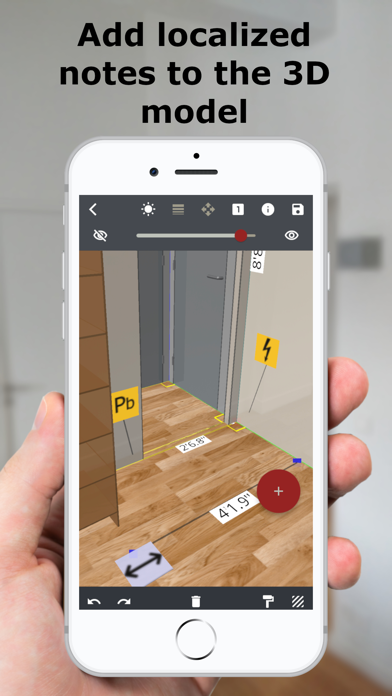
- ability to add localized annotations for informations, risks or specific length measurements
- visualization of 3D floor plans on a smaller scale

This app can be tried for free. A licence to add a first dwelling is offered. The associated 3D model can be updated and visualized it in Augmented Reality without any time limit. Note however that, with this licence, the use of some features is restricted. The licences for additional dwellings (without any surface limitation) must be purchased inside the app.

Install and try Wodomo 3D and start your home improvement project today!
Show more Show less

More data about Wodomo 3D - Home improvement

Price Free
Rating 4.00 based on 4 ratings
Ranking Not ranked
Version 1.17.0
App size 73.5 MB
Suitable for Everyone

Alternatives to Wodomo 3D - Home improvement

Roomle: AI 3D Room Planner icon Roomle: AI 3D Room Planner
Roomle GmbH
4.2
Free
1.5K ratings
Kitchen Design PRO icon Kitchen Design PRO
PlannerSoft
4.5
Free
1.7K ratings
ARchi VR - Create & Browse AR icon ARchi VR - Create & Browse AR
Philipp Ackermann
4.7
Free
3 ratings
Live Home 3D - House Design icon Live Home 3D - House Design
Belight Software, ltd
4.6
Free
19.2K ratings
Keyplan 3D Lite - Home design icon Keyplan 3D Lite - Home design
Quasarts LLC
4.5
Free
52.8K ratings
Home Improov icon Home Improov
Joseph Pearce
1.0
Free
1 ratings
Photo Measures Lite icon Photo Measures Lite
Cubent
2.2
Free
31 ratings
OrthoGraph – Floor Plan icon OrthoGraph – Floor Plan
OrthoGraph Kft.
2.4
Free
9 ratings

Changelog of Wodomo 3D - Home improvement

No changelog data

Developer information for ASSYSTO

ASSYSTO

Address:

Share Wodomo 3D - Home improvement

Comments on Wodomo 3D - Home improvement for iOS

We don't have enough comments to show example comments. Please check back later.

App Store Rankings for Wodomo 3D - Home improvement

This app is not ranked

Technologies used by Wodomo 3D - Home improvement

Frequently asked questions about Wodomo 3D - Home improvement

Is Wodomo 3D - Home improvement free?

Yes. Wodomo 3D - Home improvement is free on the App Store.

Is Wodomo 3D - Home improvement still available?

Yes. Wodomo 3D - Home improvement is on the App Store, and the last update we saw was on September 22, 2022.

How large is Wodomo 3D - Home improvement?

Wodomo 3D - Home improvement is 73.46 MB.

Is Wodomo 3D - Home improvement suitable for children?

App Store rates the content of Wodomo 3D - Home improvement as suitable for everyone.

How do people rate Wodomo 3D - Home improvement?

Wodomo 3D - Home improvement scores 4.00 out of 5 stars, from 4 ratings on the App Store.

Who made Wodomo 3D - Home improvement?

Wodomo 3D - Home improvement was developed by ASSYSTO. It is listed in the productivity category on the App Store.

What are the best alternatives to Wodomo 3D - Home improvement?

People looking at Wodomo 3D - Home improvement also look at these productivity apps: Roomle: AI 3D Room Planner, Kitchen Design PRO, ARchi VR - Create & Browse AR, Live Home 3D - House Design, Keyplan 3D Lite - Home design.

Price drops on Google Play Apps other people are watching Popular Productivity Apps Top new apps Today's trending apps
Roomle: AI 3D Room Planner icon Roomle: AI 3D Room Planner
Kitchen Design PRO icon Kitchen Design PRO
ARchi VR - Create & Browse AR icon ARchi VR - Create & Browse AR
Live Home 3D - House Design icon Live Home 3D - House Design
Keyplan 3D Lite - Home design icon Keyplan 3D Lite - Home design
Home Improov icon Home Improov
Photo Measures Lite icon Photo Measures Lite
OrthoGraph – Floor Plan icon OrthoGraph – Floor Plan
AppBrain Intelligence premium content

Subscribe now to get full and unlimited access to AppBrain Intelligence. You'll have access to:

  • App Intelligence dashboard (performance timeline, competitor comparison, country rankings, insight cards)
  • Detailed ranking data per app
  • Full timeline per developer
  • Device market shares data per country
  • Unlimited keyword tracking
  • AI assistant access via MCP (Claude, Cursor or any MCP client)
1 Month

$75/mo
(billed every month)

SAVE 0%
Subscribe
3 Months

$65/mo
($195 billed every 3 months)

SAVE 13%
Subscribe
1 Year

$57.50/mo
($690 billed every year)

SAVE 23%
Subscribe
Each subscription will automatically renew 3 days before the expiration date for the same time period. Subscriptions can be cancelled at any time before the renewal.

AppBrain is an app data site, we track rankings, ratings, installs for all apps and games on Google Play and the App Store. AppBrain doesn't host app files or APKs, all install links go directly to the official store. All trademarks are owned by their respective owners.

More apps

  • Top Android apps being viewed
  • XB Price Compare Store Region
  • HMU: Interactive Drama Game
  • Barbie Dreamhouse Adventures

App statistics

  • Android statistics
  • Google Play Developer stats
  • Trending Android Apps
  • Trending iOS apps
  • Top popular Apps
  • Buy the best Android phone
  • Buy & sell app businesses

About AppBrain

  • Contact
  • Privacy
  • Documentation
  • DMCA takedowns
  • Blog
  • The best curated Android app categories
© 2010-2026 - AppBrain