

Wonder Copy - Copy & Paste
Wonder Copy - Copy & Paste is made and published by 小利 薛. AppBrain is an independent app data site and isn't affiliated with 小利 薛. The app name, icon, screenshots and description belong to 小利 薛 and are shown as published on the App Store.
AppBrain's verdict
- Rating on App Store
- 5.00
- 4 ratings
- Last updated
- August 20, 2026
- Size
- 14.8 MB
It doesn't have enough ratings yet to judge what users think.
User feedback
Ratings and reviews on the App StoreComments on Wonder Copy - Copy & Paste for iOS
We don't have enough comments to show example comments. Please check back later.
Store listing
By 小利 薛, from the App Store
Description by 小利 薛 Written by the developer, not by AppBrain. Click to read.
**Core Features in Detail**
Long Press to Batch Send – Efficient Bulk Distribution at Your Fingertips
Users can simply long-press on the desired content to trigger continuous automated sending, sequentially pushing multiple preset clipboard entries to the input field without the need for repeated copy-and-paste actions. This feature is particularly valuable in scenarios requiring high-frequency distribution of standardized information, such as customer service script responses, community operation message distribution, and interview invitation notifications, significantly reducing repetitive labor and unleashing productivity.
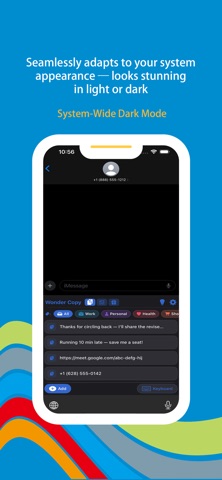
Seamless System-Wide Dark Mode Adaptation
Fully compatible with the iOS system-level dark mode, the app interface automatically switches between light and dark appearances in sync with system settings. Whether used outdoors under bright sunlight or in low-light indoor environments, the interface maintains clear readability and visual consistency, fully respecting user system preferences while balancing aesthetics and practicality.
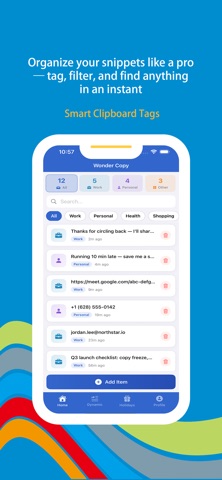
Clipboard Tag Management – Building a Personal Knowledge Base
Equipped with a powerful and flexible tag management system, users can freely add one or more custom tags to each clipboard entry, enabling multi-dimensional content classification. Through a combination of tag filtering and keyword search, users can quickly locate desired content from a vast history of records. Over time, the clipboard transcends its role as a temporary storage space and gradually becomes a personal frequently-used phrase knowledge base that can be accessed at any time.
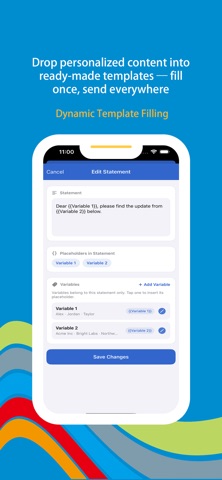
Dynamic Template Content Filling – Generate Personalized Messages with One Tap
Users can preset message templates with embedded dynamic variable placeholders. During actual use, the system automatically or manually assigns values to these variables based on the current context, rendering the template into a complete, personalized final message with a single tap. Whether sending bulk invitations with recipient names or generating notifications containing various dates and times, dynamic filling accomplishes these tasks efficiently, ensuring standardized expression while accommodating personalization needs.
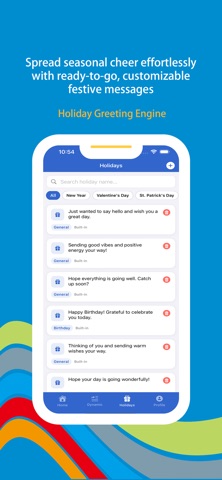
Holiday Greeting Template Library – Effortless Social and Business Etiquette
Comes with a rich and diverse collection of holiday greeting templates, covering traditional Chinese festivals, statutory holidays, international celebrations, and various commemorative occasions. Each template has been carefully polished in wording and offers multiple style options, such as formal business editions, warm family-and-friend editions, and lighthearted casual editions. Combined with the dynamic filling feature, users can quickly embed variables such as recipient names and relationship titles into templates, generating exclusive greeting content with ease and confidently handling social and business correspondence throughout the year.
**Subscription Service**
When you subscribe to the "VIP Subscription" service, you will enjoy the following benefits:
1. Unrestricted access to all features.
2. AI content recommendations.
Payment for subscriptions is straightforward—the user's iTunes account is credited immediately after confirmation of purchase and payment. Please note that the Apple iTunes account will be automatically debited 24 hours prior to expiration. Upon successful deduction, the subscription term will be extended by one subscription cycle.
User Agreement: https://www.wonderda.com/agreement.html
Privacy Agreement: https://www.wonderda.com/privacy.html
Safety and technology
Found in the app by AppBrain- Price
- Free
- App size
- 14.8 MB
- Content rating
- Everyone
Technologies used by Wonder Copy - Copy & Paste
Releases
Updates seen on the App Store- Version
- 2.0
- Launched
- January 2026
No changelog data
Alternatives
Similar apps and more from 小利 薛Alternatives to Wonder Copy - Copy & Paste




More from 小利 薛


Rankings
App Store top chartsApp Store Rankings for Wonder Copy - Copy & Paste
About the app and developer
About Wonder Copy - Copy & Paste
Wonder Copy - Copy & Paste is an utilities app developed by 小利 薛.
User Ratings
Wonder Copy - Copy & Paste is rated 5.00 out of 5 stars. The rating is based on 4 ratings.
App Information
Wonder Copy - Copy & Paste is freely available from the App Store. The app size is 14.82 MB. The latest version available is 2.0. The last update was on August 20, 2026.
Technical Requirements
The app has a content rating of Everyone. The app has been available on the App Store since January 2026.
Developer information for 小利 薛
Address: