

Word Editor: DOCX Documents
Word Editor: DOCX Documents is made and published by omar yaboutene. AppBrain is an independent app data site and isn't affiliated with omar yaboutene. The app name, icon, screenshots and description belong to omar yaboutene and are shown as published on the App Store.
AppBrain's verdict
- Rating on App Store
- 1.00
- 1 ratings
- Last updated
- September 24, 2026
It doesn't have enough ratings yet to judge what users think.
Rankings
App Store top chartsApp Store Rankings for Word Editor: DOCX Documents
Competitors
Similar apps and more from omar yabouteneAlternatives to Word Editor: DOCX Documents





More from omar yaboutene


Releases
Updates seen on the App Store- Version
- 1.0.4
- Launched
- May 2026
No changelog data
User feedback
Ratings and reviews on the App StoreComments on Word Editor: DOCX Documents for iOS
We don't have enough comments to show example comments. Please check back later.
Technology
Found in the app by AppBrain- Price
- Free
- App size
- 10.6 MB
- Content rating
- Everyone
Technologies used by Word Editor: DOCX Documents
About the app and developer
About Word Editor: DOCX Documents
Word Editor: DOCX Documents is a productivity app developed by omar yaboutene.
User Ratings
Word Editor: DOCX Documents is rated 1.00 out of 5 stars. The rating is based on one rating ratings.
App Information
Word Editor: DOCX Documents is freely available from the App Store. The app size is 10.57 MB. The latest version available is 1.0.4. The last update was on September 24, 2026.
Technical Requirements
The app has a content rating of Everyone. The app has been available on the App Store since May 2026.
Developer information for omar yaboutene
Address:
Store listing
By omar yaboutene, from the App Store




Description by omar yaboutene Written by the developer, not by AppBrain. Click to read.
KEY FEATURES:
DUAL VIEW MODES:
Read Mode: View your documents using high-fidelity native system rendering. Perfect for comfortable, distraction-free reading.
Edit Mode: Switch with a single tap into an elegant, dark-themed card workspace designed specifically for mobile touchscreens.
PRECISE TEXT FORMATTING:
Full control over individual text runs.
Customize typography: Select custom fonts and adjust text sizing.
Apply emphasis: Bold, Italic, Underline, and Strikethrough.
Vibrant coloring: Choose custom text colors to make headings or critical action items stand out.
POWERFUL TABLE EDITING:
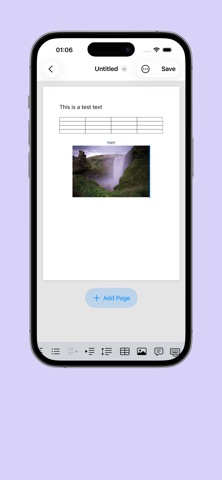
Ditch clunky desktop interfaces. Tweak and edit tables cell-by-cell inside an interactive, scrollable grid view.
Keep track of table dimensions instantly with dynamic row and column counting.
CREATE OR IMPORT IN SECONDS:
Start from scratch with clean, pre-built templates.
Easily import existing .docx files from the Files app, iCloud, or external drives.
EFFORTLESS FILE MANAGEMENT:
Access recently opened documents instantly from your Home dashboard.
Organize your workspace with intuitive iOS gestures—simply swipe a file card to clear it from your recents list.
Real-time status badges keep track of paragraph counts, table counts, and unsaved changes.
PRIVACY-FIRST & OFFLINE-READY:
Your documents are processed completely locally on your device. No cloud uploads, no forced accounts, and absolute privacy.
Works 100% offline—draft and edit wherever you go.