

Word2PDF - Convert Word to pdf
Word2PDF - Convert Word to pdf is made and published by Shivang Mishra. AppBrain is an independent app data site and isn't affiliated with Shivang Mishra. The app name, icon, screenshots and description belong to Shivang Mishra and are shown as published on the App Store.
AppBrain's verdict
- Rating on App Store
- 1.00
- 1 ratings
- Last updated
- May 22, 2025
It doesn't have enough ratings yet to judge what users think.
Rankings
App Store top chartsApp Store Rankings for Word2PDF - Convert Word to pdf
Competitors
Similar apps and more from Shivang MishraAlternatives to Word2PDF - Convert Word to pdf






More from Shivang Mishra



Releases
Updates seen on the App Store- Version
- 7.5
- Launched
- May 2024
No changelog data
User feedback
Ratings and reviews on the App StoreComments on Word2PDF - Convert Word to pdf for iOS
We don't have enough comments to show example comments. Please check back later.
Technology
Found in the app by AppBrain- Price
- Free
- App size
- 7.47 MB
- Content rating
- Everyone
Technologies used by Word2PDF - Convert Word to pdf
About the app and developer
About Word2PDF - Convert Word to pdf
Word2PDF - Convert Word to pdf is an utilities app developed by Shivang Mishra.
User Ratings
Word2PDF - Convert Word to pdf is rated 1.00 out of 5 stars. The rating is based on one rating ratings.
App Information
Word2PDF - Convert Word to pdf is freely available from the App Store. The app size is 7.47 MB. The latest version available is 7.5. The last update was on May 22, 2025.
Technical Requirements
The app has a content rating of Everyone. The app has been available on the App Store since May 2024.
Developer information for Shivang Mishra
Address:
Store listing
By Shivang Mishra, from the App Store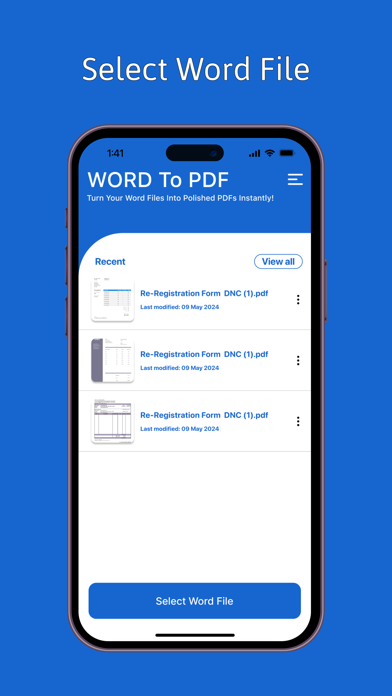


Description by Shivang Mishra Written by the developer, not by AppBrain. Click to read.
Looking for a reliable Word to PDF converter? Transform your Word documents (DOC, DOCX) into professional PDFs quickly and effortlessly with our top-rated Word to PDF Converter app. Perfect for converting DOC files, DOCX files, and more, our app ensures accurate and high-quality PDF conversion, maintaining the integrity of your original documents.
Key Features:
Instant Conversion: Convert Word documents (DOC, DOCX) to PDF format in seconds. Fast, efficient, and easy-to-use, our app handles all your file conversion needs.
Secure PDF Conversion: Protect your converted PDFs with password protection. Our app ensures that your sensitive information remains secure with advanced encryption and security measures.
High-Quality PDF Output: Retain the layout, images, and text formatting of your original Word documents. Ensure your PDFs look professional and accurate, with no loss of quality.
Secure and Private: We prioritize your privacy. Your files are processed securely and never stored, ensuring complete confidentiality and data protection.
User-Friendly Interface: Enjoy a seamless experience with our intuitive, easy-to-navigate interface. Ideal for users of all levels, from beginners to advanced.
Offline PDF Conversion: Convert Word to PDF without needing an internet connection. Perfect for offline use, whether you're traveling or in a low-connectivity area.
Document Sharing: Share your PDFs via email, social media, or messaging apps with ease. Efficiently distribute your converted documents to clients, colleagues, or friends.
Batch Conversion: Save time by converting multiple Word documents to PDF in one go. Streamline your workflow with batch processing capabilities.
PDF Editing: Annotate, highlight, and add comments to your PDFs within the app. Enhance and customize your documents effortlessly.
Versatile Document Support: Supports various document types including reports, presentations, resumes, essays, contracts, and more. Suitable for business, academic, and personal use.
Customizable Conversion Settings: Adjust settings such as page size, orientation, and more to meet your specific needs and preferences.
Regular Updates and Improvements: Benefit from regular app updates with new features and enhancements to improve your PDF conversion experience.
Why Choose Word to PDF Converter?
Fast and Reliable: Quick and dependable conversion from Word to PDF format.
Secure and Private: Advanced security features to keep your documents safe.
Convenient and Efficient: All-in-one solution for converting and managing PDFs.
Offline Functionality: Convert documents without needing an internet connection.
Professional Quality: High-quality output that maintains the original document’s formatting.
Versatile Compatibility: Works with various document types and formats.
Easy Sharing: Simple options for sharing your PDFs via multiple platforms.
How It Works:
Select the Word Document: Choose your Word file (DOC, DOCX) from your device.
Tap 'Convert': Initiate the conversion process with a single tap.
Save or Share: Save your new PDF file or share it directly from the app.
Download the Word to PDF Converter app now and experience a powerful tool for converting Word documents into high-quality PDFs. Whether you need to convert business reports, academic papers, resumes, or any other document type, our app provides a seamless, efficient, and secure solution. Enjoy hassle-free conversions and professional results anytime, anywhere with our leading PDF conversion app.