Wordot: Simple Write on Photo
Wordot: Simple Write on Photo is made and published by Nomad C. AppBrain is an independent app data site and isn't affiliated with Nomad C. The app name, icon, screenshots and description belong to Nomad C and are shown as published on the App Store.
AppBrain's verdict
Established- Rating on App Store
- 4.45
- 66 ratings
- Last updated
- June 21, 2026
- Size
- 229.4 MB
It doesn't have enough ratings yet to judge what users think.
User feedback
Ratings and reviews on the App StoreComments on Wordot: Simple Write on Photo for iOS
We don't have enough comments to show example comments. Please check back later.
Store listing
By Nomad C, from the App StoreDescription by Nomad C Written by the developer, not by AppBrain. Click to read.
- Font style : 100+ types
- Font size : 6~100pt
- Font opacity: 0~100
- Font thickness : default, Bold
- Line spacing : 1~40 level
- Font shadow : blur, static, box, stroke
- Font shadow: color, opacity
- Alignment : left, center, right
- Font color : 10~256 colors
- Underline 3 types
- Strike throught 3 types
- Redo/Undo
- Text refresh
[Writer's tools]
- Copyright : shown as a text or an image.
- Widget : shown your work on every midnight/afternoon 3 o'clock.
- Available to edit without WiFi.
- Enable Ratio each 1:1, 4:5, 16:9, full
- Available Dark mode (following iOS Settings)
[Note style]
- Solid Color : simple solid color 10 types, add color
- Gradation : Pastel, Vivid feeling (10 types)
- Paper Texture : a various paper style (10 types)
- with Moon : minimal moon picture (10 types)
- Water Color : water color graphic (10 types)
- Post-it: My photos + emotional post it (5 types)
- Illustration : by Pixabay (490K+)
- My Photos : black layer, blur effect
- Search Photo : supported photo by Unsplash (900,000 units+)
[My Wordot]
- List of writing
- Show date created
- Copy posts
- Share/Save/Delete
- Show total count of writing
- Show monthly count of writing
- View the calendar
[Templates]
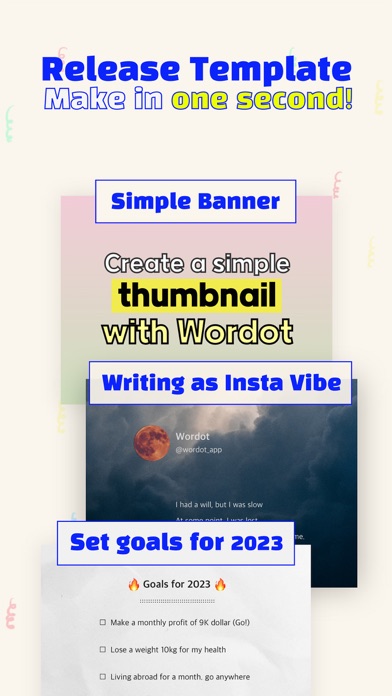
- A simple thumbnail
- Insta profile vibe
- Set goals 2023
- Christmas card
[Save space]
- Save in application Wordot (if you delete app, your picture will gone)
- Save in Photo album automatically
[Setting]
- Watermark on/off
- Set Watermark (9 types)
- Copyright on/off
- Set copyright
- Set main image ratio (1:1, 4:5, 16:9, full)
- Set main background (set as first screen)
- Manage font download
- Security settings (Passcode, Touch ID, Face ID)
- When Image is saved, text refresh on/off
- BGM on/off
- Show store button in home on/off
- Save image high quality (jpg, png)
- Select Main Solid Color
- Setting Erasers
- A Heart supporting Wordot
[Share after writing down]
- Blog
- Kakaotalk
- Tumblr
Tag #Wordot in
social media like Instagram, facebook
Safety and technology
Found in the app by AppBrain- Price
- Free
- App size
- 229.4 MB
- Content rating
- Everyone
Technologies used by Wordot: Simple Write on Photo
Releases
Updates seen on the App Store- Version
- 3.3.1
- Launched
- June 2017
No changelog data
Alternatives
Similar apps and more from Nomad CAlternatives to Wordot: Simple Write on Photo
More from Nomad C
Rankings
App Store top chartsApp Store Rankings for Wordot: Simple Write on Photo
About the app and developer
About Wordot: Simple Write on Photo
Wordot: Simple Write on Photo is a productivity app developed by Nomad C.
User Ratings
Wordot: Simple Write on Photo is rated 4.45 out of 5 stars. The rating is based on 66 ratings.
App Information
Wordot: Simple Write on Photo is freely available from the App Store. The app size is 229.35 MB. The latest version available is 3.3.1. The last update was on June 21, 2026.
Technical Requirements
The app has a content rating of Everyone. The app has been available on the App Store since June 2017.
Developer information for Nomad C
Address:
Frequently asked questions about Wordot: Simple Write on Photo
Is Wordot: Simple Write on Photo free?
Yes. Wordot: Simple Write on Photo is free on the App Store.
Is Wordot: Simple Write on Photo still available?
Yes. Wordot: Simple Write on Photo is on the App Store, and the last update we saw was on June 21, 2026.
How large is Wordot: Simple Write on Photo?
Wordot: Simple Write on Photo is 229.35 MB.
Is Wordot: Simple Write on Photo suitable for children?
App Store rates the content of Wordot: Simple Write on Photo as suitable for everyone.
How do people rate Wordot: Simple Write on Photo?
Wordot: Simple Write on Photo scores 4.45 out of 5 stars, from 66 ratings on the App Store.
Who made Wordot: Simple Write on Photo?
Wordot: Simple Write on Photo was developed by Nomad C. It is listed in the productivity category on the App Store.
What are the best alternatives to Wordot: Simple Write on Photo?
People looking at Wordot: Simple Write on Photo also look at these productivity apps: Storyist 4, Just Write - App For Writer, Creative Writer - easy writing, Writing Space: Books & Scripts, Werdsmith: Writing App.