

WorkTime: Hours Tracker Log
WorkTime: Hours Tracker Log is made and published by Barnasoba, S.L. AppBrain is an independent app data site and isn't affiliated with Barnasoba, S.L. The app name, icon, screenshots and description belong to Barnasoba, S.L. and are shown as published on the App Store.
AppBrain's verdict
EstablishedLoved by users- Rating on App Store
- 4.75
- 623 ratings
- Last updated
- October 9, 2026
Users love it: 4.8 stars from 623 ratings.
Rankings
App Store top chartsApp Store Rankings for WorkTime: Hours Tracker Log
Competitors
Similar apps and more from Barnasoba, S.L.







Releases
Updates seen on the App Store- Version
- 15.2.1
- Launched
- January 2020
No changelog data
User feedback
Ratings and reviews on the App StoreComments on WorkTime: Hours Tracker Log for iOS
We don't have enough comments to show example comments. Please check back later.
Technology
Found in the app by AppBrain- Price
- Free
- App size
- 75.9 MB
- Content rating
- Everyone
Technologies used by WorkTime: Hours Tracker Log
About the app and developer
About WorkTime: Hours Tracker Log
WorkTime: Hours Tracker Log is a productivity app developed by Barnasoba, S.L.
User Ratings
WorkTime: Hours Tracker Log is rated 4.75 out of 5 stars. The rating is based on 620 ratings.
App Information
WorkTime: Hours Tracker Log is freely available from the App Store. The app size is 75.90 MB. The latest version available is 15.2.1. The last update was on October 9, 2026.
Technical Requirements
The app has a content rating of Everyone. The app has been available on the App Store since January 2020.
Developer information for Barnasoba, S.L.
Address:
Store listing
By Barnasoba, S.L., from the App Store


Description by Barnasoba, S.L. Written by the developer, not by AppBrain. Click to read.
Work Time is your all-in-one hours tracker, timesheet calculator, and work log app – perfect for freelancers, hourly employees, and shift workers.
Key Features:
Easy Time Tracking: Log start and end times of your shifts in seconds.
Break Time Deduction: Automatically subtract break durations from your total hours.
Pay Calculator: Enter your hourly wage and let the app compute your daily, weekly, or monthly earnings.
Smart Work Log: View your logged hours by day or month with quick summaries and detailed history.
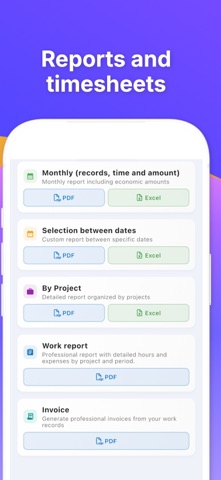
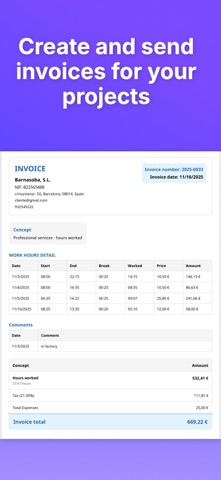
PDF Reports: Export professional-looking timesheets and punch-in/punch-out records to PDF.
Effortless Sharing: Send timesheets or work logs via email, cloud, or any app you use.
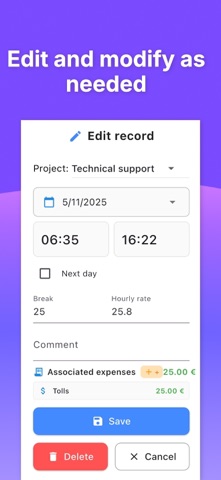
Custom Notes: Add comments or job details for each entry to stay organized.
Whether you're looking for a clock in/out app, a shift tracker, or a freelancer time calculator, Work Time has you covered.
How It Works:
Select a date (default is today).
Enter your start and end time.
Input any break duration.
Add your hourly rate to calculate pay.
Tap "Calculate" and save your entry.
Optional: Add a comment to your log.
Designed for Flexibility
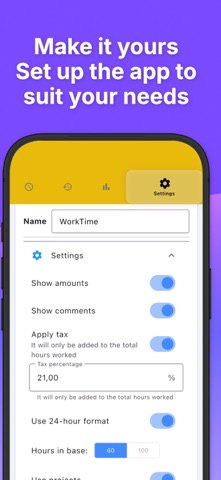
Work Time adapts to your workflow – daily tracking, overtime calculation, or managing multiple jobs.
This free version is ad-supported. Upgrade to remove ads and enjoy an uninterrupted experience.
Why Users Love Work Time:
Accurate salary estimates
Clean and intuitive design
Reliable PDF reports
Ideal for freelancers, temp workers, and anyone who logs job hours
Download Work Time today and take full control of your hours, salary, and schedule. The smartest way to manage your time on iPhone.
Terms of Use: https://www.apple.com/legal/internet-services/itunes/dev/stdeula/