


AppBrain's verdict
Established- Rating on App Store
- 1.57
- 75 ratings
- Last updated
- November 3, 2017
- Size
- 138.8 MB
It doesn't have enough ratings yet to judge what users think.
User feedback
Ratings and reviews on the App StoreComments on World Edit for MCPE for iOS
We don't have enough comments to show example comments. Please check back later.
Store listing
By Mustafa Alpay, from the App StoreDescription by Mustafa Alpay Written by the developer, not by AppBrain. Click to read.
Latest version of MCPE 1.2 is supported.
You can edit your existing MCPE worlds by copying & pasting with iTunes. In order do that you must connect your iOS devices over USB ( MAC or PC needed). Please always make backups. Please watch help video how to do that:
https://www.youtube.com/watch?v=i4KjHWFSDcQ
The good part is that we are continuously updating our app to be compatible with latest & future versions of Minecraft PE.
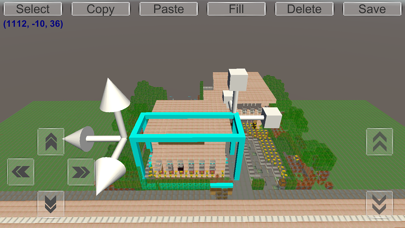
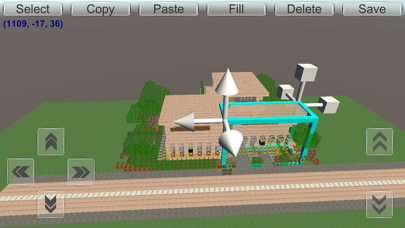
Our app is the easiest & smartest world edit tool for Minecraft PE because it works by selecting your blocks & dragging and dropping to the place you want. You can preview where you will paste your selection like a house, castle or a vehicle.
Just select your creations & drag and drop in your MCPE worlds: World editing is simple as that!
World Edit for Minecraft Features:
---------------------------------------------
- Select by drag and drop, you can move & resize selection area. You can change the size of the copied blocks.
- Copy your selection of cubes,
- Paste your selection of cubes,
- Delete the selected cubes,
- Fill your selection by typing your block name or by scrolling & tapping on the block list. You can fill your blocks by searching block names.
- You can see your exact location & coordinates in your worlds! On top left of the screen your position in your MCPE world is shown! There is no need for markers anymore!
- On flat worlds current -saved- terrain data is preserved & new flat world terrain data is generated,
- On infinite & old worlds -saved- terrain data is showed & is not generated! If you want to edit your infinite & old type worlds please add at least one cube at every chunk and save your MCPE world!
- Many more features like replace, rotate, undo & redo are coming soon ...
To edit your worlds, you can just select, copy & paste parts of your worlds. You can drag and drop your selections like home or castles anywhere you want in your worlds. In addition, you can see your selections & where you will paste them. You can preview before pasting. You can move & resize your selections. World editing is much more simple, easy & fun to use.
Do you want to copy & paste your hard-worked creations by dragging and dropping? Do you want to make a city from your houses? Do you want to copy your houses, castles, vehicles or any parts from one world to another world of yours? Do you want a simple way to do world edit? Well it is possible now with our easy and fun to use smart world edit tool by simply dragging and dropping :)
Finally, please remember there are no annoying ads in World Edit for Minecraft and it is free to try so there is no risk. Thanks for trying & supporting our app :)
Our app’s web site: http://www.mcpedit.com
You can reach the developer on twitter: @mcpedit (https://twitter.com/mcpedit)
For developers: GitHub project is here: https://github.com/mcpedit/mcpedit
Disclaimer:
This app is not an official Minecraft product and it is not approved or associated with Mojang. This app comes with no warranty of any kind so please always backup your MCPE worlds. You can back up your worlds simply changing the name when saving your MCPE world :)
This application is not affiliated in any way with Mojang AB. The Minecraft Name, the Minecraft Brand and the Minecraft Assets are all property of Mojang AB or their respectful owner. This is an unofficial application for Minecraft Pocket Edition. All rights reserved. For further information, please visit http://account.mojang.com/documents/brand_guidelines
Please remember that this app is a complementary tool for Minecraft PE, it is not Minecraft PE for this reason you are strongly advised to purchase Minecraft PE app. Our app will only ease your world making process :)
Safety and technology
Found in the app by AppBrain- Price
- Free
- App size
- 138.8 MB
- Content rating
- Everyone
Technologies used by World Edit for MCPE
Releases
Updates seen on the App Store- Version
- 1.01
- Launched
- November 2017
No changelog data
Alternatives
Similar apps and more from Mustafa AlpayAlternatives to World Edit for MCPE




More from Mustafa Alpay


Rankings
App Store top chartsApp Store Rankings for World Edit for MCPE
About the app and developer
About World Edit for MCPE
World Edit for MCPE is a games app developed by Mustafa Alpay.
User Ratings
World Edit for MCPE is rated 1.57 out of 5 stars. The rating is based on 75 ratings.
App Information
World Edit for MCPE is freely available from the App Store. The app size is 138.84 MB. The latest version available is 1.01. The last update was on November 3, 2017.
Technical Requirements
The app has a content rating of Everyone. The app has been available on the App Store since November 2017.
World Edit for MCPE is made and published by Mustafa Alpay. AppBrain is an independent app data site and isn't affiliated with Mustafa Alpay. The app name, icon, screenshots and description belong to Mustafa Alpay and are shown as published on the App Store.
Developer information for Mustafa Alpay
Address:
Frequently asked questions about World Edit for MCPE
Is World Edit for MCPE free?
Yes. World Edit for MCPE is free on the App Store.
Is World Edit for MCPE still available?
Yes. World Edit for MCPE is on the App Store, and the last update we saw was on November 3, 2017.
How large is World Edit for MCPE?
World Edit for MCPE is 138.84 MB.
Is World Edit for MCPE suitable for children?
App Store rates the content of World Edit for MCPE as suitable for everyone.
How do people rate World Edit for MCPE?
World Edit for MCPE scores 1.57 out of 5 stars, from 75 ratings on the App Store.
Who made World Edit for MCPE?
World Edit for MCPE was developed by Mustafa Alpay. It is listed in the games category on the App Store.
What are the best alternatives to World Edit for MCPE?
People looking at World Edit for MCPE also look at these games apps: Plug Toolbox for Minecraft, Addons, Skinseed For Minecraft, Strike.is: The Game, MODBOX – mods for Minecraft, MC Constructor for Minecraft.