

WriteFlow: AI Writing Keyboard
WriteFlow: AI Writing Keyboard is made and published by Juraj Gajdos. AppBrain is an independent app data site and isn't affiliated with Juraj Gajdos. The app name, icon, screenshots and description belong to Juraj Gajdos and are shown as published on the App Store.
AppBrain's verdict
- Rating on App Store
- 5.00
- 2 ratings
- Last updated
- August 20, 2026
- Size
- 27.2 MB
It doesn't have enough ratings yet to judge what users think.
User feedback
Ratings and reviews on the App StoreComments on WriteFlow: AI Writing Keyboard for iOS
We don't have enough comments to show example comments. Please check back later.
Store listing
By Juraj Gajdos, from the App Store



Description by Juraj Gajdos Written by the developer, not by AppBrain. Click to read.
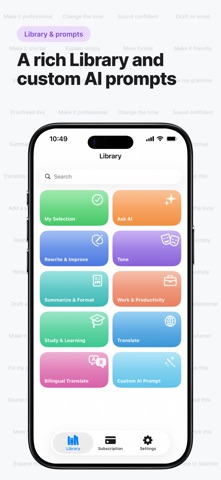
Tap one tool and your text is instantly proofread, rephrased, shortened, or restyled in the tone you want.
WHY WRITEFLOW
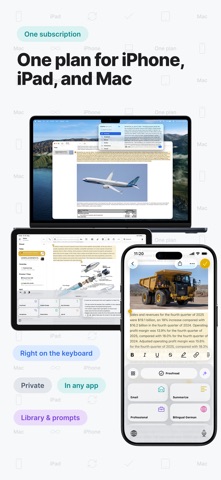
• Write better in seconds, in any app: Messages, Mail, WhatsApp, Gmail, Slack, Instagram, LinkedIn, and Notes
• 50+ languages, including bilingual translation that shows the original and the translation together
• Pick a tone: professional, friendly, confident, concise, or casual
• Create your own custom AI prompts and pin the tools you use most
WHAT YOU CAN DO
• Proofread and fix grammar, spelling, and punctuation
• Rewrite or paraphrase to sound clearer and more natural
• Make text shorter, longer, or simpler
• Reply faster with quick, relevant suggestions
• Summarize long text into key points
• Translate into 50+ languages
HOW IT WORKS
1. Type or select your text
2. Tap a WriteFlow tool
3. Your improved text is ready to send
PRIVACY
Your text is processed only to complete your request and is never stored afterward.
WORKS WHEREVER YOU WRITE
One WriteFlow subscription works across iPhone, iPad, and Mac, so your tools go everywhere you do.
FREE TO START
Use WriteFlow free every day, or upgrade to Pro for unlimited access to every tool and all languages.
Terms of Use: https://www.apple.com/legal/internet-services/itunes/dev/stdeula/
Safety and technology
Found in the app by AppBrain- Price
- Free
- App size
- 27.2 MB
- Content rating
- Everyone
Technologies used by WriteFlow: AI Writing Keyboard
Releases
Updates seen on the App Store- Version
- 6.2
- Launched
- March 2026
No changelog data
Alternatives
Similar apps and more from Juraj GajdosAlternatives to WriteFlow: AI Writing Keyboard


Rankings
App Store top chartsApp Store Rankings for WriteFlow: AI Writing Keyboard
About the app and developer
About WriteFlow: AI Writing Keyboard
WriteFlow: AI Writing Keyboard is a productivity app developed by Juraj Gajdos.
User Ratings
WriteFlow: AI Writing Keyboard is rated 5.00 out of 5 stars. The rating is based on 2 ratings.
App Information
WriteFlow: AI Writing Keyboard is freely available from the App Store. The app size is 27.24 MB. The latest version available is 6.2. The last update was on August 20, 2026.
Technical Requirements
The app has a content rating of Everyone. The app has been available on the App Store since March 2026.
Developer information for Juraj Gajdos
Address:
Frequently asked questions about WriteFlow: AI Writing Keyboard
Is WriteFlow: AI Writing Keyboard free?
Yes. WriteFlow: AI Writing Keyboard is free on the App Store.
Is WriteFlow: AI Writing Keyboard still available?
Yes. WriteFlow: AI Writing Keyboard is on the App Store, and the last update we saw was on August 20, 2026.
How large is WriteFlow: AI Writing Keyboard?
WriteFlow: AI Writing Keyboard is 27.24 MB.
Is WriteFlow: AI Writing Keyboard suitable for children?
App Store rates the content of WriteFlow: AI Writing Keyboard as suitable for everyone.
How do people rate WriteFlow: AI Writing Keyboard?
WriteFlow: AI Writing Keyboard scores 5.00 out of 5 stars, from 2 ratings on the App Store.
Who made WriteFlow: AI Writing Keyboard?
WriteFlow: AI Writing Keyboard was developed by Juraj Gajdos. It is listed in the productivity category on the App Store.
What are the best alternatives to WriteFlow: AI Writing Keyboard?
People looking at WriteFlow: AI Writing Keyboard also look at these productivity apps: SSHPanel: SSH & Server Admin, Type Now: AI Keyboard Writer, FocusAnchor, Crit: AI Design Advisor, Flashdrive Pro.